
Measuring electricity is both a science and an art. Whether you’re a hobbyist troubleshooting a broken appliance, an automotive technician diagnosing a faulty sensor, or an electrical engineer ensuring system safety, your digital multimeter is a trusted companion. Yet, one question stumps both beginners and seasoned users: When should you use AC or DC on a multimeter? Using the wrong setting can give you inaccurate readings, or worse, damage your equipment. This article demystifies AC and DC measurements, guiding you step-by-step so you can confidently choose the right mode, interpret results, and avoid common pitfalls.
From the fundamental physics of electricity to advanced troubleshooting techniques, you’ll gain a clear understanding of how, when, and why to use each mode on your multimeter. You’ll find actionable examples, expert tips, comparison tables, and real-world case studies. Whether you’re reading this as a first-time user or looking to refine your skills as a pro, you’ll discover practical knowledge to make safer, smarter, and more reliable electrical measurements.
Key Takeaways
- AC (Alternating Current) and DC (Direct Current) are two fundamentally different types of electricity, and using the correct setting on your multimeter is crucial for accurate results.
- Use DC mode for batteries, electronics, and most automotive circuits; use AC mode for household outlets, appliances, and power tools.
- Modern multimeters often combine AC and DC measurement in one device, but always double-check your manual and leads before testing.
- Understanding the risks of incorrect measurement is essential; measuring AC as DC or vice versa can yield false readings or damage your meter.
- Advanced features like True RMS and auto-ranging improve accuracy, especially for non-standard AC signals.
- Consult a qualified professional for high-voltage or complex diagnostic work, improper use of a multimeter can be hazardous.
Credit: www.youtube.com
Understanding Ac And Dc: The Electrical Fundamentals
To master your multimeter, start with the basics: what exactly are AC and DC?
What Is Dc (direct Current)?
Direct Current (DC) refers to electricity flowing in one constant direction, like water running steadily through a pipe. The voltage level remains consistent over time. Batteries (AA, AAA, car batteries), solar panels, and most electronics use DC power.
- Example: A 9V battery in a smoke detector supplies pure DC.
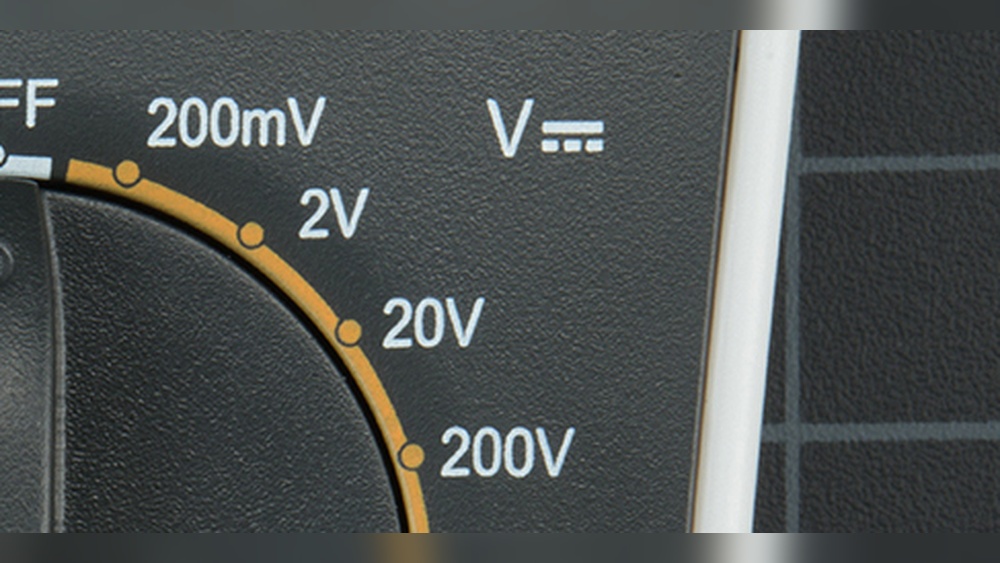
- Key visual: On a multimeter, DC voltage is often indicated by a solid line with a dashed line underneath it (, …).
What Is Ac (alternating Current)?
Alternating Current (AC) reverses direction periodically, typically in a smooth sine wave. The voltage alternates between positive and negative values. This is the type of electricity delivered to homes and businesses by power companies.
- Example: The power from a wall outlet in the United States is 120V AC at 60Hz.
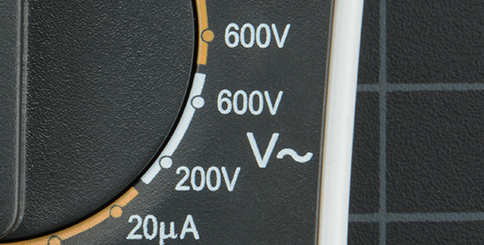
- Key visual: On a multimeter, AC voltage is usually marked as a wavy line (~).
Why The Difference Matters
The type of current determines which multimeter setting you must use. DC and AC differ not only in flow but in how they interact with circuits and components. Measuring AC as DC, or vice versa, leads to incorrect readings and can even damage sensitive components.
Pro Tip: Before measuring, always identify the power source type, trace the circuit, read labels, or consult device manuals.

Credit: expertce.com
The Anatomy Of A Multimeter: Decoding The Settings
Multimeters come in many shapes and sizes, but their core features are similar. Understanding the controls and symbols is essential for accurate measurement.
Key Components Of A Multimeter
- Dial/Selector Switch: Choose between ACV (AC voltage), DCV (DC voltage), ACA (AC current), DCA (DC current), and resistance (Ω).
- Display: Shows your measurement, often in volts (V), milliamps (mA), or ohms (Ω).
- Test Leads: Red (positive) and black (common/negative); insert into the correct ports.
- Range Selection: Some meters are manual-range, others auto-ranging. Auto-ranging models adjust automatically to the detected voltage or current.
Ac Vs Dc Symbols
| Function | DC Symbol | AC Symbol |
|---|---|---|
| Voltage | V⎓, V, (solid/dashed lines) | V~ (wavy line) |
| Current | A⎓, A, | A~ |
| Resistance | Ω (same for AC/DC) | Ω |
Manual Vs Auto-ranging
- Manual-ranging: You must select the correct voltage/current range. Start high to avoid overloading.
- Auto-ranging: The meter chooses the range automatically. This is safer and more beginner-friendly.
Safety Precautions Before Measuring
- Inspect leads for damage.
- Make sure the multimeter is rated for the voltage/current you expect.
- Never switch ranges while measuring.
Warning: Using the wrong port or setting (especially for current measurements) can blow an internal fuse or destroy your meter.
When To Use Dc Mode On A Multimeter
Most electronics and battery-powered devices rely on DC electricity. Knowing when to use DC mode will help you troubleshoot, repair, and maintain a vast array of devices.
Measuring Batteries
To check if a battery is still good, use DC voltage mode:
- Set the dial to DCV (e.g., 20V for a 9V battery).
- Place the red lead on the battery’s positive terminal, black on negative.
- Read the display. A 1.5V AA battery below 1.3V is considered weak.
Example: In my experience, measuring a car battery in DC mode (set to 20V) should yield about 12.6V when fully charged.
Testing Power Supplies And Chargers
Most phone chargers, USB ports, and laptop adapters convert AC from the wall to DC for your devices.
- Set your meter to DCV.
- Probe the output terminals or the exposed USB power pins.
- Compare the reading to the device label (e.g., a 5V USB charger should show 5V DC).
Diagnosing Automotive Circuits
Cars and trucks use a 12V DC system. Use DC mode to:
- Check battery voltage and alternator output.
- Diagnose fuses and wiring.
- Measure voltage drops across sensors and actuators.
Electronics Projects And Circuit Boards
All circuit boards, from Arduino to Raspberry Pi, run on DC. Use DC mode to:
- Verify supply rails (e.g., 3.3V, 5V).
- Test individual components (transistors, ICs).
- Debug logic signals (low/high states).
Quick Checklist: When To Use Dc Mode
- Testing batteries (AA, AAA, 9V, car batteries)
- Checking solar panels
- Measuring the output of DC power supplies
- Troubleshooting electronics
- Automotive electrical diagnosis
Credit: learn.sparkfun.com
When To Use Ac Mode On A Multimeter
AC mode is crucial for working with household power, appliances, and industrial equipment. Misusing this mode can be dangerous, always double-check your setting and leads.
Measuring Wall Outlets And Mains Power
To measure the voltage at a wall outlet:
- Set the meter to ACV (e.g., 200V or auto-range).
- Insert the leads into the outlet slots (black to neutral, red to hot).
- Expect ~120V AC in the US, ~230V AC in Europe.
Warning: Only attempt this if you are confident and your multimeter is rated CAT II or higher. Touch only the insulated parts of the leads.
Testing Household Appliances
Most large appliances, ovens, refrigerators, washing machines, are powered by AC.
- Use AC mode to check if an appliance is receiving power.
- Measure the output voltage at plug sockets or internal terminals.
Diagnosing Light Fixtures And Switches
Light fixtures and wall switches typically operate on AC. Use AC mode to:
- Confirm power at the fixture or switch.
- Detect faulty wiring or dead circuits.
Industrial And Commercial Equipment
Industrial machines, HVAC units, and three-phase motors operate on AC. Use AC mode for:
- Verifying supply voltage (single-phase or three-phase).
- Testing transformers and relays.
Quick Checklist: When To Use Ac Mode
- Measuring household outlets
- Testing appliance power
- Checking lighting circuits
- Diagnosing industrial AC equipment
Common Mistakes And How To Avoid Them
Even experienced users occasionally make critical errors when measuring AC and DC. Here’s how to sidestep the most frequent pitfalls.
Measuring Ac As Dc (or Vice Versa)
If you set your multimeter to DC and measure an AC source (or vice versa):
- The reading may be zero, erratic, or significantly off.
- Some meters show a small “average” voltage, which is NOT meaningful for AC.
Example: Measuring a 120V AC outlet in DC mode might show a fluctuating or near-zero value, giving a false sense of safety.
Using The Wrong Ports For Current Measurement
Current (amperes) is measured differently from voltage. Always:
- Move the red lead to the correct “A” or “mA” port (not the voltage port).
- Set the correct AC or DC mode before measuring.
Warning: Trying to measure current with the leads in the voltage port can blow an internal fuse or damage your meter.
Overloading The Meter
Selecting too low a range can overload the display or trigger a protection circuit.
- Always start with the highest range, then step down.
- If you’re unsure, use auto-ranging.
Ignoring Cat Ratings
CAT ratings define the meter’s safety level for different environments (CAT I to CAT IV). Using a meter with an inadequate rating can result in serious injury or equipment destruction when working on mains or high-voltage circuits.
| CAT Rating | Application | Example |
|---|---|---|
| CAT I | Protected electronic equipment | TVs, radios |
| CAT II | Local mains (outlets) | Household appliances |
| CAT III | Distribution level | Switchboards, circuit breakers |
| CAT IV | Utility connection | Electric meters, outdoor lines |
Pro Tip: Always read your meter’s manual and ensure it’s rated for your specific application.
Advanced Features And Tips For Accurate Measurement
As you gain confidence, you’ll encounter situations where basic AC/DC readings aren’t enough. Modern multimeters offer advanced features to enhance precision and ease.
True Rms Vs Average Responding Meters
Most household AC is a pure sine wave, but many devices (dimmers, motor controls) produce non-sinusoidal waves. True RMS (Root Mean Square) meters accurately measure both standard and distorted AC.
- True RMS: Correct for all waveform shapes.
- Average responding: Only accurate for pure sine waves.
Example: Measuring voltage at a variable speed drive with a non-RMS meter can be off by 30% or more.
Auto-ranging And Manual Ranging
Auto-ranging meters select the best range automatically, reducing user error. Use manual ranging for faster results when you know the expected value.
Using Min/max And Hold Functions
- Min/Max: Records the highest and lowest values.
- Hold: Freezes the current reading for review.
These are valuable for capturing transient events or working in awkward positions.
Measuring Frequency And Duty Cycle
Some advanced meters can measure frequency (Hz) and duty cycle (% on/off time), essential for diagnosing electronic signals, inverters, or motor controllers.
Temperature, Capacitance, And Continuity
Many modern multimeters can also measure:
- Temperature: Using a thermocouple probe.
- Capacitance: Diagnosing capacitors in AC circuits.
- Continuity: Audible beep for complete circuits.
Pro Tip: Always calibrate your meter regularly and replace leads when worn for the most accurate measurements.
Real-world Examples And Case Studies
Seeing multimeters in action clarifies the practical differences between AC and DC modes. Here are three instructive scenarios:
Example 1: Troubleshooting A Dead Laptop
A laptop won’t charge. You suspect the power adapter is faulty.
- Set your multimeter to DCV.
- Probe the barrel connector’s center (positive) and sleeve (negative).
- Expected reading: 19V DC (per label). If you see 0V or much less, the adapter is bad.
Example 2: Checking A Wall Outlet’s Safety
A Room Light Is Out. Is The Outlet Live?
- Set meter to ACV (200V or auto).
- Insert leads into outlet slots.
- Reading should be 120V AC (US). If 0V, the circuit breaker may be tripped.
Example 3: Diagnosing A Car That Won’t Start
The Engine Won’t Turn Over. Is The Battery To Blame?
- Set meter to DCV (20V range).
- Probe battery terminals.
- A healthy battery: 12.6V DC or higher. Below 12V: needs charging or replacement.
Pro Tip: Always record your readings and compare them to manufacturer specifications for accurate diagnostics.
Ac Vs Dc Measurement: Data-driven Comparison
How does measuring AC differ from DC in practical terms? Here’s a quick reference table:
| Feature | AC Measurement | DC Measurement |
|---|---|---|
| Source Examples | Wall outlets, appliances, motors | Batteries, electronics, solar panels |
| Meter Symbol | V~ or A~ | V⎓ or A, |
| Risk Level | Higher (shock hazard) | Lower (except for high-current circuits) |
| Typical Range | 120, 240V (US/EU) | 1.5, 24V (electronics); 12V (auto); 48V+ (solar) |
| Meter Features | True RMS, frequency, phase | Polarity, ripple |
Troubleshooting Guide: Step-by-step Diagnosis
Combining your knowledge of AC and DC, here’s a step-by-step method to solve common electrical problems.
Step 1: Identify The Circuit Type
- Trace wires or consult schematics.
- If the device has a battery or USB port, it’s almost always DC.
- If it plugs into a wall outlet, it’s AC.
Step 2: Select The Correct Meter Setting
- For batteries, electronics, or automotive: DCV
- For outlets, appliances, or lighting: ACV
Step 3: Check Meter And Leads
- Inspect for damage.
- Set to highest range or auto.
- Confirm leads are in voltage (not current) ports.
Step 4: Probe Safely
- Touch only insulated parts of leads.
- For AC, keep one hand behind your back (reduces shock risk).
Step 5: Interpret The Reading
- Compare to device specs.
- For DC, negative readings mean reversed leads.
- For AC, polarity doesn’t matter.
Step 6: Take Action
- If voltage is low or absent, check upstream connections, fuses, or breakers.
- For abnormal readings, consult the device manual or seek expert help.
Example: In my experience, following this systematic approach prevents misdiagnosis and protects both the technician and the equipment.
Frequently Asked Questions
What Happens If I Measure Ac Voltage With The Meter Set To Dc?
Measuring AC voltage in DC mode yields a reading close to zero or an erratic value. This is because the multimeter’s DC mode only senses constant voltage, not the oscillating nature of AC. This can lead to a false negative, thinking a circuit is dead when it’s live and dangerous.
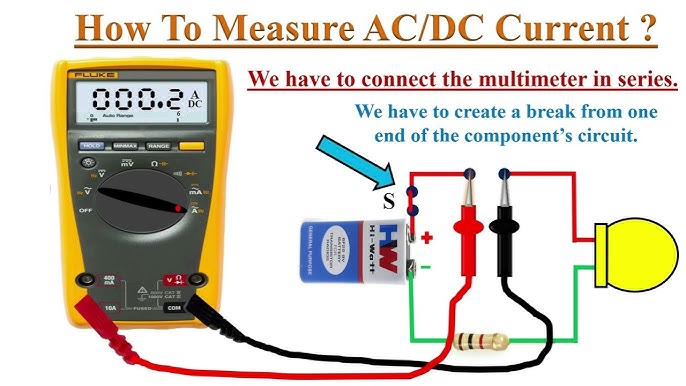
Can I Use My Multimeter To Measure Both Ac And Dc Current?
Most digital multimeters support both AC and DC current measurements, but you must set the correct mode and move the red lead to the current port. Some basic meters only measure DC current; check your manual. For large AC currents (e.g., home mains), use a clamp meter designed for AC.
Why Do My Ac Voltage Readings Seem Lower Than Expected?
This is often due to using a non-True RMS meter on a non-sinusoidal waveform, such as those produced by dimmer switches or inverters. Only True RMS meters provide accurate readings for all waveforms. Also, ensure your meter’s CAT rating matches the application and leads are undamaged.
What Does “auto-ranging” Mean On A Multimeter?
Auto-ranging means the meter automatically selects the optimal range for the detected voltage or current. This reduces setup time and prevents overloads, making it ideal for beginners. Manual-range meters require you to choose the range before testing.
Is It Safe To Measure High-voltage Ac Circuits At Home?
Measuring high-voltage AC (like wall outlets) is inherently risky. Only use a meter with the proper CAT rating and insulation. If you’re unsure, consult a licensed electrician. Always follow safety protocols and never touch exposed metal parts during measurement.
Resources And Further Reading
For a deeper dive into multimeter safety and advanced measurement techniques, consult:
Mastering when to use AC or DC on your multimeter is a foundational skill for anyone working with electricity. By understanding the underlying principles, learning your meter’s functions, and following systematic troubleshooting steps, you can work more safely and efficiently.
Whether you’re a beginner or a seasoned professional, make a habit of double-checking your settings, following safety guidelines, and consulting your meter’s manual. With practice and attention to detail, your multimeter will become an indispensable tool for all your electrical projects.