
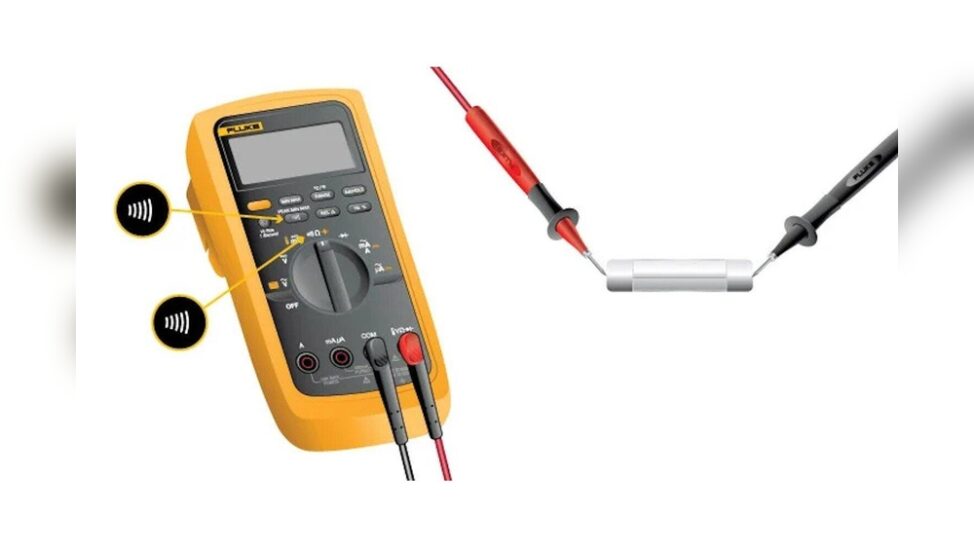
If you’re troubleshooting electronics, fixing appliances, or learning the basics of electrical maintenance, knowing how to check for continuity is a must-have skill. The humble multimeter, often found in every electrician’s toolkit, is the key instrument for this job. Using a multimeter to check continuity helps you find broken wires, faulty switches, and bad connections, issues that could otherwise remain invisible and cause endless frustration.
Yet, for beginners, the array of dials, probes, and symbols on a multimeter can feel intimidating. Even for experienced users, maximizing the tool’s capabilities, while ensuring safety, demands a clear, step-by-step approach. This comprehensive guide bridges that gap, walking you through continuity testing from the ground up, complete with advanced tips, real-world examples, and expert troubleshooting strategies.
By the end, you’ll wield your multimeter with confidence, whether you’re restoring vintage electronics or ensuring a new home’s wiring is safe.
Key Takeaways
- Continuity testing is essential for identifying breaks or shorts in electrical circuits using a multimeter.
- Both analog and digital multimeters can perform continuity checks, with digital models offering audible feedback and easier readings.
- Proper preparation, safety precautions, and understanding of your device are crucial for accurate results.
- Advanced users can diagnose complex circuit issues and avoid common pitfalls by mastering probe placement, resistance interpretation, and multi-point testing.
- Real-world case studies highlight practical uses, from appliance repair to automotive diagnostics.

Credit: chibitronics.com
Understanding Continuity And Multimeters
Before diving into hands-on steps, it’s vital to grasp what continuity means in an electrical context, and how a multimeter facilitates this test.
What Is Continuity?
Continuity refers to an unbroken path for electric current to flow. In other words, if a wire, switch, or circuit is continuous, electricity can travel from one end to the other without interruption. If there’s a break, due to a snapped wire, corroded connection, or failed component, the continuity is lost, and current stops flowing.
A continuity test helps you:
- Identify open circuits (breaks in the path)
- Detect short circuits (unintended paths)
- Confirm that switches, fuses, and wires are functioning correctly
How Multimeters Check Continuity
A multimeter is a versatile device that measures voltage, current, resistance, and, crucially, continuity. During a continuity test, the multimeter sends a small current through the test object. If the circuit is complete (continuous), the multimeter alerts you, often with a beep and a digital or analog display.
Digital multimeters are preferred for continuity testing because:
- They provide a clear audible signal (beep) when continuity is present.
- Their display shows low resistance (usually less than 50 ohms) for a closed circuit.
- They often include dedicated continuity modes, making setup faster.
Analog multimeters can also test continuity, but require you to watch the needle move, which is less intuitive for beginners.
Types Of Multimeters: A Quick Comparison
Choosing the right multimeter improves your testing experience. Below is a comparison of key features:
| Feature | Analog Multimeter | Digital Multimeter |
|---|---|---|
| Display | Needle Gauge | Digital LCD/LED |
| Continuity Beep | No | Yes (most models) |
| Accuracy | Moderate | High |
| Ease of Use | Requires Interpretation | Straightforward |
| Price Range | Low | Wide (budget to pro) |
Pro Tip: Beginners will benefit from a digital multimeter with a dedicated continuity mode and audible alert.

Credit: www.youtube.com
Preparing For A Continuity Test
Proper preparation ensures your safety and the accuracy of your results. Here’s what you need to know before starting any continuity test.
Safety Precautions
Never test continuity on a live circuit. Always ensure the circuit or device you’re testing is powered off and unplugged. Testing continuity on an energized circuit can damage your multimeter or result in electric shock.
- Double-check power switches and unplug devices.
- Discharge capacitors in the circuit (especially in high-voltage equipment).
- Wear insulated gloves if working with potentially charged components.
Gathering Your Tools
The essential equipment for continuity testing includes:
- Digital multimeter (with continuity mode)
- Test leads/probes (typically red and black)
- Alligator clips (optional, for hands-free testing)
- Spare fuses (for device repairs)
- Safety gloves
Familiarizing Yourself With Your Multimeter
Review your multimeter’s manual. Key features to identify:
- Continuity symbol: Usually a diode or sound wave icon.
- COM port: Where you plug the black lead (common/ground).
- VΩmA port: For the red lead.
- Range dial: Allows you to select continuity mode or resistance.
Setting Up For Success
Before testing, inspect your test leads for damage, and ensure the multimeter’s battery is fresh. A weak battery can lead to inaccurate readings or a faint/no beep.
Example: When I tested a garage door opener, a faulty test lead led to a false “open circuit” reading. Replacing the lead immediately resolved the issue.

Credit: www.wikihow.com
Step-by-step Guide: Using A Multimeter To Check Continuity
Follow these detailed steps to reliably check for continuity, whether you’re a beginner or an advanced user.
Step 1: Power Down And Prepare
- Turn off and unplug the device or circuit you plan to test.
- Visually inspect the component for obvious damage or disconnections.
- Remove any batteries or external power sources.
Step 2: Insert Test Leads
- Plug the black lead into the COM port.
- Insert the red lead into the VΩmA port.
Step 3: Set The Multimeter To Continuity Mode
- Rotate the dial to the continuity symbol (diode or sound wave).
- On some models, this may be shared with the resistance (ohms) setting, check your manual.
- When in continuity mode, many digital multimeters display a sound wave or speaker icon.
Step 4: Test The Multimeter (optional But Recommended)
- Touch the probe tips together.
- You should hear a clear beep and see a low resistance (typically <1 ohm) on the display.
- No beep or a high resistance reading may indicate a problem with the meter or leads.
Step 5: Probe The Test Points
- Place one probe on each end of the component or wire.
- For wires, test from one connector to the other.
- For switches, test across the terminals (with the switch in the “on” position).
Pro Tip: If possible, remove components from the circuit to avoid parallel paths that may affect readings.
Step 6: Interpret The Results
- Beep + Low Resistance: The circuit is continuous (no break).
- No Beep + Infinite/High Resistance: The circuit is open (broken).
- Beep with Moderate Resistance (10-50Ω): Possible corrosion or partial break.
Advanced Testing Techniques
Multi-point Testing
For complex wiring, test each segment separately to isolate the location of a break.
Testing Switches And Relays
Check continuity in both “on” and “off” positions to verify proper operation.
Identifying Shorts
Place probes across unintended paths (e. g. , between ground and power) to detect shorts, continuity in these locations usually signals a problem.
Using Alligator Clips
Attach clips to test leads for hands-free testing, especially when probing small or delicate components.
Troubleshooting Common Issues
- False Readings: Check for dirty or oxidized probe tips; clean if necessary.
- No Sound in Continuity Mode: Confirm the meter is not muted or the battery isn’t depleted.
- Intermittent Results: Wiggle the wire or component gently to detect intermittent connections.
Real-world Applications Of Continuity Testing
Continuity testing is not just for electronics enthusiasts, its value is proven across various industries and repair scenarios.
Appliance Repair
If a toaster won’t heat, checking the continuity of the heating element instantly reveals if the element is broken or the fault lies elsewhere.
Example: A homeowner suspected a faulty oven heating element. Testing for continuity confirmed an open circuit; replacing the element solved the problem.
Automotive Diagnostics
Modern vehicles rely on intricate wiring harnesses. Continuity testing helps trace broken wires or faulty switches, saving hours of guesswork.
- Starter Circuit: No crank? Test the ignition switch, starter relay, and wiring for breaks.
- Tail Lights: If a single light fails, check the socket and wiring for continuity.
Home Electrical Maintenance
- Light Switches: Verify switches are passing current when “on.”
- Fuses: Confirm if a blown fuse is truly open.
Industrial Equipment
Technicians use continuity tests to:
- Inspect relay contacts for wear.
- Confirm PLC input/output wiring.
- Check motor windings for open coils.
Electronics Prototyping
Hobbyists and engineers rely on continuity checks to:
- Debug printed circuit boards (PCBs)
- Ensure solder joints are solid and not accidentally bridged
- Validate breadboard connections
Data Table: Common Continuity Test Scenarios
| Scenario | Expected Result | Common Issue if Fails |
|---|---|---|
| Testing a Light Switch (ON) | Beep, low resistance | Worn contacts |
| Testing a Fuse | Beep, <1Ω | Blown fuse |
| Checking a Wire | Beep, low resistance | Broken conductor |
| Relay Coil | Beep, specified resistance | Burned/open coil |
| Motor Windings | Beep, low-moderate resistance | Open winding |
Best Practices For Accurate Continuity Testing
Getting reliable results from your multimeter involves more than just touching probes to metal. Follow these guidelines to avoid mistakes and ensure accuracy.
Ensuring Good Contact
Dirty, oxidized, or painted surfaces may prevent proper contact. Always:
- Clean test points with a wire brush or sandpaper if necessary.
- Apply firm, steady pressure with probe tips.
Isolating The Component
Whenever possible, test components *out of circuit*. Parallel paths or connected loads can cause misleading readings.
- For example, testing a resistor on a PCB may show continuity due to other parallel components.
Understanding Resistance Readings
A perfect connection will show near zero ohms (<1Ω). Higher resistance (10-50Ω) indicates a poor connection or partial break.
- Short Circuits: Continuity is present where it shouldn’t be; always investigate further.
- Partial Continuity: Suggests corrosion, loose wires, or damaged connectors.
Using The Multimeter’s Features
Take advantage of your multimeter’s advanced features:
- Hold Function: Freeze the reading on the display for hard-to-see locations.
- Backlight: Use in dimly lit areas.
- Auto-off: Saves battery life for infrequent users.
Avoiding Common Pitfalls
- Testing Live Circuits: Always double-check power is off.
- Ignoring Battery Life: Weak batteries can cause false negatives.
- Assuming All Beeps Mean Good Continuity: Some meters beep for resistance up to 50Ω, check your manual.
Example: When teaching electronics workshops, I emphasize verifying the resistance value alongside the beep. In one session, a student found a beeping connection with 30Ω resistance, corrosion was the culprit.
Advanced Continuity Testing Techniques
For users seeking to master continuity testing, these advanced techniques improve diagnosis speed and accuracy.
Continuity Mapping In Complex Circuits
When working with multi-wire cables or PCBs, systematically map connections:
- Identify all endpoints.
- Test each wire or trace from source to destination.
- Document results in a table for reference.
Diagnosing Intermittent Faults
Wires can break internally, causing *intermittent* faults. To catch these:
- Flex the wire gently while performing the test.
- Observe for beeps that cut in and out, this signals a hidden break.
Continuity Testing With Schematic Diagrams
Use circuit diagrams to plan test points and expected results. This is essential for:
- Automotive wiring harnesses
- Industrial control panels
- Audio/visual equipment
Testing Multi-path Circuits
Some circuits have multiple parallel paths. Test each individually to isolate the fault.
- Use alligator clips to probe one point, then systematically test each destination.
Using Accessories For Hard-to-reach Areas
- Needle probes for fine PCB work.
- Flexible leads for tight spaces.
Data Table: Advanced Testing Accessories
| Accessory | Use Case | Benefit |
|---|---|---|
| Alligator Clips | Hands-free testing | Improved stability |
| Needle Probes | PCB and fine wires | Precision contact |
| Flexible Leads | Confined spaces | Ease of access |
| Magnetic Probe Tips | Testing terminal blocks | Quick attachment |
Troubleshooting: When Continuity Testing Goes Wrong
Even with the right tools and knowledge, you may encounter confusing results. Here’s how to address common continuity testing challenges.
False Positives And Negatives
- False Positive (Beep but No Continuity): May occur if there’s parallel resistance, moisture, or conductive debris bridging the gap.
- False Negative (No Beep but Circuit Intact): Possible causes include dirty contacts, weak batteries, or improper probe placement.
Environmental Factors
- High Humidity: Can cause unintended paths for current, especially on PCBs.
- Temperature Extremes: May affect contact resistance and meter performance.
Multimeter Malfunctions
- Dead Battery: Replace if display is dim or readings are erratic.
- Blown Fuse: If meter won’t measure current after a continuity check, inspect the internal fuse.
Human Error
- Misidentifying Terminals: Always double-check the circuit diagram.
- Rushing the Test: Take time to ensure solid probe contact and correct mode selection.
Pro Tip: If a reading doesn’t make sense, reset the test, verify the meter, leads, and component, and retest from scratch.
When To Consult A Professional
If you encounter:
- Persistent false readings
- High-voltage circuits you’re not comfortable with
- Complex industrial or medical devices
Seek expert help to avoid injury or equipment damage. For more on electrical safety, refer to the Electrical Safety Wikipedia page.
Enhancing Your Multimeter Skills: Practical Exercises
Practice is the best way to build confidence and accuracy with continuity testing. Here are beginner-to-advanced exercises.
Beginner Exercises
- Test spare wires: Cut a wire in half, then test each section.
- Check household fuses: Remove and verify for continuity.
- Test a battery holder: Insert a battery and test from one end to the other.
Intermediate Exercises
- Switch testing: Check various household switches (light, appliance, power strip).
- Socket continuity: Test continuity between socket terminals when “on.”
- Extension cords: Probe for breaks along the length.
Advanced Exercises
- PCB troubleshooting: Test continuity along specific traces.
- Automotive harness: Map out a multi-pin connector.
- Relay contacts: Check coil and switch contacts for correct operation.
Example: Learning From Mistakes
In my experience training new technicians, structured exercises like these not only teach correct technique but highlight common pitfalls, such as forgetting to power down or misinterpreting resistance values.
Frequently Asked Questions
What Does It Mean If My Multimeter Beeps During A Continuity Test?
A beep usually signals good continuity, there’s a complete path for current. However, check your multimeter’s manual: some models beep for resistances up to 50 ohms, which may include slightly corroded or partially broken connections. Always verify the actual resistance reading on the display for critical applications.
Can I Use The Continuity Function To Test All Electronic Components?
No. While continuity testing works well for wires, switches, fuses, and some coils, it’s not suitable for components like resistors, capacitors, or semiconductors (e.g., diodes, transistors) because their function depends on resistance, capacitance, or directionality. Use the appropriate measurement mode for these components to avoid incorrect conclusions.
Why Is It Important To Disconnect Power Before Testing Continuity?
Testing continuity on a powered circuit can damage your multimeter and potentially cause electric shock. The test sends a small current through the circuit; if line voltage is present, it may overload the device or pose a safety hazard. Always ensure the circuit is powered down and capacitors are discharged before testing.
How Do I Know If My Multimeter’s Continuity Function Is Working Correctly?
Before each session, touch the probes together and verify you hear a beep and see near-zero resistance. If not, check for damaged leads, a dead battery, or a blown fuse in the meter. Regularly inspecting and testing your equipment ensures reliable results.
What Advanced Features Should I Look For In A Multimeter For Continuity Testing?
For enhanced accuracy and convenience, look for features such as an audible beep, auto-ranging, backlit display, hold function, and compatibility with accessories like alligator clips or needle probes. Higher-end models may also offer data logging and Bluetooth connectivity for complex diagnostic tasks. For more details, see the Fluke digital multimeter guide.
Mastering continuity testing with a multimeter equips you to confidently diagnose and repair a wide range of electrical and electronic issues. By combining careful preparation, methodical testing, and attention to advanced techniques, you’ll ensure your circuits are safe, reliable, and ready for action, whether at home, in the garage, or on the job site.