
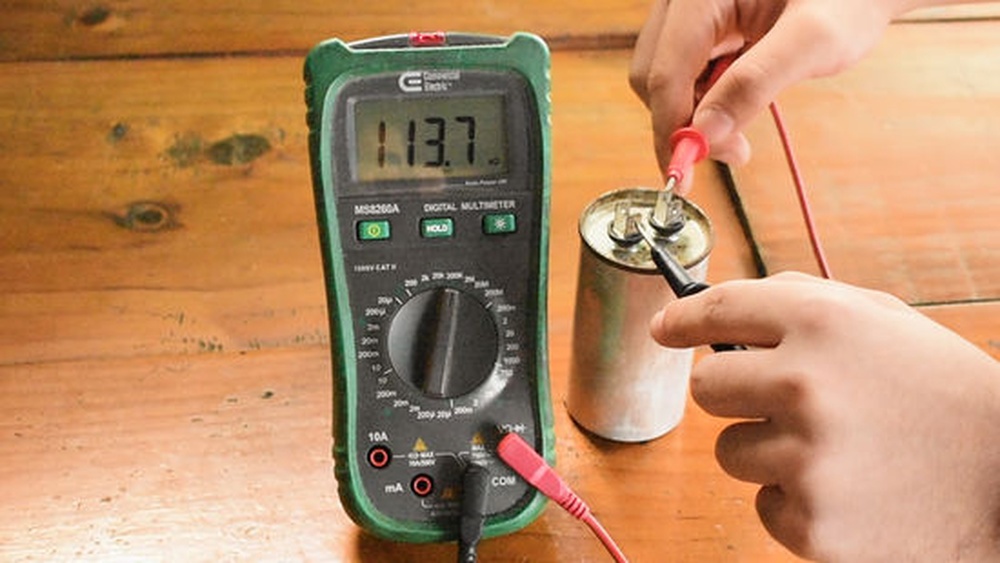
Testing capacitors is a crucial task for anyone working with electronics, from hobbyists to professionals. Knowing whether your multimeter can measure capacitors can save you time, prevent mistakes, and help you diagnose circuits more effectively. But with dozens of multimeter models on the market, and various features to consider, the question arises: How do you know if your multimeter can test capacitors? This guide offers clear answers for beginners and advanced users, helping you confidently determine your tool’s capabilities and make the most of your equipment.
Whether you’re troubleshooting a faulty power supply or assembling a new circuit board, capacitor testing is a common requirement. Not all multimeters are equipped for the job, and using the wrong tool can lead to inaccurate readings or even equipment damage.
This article breaks down what to look for in your multimeter, how to identify its features, and practical tips for both basic and advanced capacitor testing. By the end, you’ll know exactly how to check your multimeter’s suitability and how to use it effectively.
Key Takeaways
- Capacitance measurement is not available on all multimeters; check for the dedicated symbol or function.
- Digital multimeters are more likely to offer capacitor testing than analog models.
- You can use spec sheets, manuals, or online resources to verify your multimeter’s capabilities.
- Advanced methods include using adapters or standalone testers if your multimeter lacks the function.
- Safety precautions are essential when testing capacitors, especially high-voltage types.
- Real-world examples and practical tips make capacitor testing accessible for beginners and advanced users.

Credit: www.blikai.com
Understanding Multimeter Types And Capacitor Testing
Multimeters come in several varieties, each with distinct features. Recognizing your multimeter’s type is the first step to knowing if it can test capacitors.
Digital Vs. Analog Multimeters
Digital multimeters (DMMs) display readings numerically, making them easier for beginners. Many DMMs include a capacitance measurement function, usually marked with a specific symbol (often “Cx” or a capacitor icon).
Analog multimeters, which use a needle and scale, rarely have capacitance testing. They focus on voltage, current, and resistance. If you own an analog meter, it’s unlikely you can test capacitors directly.
| Feature | Digital Multimeter | Analog Multimeter |
|---|---|---|
| Capacitance Measurement | Common (look for Cx or capacitor symbol) | Rare or absent |
| Display | Numeric LCD/LED | Needle scale |
| Accuracy | High | Moderate |
| Ease of Use | Beginner-friendly | Requires experience |
Capacitance Measurement Modes
If your multimeter has a capacitance mode, it’s usually selectable via a rotary dial or push button. Look for:
- The capacitance symbol (two parallel lines with a line between them, like “-| |-”).
- A range marked “F” (for Farads, the unit of capacitance), often subdivided into microfarads (μF), nanofarads (nF), or picofarads (pF).
- A dedicated socket or port labeled “Cx”.
Pro Tip: For beginners, reading the manual or quick start guide is the fastest way to identify if your multimeter can test capacitors.
Manual Verification
If unsure, check:
- Multimeter’s manual or datasheet.
- Manufacturer’s website for specifications.
- Online reviews or forums, such as Wikipedia, which often list features for popular models.
Identifying Capacitance Testing Features On Your Multimeter
Knowing the exact features and symbols your multimeter uses is crucial. Here’s how to spot them:
Locating Symbols And Functions
Most multimeters with capacitance testing will have:
- A rotary dial position with a capacitor symbol.
- Cx or Cap label near test ports or on the dial.
- Range selectors for μF, nF, or pF.
Example: On a typical digital multimeter, the capacitance setting is often between resistance (Ω) and frequency (Hz).
Reading The Display
When you select capacitance mode, the display should show:
- The value in Farads, microfarads, nanofarads, or picofarads.
- A “0L” or “OL” reading if the capacitor is out of range or open.
Test Lead Placement
Some multimeters require:
- Regular test leads for capacitance measurement.
- Special sockets (Cx ports) for direct insertion of capacitor legs.
Warning: Always discharge capacitors before testing. High-voltage capacitors can hold dangerous charges even after being removed from a circuit.
Typical Capacitance Ranges
Most multimeters measure:
- 0.1 μF to 100 μF (common for general-purpose capacitors).
- Some advanced models measure down to picofarads or up to thousands of microfarads.
| Capacitance Range | Typical Multimeter Capability | Advanced Multimeter Capability |
|---|---|---|
| 1 pF, 1 nF | Rare | Possible |
| 1 nF, 100 μF | Common | Common |
| 100 μF, 10,000 μF | Limited | Possible |

Credit: www.ersaelectronics.com
Step-by-step Guide: How To Check If Your Multimeter Can Test Capacitors
For beginners and advanced users alike, here’s a practical guide:
Step 1: Inspect The Multimeter
- Look for capacitance markings (“-| |-”, “Cx”, or “Cap”).
- Examine the rotary dial and test ports.
Step 2: Read The Manual
- Find the specifications section.
- Look for capacitance measurement listed as a function.
Step 3: Check Online Resources
- Visit the manufacturer’s website for your model.
- Search for “capacitance measurement” in the FAQ or support section.
- Use forums like Fluke for expert advice and real-world experiences.
Step 4: Test A Known Capacitor (optional)
If you suspect your multimeter can measure capacitance:
- Set the dial to capacitance mode.
- Insert or connect a known capacitor.
- Observe the display for a value in μF, nF, or pF.
Step 5: Confirm Range And Limits
- Check if your multimeter matches the expected value.
- If the display shows “OL” or “0L,” the capacitor may be out of range or defective.
Pro Tip: In my experience, some multimeters only measure up to 100 μF, which is fine for small capacitors but insufficient for large electrolytics.
Step 6: Safety Precautions
- Always discharge capacitors before testing.
- Use insulated tools and avoid touching capacitor leads directly.

Credit: www.fluke.com
Real-world Examples And Case Studies
Understanding through real-world scenarios helps beginners and advanced users alike.
Example 1: Basic Digital Multimeter
A hobbyist purchases a basic digital multimeter for $25. Upon inspection, the device includes the “-| |-” symbol on its dial. Reading the manual confirms it can measure up to 100 μF. The user successfully tests several capacitors from a broken radio, matching expected values.
Example 2: Advanced Multimeter In A Professional Lab
An electronics engineer uses a Fluke 87V multimeter, which offers a dedicated capacitance socket and measures up to 10,000 μF. The engineer tests large electrolytic capacitors from industrial power supplies, quickly identifying defective units.
Example 3: Analog Multimeter Limitation
A student attempts to test capacitors with an analog multimeter. No capacitance function is available, so the student resorts to measuring resistance, which only indicates if the capacitor is open or shorted, not its value.
Advanced Techniques And Alternatives For Capacitor Testing
If your multimeter lacks capacitance measurement, there are alternative methods.
Using A Dedicated Capacitor Tester
Standalone capacitor testers offer:
- Higher accuracy
- Wider measurement range
- Additional features (ESR, leakage current)
These devices are ideal for professionals or advanced users.
Measuring Indirectly With Resistance
Although not precise, you can:
- Set your multimeter to resistance (Ω) mode.
- Connect the leads to the capacitor.
- Observe the initial resistance “jump,” indicating charging.
Warning: This method only detects open or shorted capacitors, not their exact value.
Adapters And External Modules
Some multimeters accept capacitance adapters:
- Plug-in modules expand measurement range.
- Useful for older or basic models.
Custom Diy Methods
Advanced users may build:
- Oscillator circuits to measure capacitance based on frequency.
- Bridge circuits for high-accuracy testing.
Pro Tip: DIY methods require electronics knowledge and should be used with caution.
Common Multimeter Models And Their Capacitor Testing Capabilities
Knowing popular models helps users identify features and limits.
Entry-level Models
Many entry-level DMMs (such as the Mastech MS8229) offer:
- Capacitance mode up to 100 μF
- Basic display
- Affordable pricing ($20-$40)
Mid-range Models
Mid-range units (like the Extech EX330) include:
- Capacitance up to 10,000 μF
- Temperature measurement
- Backlit display
Professional Models
High-end devices (e.g., Fluke 87V, Keysight U1282A) feature:
- Wide range (up to 100,000 μF)
- High accuracy
- Multiple input methods
| Model | Capacitance Range | Accuracy | Price Range |
|---|---|---|---|
| Mastech MS8229 | Up to 100 μF | ±2% | $25-$40 |
| Extech EX330 | Up to 10,000 μF | ±1% | $60-$90 |
| Fluke 87V | Up to 100,000 μF | ±0.5% | $400-$500 |
Analog Models
Most analog multimeters (e.g., Simpson 260) lack capacitance testing.
Warning: Don’t attempt to measure capacitance on analog meters unless the device specifically includes a capacitance mode.
Practical Tips For Beginners: Making Capacitor Testing Easy
Capacitor testing can be intimidating for beginners. Here are some actionable tips:
Start With The Manual
- Read the manual for your multimeter before testing.
- Identify all symbols and functions.
Use Proper Tools
- Use insulated test leads.
- Discharge capacitors before handling.
Practice On Known Components
- Test capacitors with labeled values.
- Compare readings to expected numbers.
Understand Measurement Limits
- Don’t test capacitors outside your meter’s range.
- Check the meter’s accuracy specs.
Keep Safety First
- Wear gloves if testing high-voltage capacitors.
- Avoid testing in-circuit unless the meter supports it.
Pro Tip: Beginners often overlook the importance of discharging capacitors. Use a resistor across the leads to safely discharge before testing.
Common Mistakes To Avoid
- Testing in-circuit: Removes accuracy, unless meter supports in-circuit testing.
- Ignoring range limits: Leads to “OL” errors.
- Not discharging capacitors: Can cause electric shock or meter damage.
Advanced Suggestions For Professionals And Experienced Users
For those seeking more control and accuracy, consider these advanced techniques:
Use An Esr Meter
ESR (Equivalent Series Resistance) meters measure capacitor health beyond just capacitance value. They’re ideal for troubleshooting power supplies and audio circuits.
Combine Multimeter With Oscilloscope
Pairing a multimeter with an oscilloscope allows for:
- Detailed frequency response analysis
- Capacitor behavior under load
Calibration And Maintenance
- Regularly calibrate your multimeter.
- Replace batteries and check test leads for integrity.
Data Logging
Some advanced multimeters offer data logging for tracking changes over time, useful in research and industrial applications.
Custom Test Fixtures
Build or purchase test fixtures for high-volume or precision testing. These ensure consistent connection and safety.
Pro Tip: When I tested industrial capacitors, using a test fixture increased safety and improved measurement repeatability.
Troubleshooting: What If Your Multimeter Can’t Test Capacitors?
If your meter lacks capacitance function, you can still diagnose capacitor faults.
Use Resistance Mode
- Open circuit: Infinite resistance (likely defective).
- Short circuit: Zero resistance (defective).
- Charging: Resistance starts low and increases.
Consider Upgrading
- If frequent capacitor testing is required, invest in a multimeter with capacitance measurement.
- Standalone testers are affordable and highly accurate.
Borrow Or Rent Equipment
- For occasional use, borrowing from a lab or renting a device can be cost-effective.
Diy Solutions
- Build basic capacitor testers using microcontrollers (Arduino, Raspberry Pi).
- Use timer circuits (555 IC) to estimate capacitance.
Warning: DIY methods are only recommended for experienced users; improper handling can cause injury or damage.
Frequently Asked Questions
How Can I Safely Test Capacitors With My Multimeter?
To safely test capacitors, always discharge the component first using a resistor or capacitor discharge tool. Ensure your multimeter is set to capacitance mode and follow the manufacturer’s instructions. Wear protective gear if testing high-voltage capacitors, and never touch the leads directly.
What Does “ol” Or “0l” Mean When Measuring Capacitance?
“OL” or “0L” stands for “Over Limit” or “Open Loop. ” This means the measured capacitor is outside the multimeter’s range or is defective. Try a smaller or larger capacitor, or consult your meter’s manual to verify the supported range.
Can I Test Capacitors In-circuit With My Multimeter?
Some advanced multimeters support in-circuit testing, but most require capacitors to be removed from the circuit for accurate measurement. In-circuit readings can be influenced by parallel components. Check your multimeter’s manual for this feature.
What Is Esr And Why Is It Important For Capacitor Testing?
ESR (Equivalent Series Resistance) is a parameter indicating the internal resistance of a capacitor. High ESR can cause circuits to malfunction even if capacitance is correct. Specialized ESR meters provide this measurement, which is vital for troubleshooting power supplies and audio equipment.
Are There Smartphone Apps Or Devices That Can Measure Capacitance?
Yes, several smartphone-connected devices and apps, such as Bluetooth-capable LCR meters, can measure capacitance. These tools offer portability and sometimes advanced features, but they may lack the precision of dedicated laboratory-grade meters.
Testing capacitors is a fundamental skill for anyone involved in electronics. Knowing whether your multimeter can perform this task is essential for accurate diagnostics and repairs. By understanding your tool’s features, reading the manual, and practicing safe techniques, you can confidently test capacitors as a beginner or an advanced user.
If your multimeter lacks capacitance testing, alternative tools and methods are available to suit every budget and skill level. With these insights, you’re equipped to make informed decisions and tackle capacitor testing with confidence.