
What Is The Meaning Of Counts In Multimeter
Multimeters are essential tools for anyone working with electronics, electrical systems, or DIY projects. Whether you’re a seasoned engineer, an electrician, or a hobbyist, you’ve likely seen the term “counts” on multimeter specifications, but what does it actually mean? Understanding counts is crucial for selecting the right multimeter and interpreting its readings accurately. Yet, many users, even experienced ones, often overlook or misunderstand this vital specification.
In my experience teaching electronics workshops, beginners frequently confuse counts with resolution, accuracy, or display digits. This confusion can lead to choosing the wrong tool or misinterpreting measurements, sometimes with costly or even dangerous results. This article will unravel what counts means in a multimeter, why it matters, and how you can use this knowledge to make smarter purchasing and measurement decisions. You’ll gain both a beginner-friendly explanation and actionable advanced tips, ensuring you’re confident with multimeter counts at any level.

Credit: www.fluke.com
Key Takeaways
- Counts define a multimeter’s maximum displayable value and directly affect measurement resolution.
- Higher counts allow for more precise readings and often indicate a higher-quality instrument.
- Counts are different from display digits; understanding both is key to proper tool selection.
- Real-world examples and tables will clarify how counts impact everyday measurement scenarios.
- Advanced users can leverage counts to improve measurement accuracy and workflow efficiency.
Credit: connectorsupplier.com
Understanding Counts: The Building Blocks Of Multimeter Display
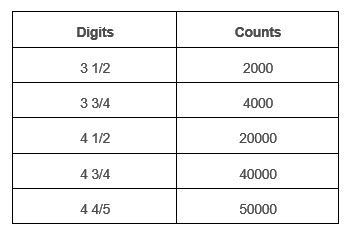
Counts in a multimeter represent the number of unique values the instrument’s display can show. This specification determines the finest change in value a multimeter can register. For example, a 2000-count multimeter can display values from 0 to 1999, while a 6000-count model can display from 0 to 5999.
What Are Counts?
A count is essentially one step or increment in the value a multimeter can display. Think of it as a digital camera’s pixel: more counts mean finer granularity in measurement, just like more pixels mean a sharper image. If your multimeter is rated at 4000 counts, it can show 4000 distinct values between its minimum and maximum reading.
Counts Vs. Digits
Many users mistakenly equate counts with digits. While related, these are not the same:
- Digits refer to how many numerical places the display has (e.g., 3 ½ digits, 4 digits).
- Counts specify the exact number of steps the display can show, which may not always align perfectly with digits.
For example, a 3 ½ digit meter can display up to 1999 (thus, 2000 counts), but a 6000-count meter may display up to 5999, often with a 3 5/6 digit display.
Why Are Counts Important?
Counts determine your meter’s resolution, the smallest possible change it can detect. Higher counts mean you can see smaller changes in your measurements, which is vital for precision work. For instance, when troubleshooting sensitive electronic circuits, a higher-count meter can reveal tiny voltage drops that a lower-count meter might miss.
Real-world Example
Suppose you’re measuring a reference voltage of 5. 000V. With a 2000-count meter, you might only see 5. 00V, while a 6000-count meter could display 5. 000V. This extra digit can make a significant difference in diagnostics and calibration tasks.
How Counts Affect Multimeter Resolution And Accuracy
To fully grasp counts, it’s vital to understand how they relate to resolution and accuracy. These concepts are interconnected but distinct.
Counts And Resolution
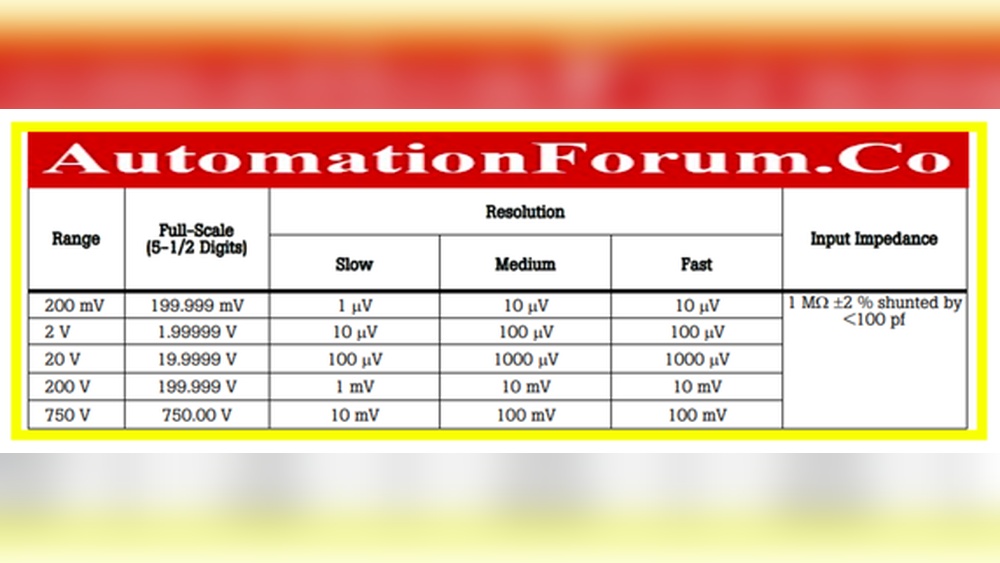
Resolution is the smallest measurable increment the multimeter can detect and display. A multimeter with 2000 counts on a 2V range can typically resolve down to 0.001V (1mV). Higher counts allow for finer resolution across all ranges.
Example:
- A 2000-count meter on a 2V range: Smallest increment = 0.001V.
- A 6000-count meter on a 6V range: Smallest increment = 0.001V.
This means a 6000-count meter provides higher resolution over a wider range, making it more versatile.
Counts And Accuracy
While counts determine resolution, accuracy is a separate specification showing how close a measurement is to the true value. A high-count meter isn’t always more accurate, but it can display smaller changes in value. Always check both counts and accuracy specs before purchasing.
Display Range And Auto-ranging
Higher counts often allow for wider display ranges without changing measurement ranges. For example, a 6000-count meter might show 5.999V on the 6V range, while a 2000-count meter would require switching to a higher range for values above 1.999V, sacrificing resolution.
Pro Tip:
When selecting a multimeter, match both the counts and accuracy to your measurement needs. Don’t assume that a higher count always means better accuracy.
Comparison Table: Counts, Resolution, And Range
| Counts | Digits | Max Displayable Value | 2V Range Resolution | 6V Range Resolution |
|---|---|---|---|---|
| 2000 | 3 1/2 | 1999 | 0.001V | 0.01V (only available on 20V range) |
| 4000 | 3 3/4 | 3999 | 0.001V | 0.001V |
| 6000 | 3 5/6 | 5999 | 0.001V | 0.001V |

Credit: www.fluke.com
Different Types Of Multimeter Counts: From 2000 To 60000
Multimeters come with a range of counts, from basic 2000-count models to advanced 60,000-count laboratory instruments. The right choice depends on your applications and budget.
2000 And 4000 Counts: Entry-level And Diy Use
2000-count meters are the most common for household and DIY use. They are affordable and sufficient for basic tasks like checking batteries, outlets, or fuses. 4000-count meters offer a slight improvement, useful for more precise hobbyist work.
Example:
Measuring a 1.5V AA battery:
- 2000-count meter shows 1.50V
- 4000-count meter shows 1.500V
6000 And 60000 Counts: Professional And Laboratory Use
6000-count meters are standard for professionals. They are capable of measuring small differences with better resolution, useful in industrial, automotive, and electronic troubleshooting.
60000-count meters are typically found in laboratories or calibration environments, offering extremely fine resolution for scientific research or calibration work.
Comparison Table: Typical Use Cases By Count
| Counts | Typical Applications | User Level | Price Range |
|---|---|---|---|
| 2000 | Basic electrical, household | Beginner, DIY | Low |
| 4000 | Hobby electronics, automotive | Hobbyist, Enthusiast | Low-Mid |
| 6000 | Industrial, professional | Technician, Engineer | Mid-High |
| 60000 | Laboratory, calibration | Scientist, Advanced Engineer | High |
When Do You Need Higher Counts?
- Troubleshooting sensitive electronics: Higher counts reveal minor voltage drops, noise, or fluctuations.
- Calibrating equipment: For tasks requiring extreme precision, such as calibrating reference voltage sources.
- Long-term monitoring: In data acquisition, small changes can signal problems before they escalate.
When Are Lower Counts Sufficient?
- Basic household checks: Power outlets, batteries, and fuses rarely require high resolution.
- Automotive work: Diagnosing 12V systems often doesn’t need more than 2000 or 4000 counts.
How To Read Multimeter Counts On Real Devices
Knowing what counts mean is one thing, seeing them in action is another. Let’s walk through real-world examples and what to look for when interpreting your multimeter display.
Example 1: Measuring Battery Voltage
Suppose you’re testing a 9V battery:
- With a 2000-count meter, the display might read 8.99V (rounded to two decimals).
- With a 6000-count meter, it could show 8.998V, revealing a small drop that may indicate a battery nearing end-of-life.
Example 2: Checking Power Supply Rails
For electronics repair, measuring a 5V regulator output:
- 2000-count meter: 5.00V (resolution 0.01V)
- 6000-count meter: 5.000V (resolution 0.001V)
- 60,000-count meter: 5.0000V (resolution 0.0001V)
The higher-count meters provide more meaningful data for quality control or troubleshooting.
Example 3: Monitoring Fluctuations
In power monitoring, a 6000-count or higher meter can show small voltage sags or surges that might be invisible on a 2000-count device.
Example:
If the voltage dips to 119.8V on a 120V line:
- 2000-count meter: Might still show 120V
- 6000-count meter: Will show 119.8V, alerting you to a real issue
Case Study: Electronics Lab Upgrade
A university electronics lab upgraded from 2000-count to 6000-count multimeters. Students immediately observed subtle voltage drops in breadboard circuits that were previously invisible. This insight led to better circuit troubleshooting, improved grades, and fewer damaged components.
Interpreting The Display
Always check:
- The number of decimal places shown, this often correlates with counts.
- Whether the reading changes as you switch between ranges (higher counts maintain resolution across more ranges).
Advanced Guide: Leveraging Counts For Precision Measurement
For professionals and advanced hobbyists, understanding counts opens up new possibilities for precision and efficiency.
Optimizing Range Selection
A high-count meter lets you stay on a lower measurement range longer, maintaining maximum resolution. For instance, a 6000-count meter on a 6V range can measure up to 5. 999V with 0. 001V resolution, while a 2000-count meter would have to switch to the 20V range above 1.
999V, losing resolution.
Counts And Data Logging
When using a multimeter for data logging or connecting to a PC, higher counts mean more granular data. This is vital for trend analysis or capturing small fluctuations over time.
Pro Tip:
When setting up automated test equipment or logging data, always select a meter with counts that match or exceed your resolution requirements.
Understanding Counts In Rms And Peak Measurements
Some advanced meters offer True RMS or Peak Hold features. High counts ensure these functions provide the necessary detail, especially in complex AC or rapidly changing signals.
Avoiding Over-interpretation
Even with high counts, remember:
- The accuracy specification sets the limit for how close your reading is to reality.
- Environmental factors, probe quality, and calibration status all affect measurement reliability.
Example: Calibrating Precision Reference
When calibrating a reference voltage source to 2.5000V:
- A 60,000-count meter displays 2.50000V, allowing you to fine-tune with extreme confidence.
- A 2000-count meter only shows 2.50V, making it impossible to see micro-volt changes.
How To Choose The Right Multimeter Based On Counts
Selecting the best multimeter means balancing counts with budget, accuracy, and application needs.
Step 1: Define Your Application
- Household/Automotive: 2000, 4000 counts usually suffice.
- Electronics/Industrial: 6000, 20,000 counts preferred.
- Research/Laboratory: 20,000, 60,000 counts often required.
Step 2: Consider Other Specifications
- Accuracy: Review the meter’s accuracy alongside counts.
- Display type: Some meters have bar-graph displays or dual displays.
- Range selection: Auto-ranging meters with higher counts offer faster, more intuitive use.
Step 3: Compare Models
| Model | Counts | Accuracy | Price Range | Best For |
|---|---|---|---|---|
| Entry-Level A | 2000 | ±0.5% | $20, $40 | Basic/DIY |
| Mid-Range B | 6000 | ±0.2% | $60, $120 | Professional/Industrial |
| Advanced Lab C | 60,000 | ±0.05% | $300, $800 | Research/Lab |
Step 4: Check Manufacturer Reputation
Choose reputable brands, such as Fluke, Keysight, or Brymen, for reliable counts and trustworthy specifications. For official definitions and deeper technical details, refer to the Wikipedia Multimeter page.
Step 5: Assess Display And Usability Features
Some high-count meters offer:
- Backlit displays
- Bar graphs for trend analysis
- Multiple measurement modes
These features can enhance usability, especially in professional environments.
Warning:
Low-quality meters may advertise high counts but lack the accuracy or build quality to support them. Always check third-party reviews and, if possible, test the meter before purchase.
Practical Tips For Beginners And Advanced Users
Whether you’re just starting out or looking to refine your measurement practice, these tips will help you get the most from your multimeter.
For Beginners
- Start with what you need: Don’t overspend on high counts if your tasks are basic.
- Read the manual: Learn your meter’s range and display capabilities.
- Practice reading values: Notice how the number of decimals changes with range selection.
For Advanced Users
- Leverage auto-ranging: Use meters that maintain high counts across ranges for speed and convenience.
- Calibrate regularly: High counts are only useful if your meter is calibrated.
- Integrate with data logging: Connect high-count meters to software for advanced analysis.
- Use shielded probes: For high-resolution work, probe quality can affect readings.
Common Mistakes To Avoid
- Ignoring accuracy: Don’t be dazzled by high counts alone.
- Confusing counts with digits: Double-check specifications.
- Using old or uncalibrated meters: This can lead to misleading results.
Resources For Further Learning
- Manufacturer datasheets and manuals
- Online forums like EEVblog or Reddit’s r/AskElectronics
- Official standards from the International Electrotechnical Commission (IEC)
Frequently Asked Questions
What Is The Difference Between Counts And Digits In A Multimeter?
Counts specify the exact number of unique values the display can show, determining resolution. Digits describe the number of numerical places on the display (e.g., 3 ½ digits), but two meters with the same number of digits may have different counts. Always check the counts specification for clarity.
Can A Higher-count Multimeter Measure More Types Of Signals?
A higher-count multimeter does not inherently measure more types of signals (e. g. , AC, DC, resistance), but it provides greater detail and finer resolution within those signals. The measurement functions depend on the meter’s features, not just its counts.
How Do I Know If I Need A 6000-count Or 60000-count Meter?
Assess your needs: For routine electrical and electronics work, 6000 counts is generally sufficient. Choose 60,000 counts only if you require extremely fine resolution, such as in precision calibration or scientific research environments.
Will Using A High-count Multimeter Improve My Measurement Accuracy?
Not necessarily. While high counts provide finer resolution, accuracy is a separate specification reflecting how close the reading is to the true value. Always check both counts and accuracy in the specifications for your intended application.
Do Counts Affect Battery Life Or Measurement Speed?
In most cases, higher counts do not significantly reduce battery life, as modern meters are designed for efficiency. However, very high-count meters with advanced processing may update readings slightly slower due to more complex computations, but this effect is usually negligible for standard measurements.
A clear understanding of counts empowers users, from beginners to advanced professionals, to select the right multimeter, interpret readings accurately, and perform better diagnostics. Whether you’re measuring a household battery or calibrating laboratory equipment, paying attention to counts means better results and greater confidence in your tools.