
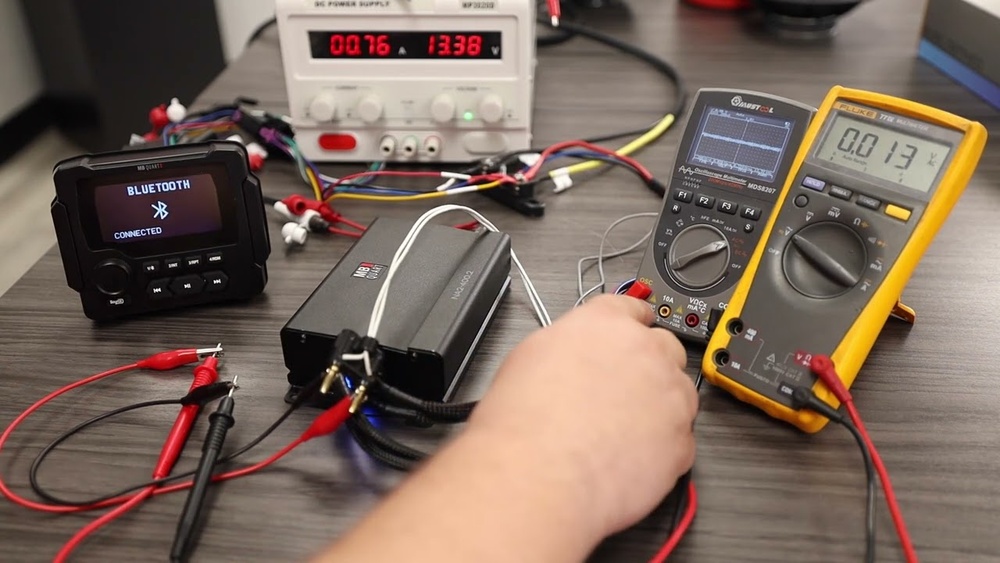
Testing audio signals with a multimeter is a valuable skill for electronics enthusiasts, audio engineers, and anyone troubleshooting sound equipment. Whether you’re repairing a home stereo, diagnosing issues in a guitar amplifier, or checking a car audio system, knowing how to use a multimeter effectively can save time, money, and frustration.
This comprehensive guide will walk you through beginner-friendly explanations and advanced techniques, ensuring you understand both the fundamentals and nuanced practices required for accurate audio signal testing.
Many beginners are intimidated by the technical jargon and complexity of audio electronics. However, with clear step-by-step instructions and practical tips, anyone can learn to test audio signals using a multimeter. By mastering these methods, you’ll gain confidence in diagnosing problems, verifying signal presence, and optimizing audio equipment performance.
For professionals and advanced users, we’ll also explore deeper insights, including interpreting readings, comparing device performance, and troubleshooting complex issues with precision.
Key Takeaways
- Multimeters are essential for diagnosing and verifying audio signal issues in diverse equipment.
- Beginners can start with simple continuity and voltage tests; advanced users can employ AC voltage and resistance measurements for deeper analysis.
- Proper preparation and safety steps ensure accurate, reliable results and protect both the user and equipment.
- Understanding signal types and reading interpretation is crucial for effective audio troubleshooting.
- Real-world examples illustrate common scenarios, from home stereo repairs to professional studio maintenance.

Credit: www.youtube.com
Understanding Audio Signals And Multimeters
Audio signals are the electrical representations of sound, typically expressed as AC (alternating current) voltages in audio systems. These signals travel through cables, circuits, and components to reach speakers, headphones, or other output devices. Multimeters, on the other hand, are versatile tools that measure electrical properties such as voltage, current, and resistance. For audio testing, multimeters are primarily used to:
- Verify signal presence
- Measure output voltage
- Check continuity and resistance
- Identify faults in cables and connectors
Types Of Audio Signals
Audio signals can be categorized by their source and purpose:
- Line-Level Signals: Used in home stereo systems and mixing consoles, typically range from 0.5V to 2V RMS.
- Instrument-Level Signals: Generated by guitars or keyboards, usually lower voltage.
- Speaker-Level Signals: Higher voltage, capable of driving speakers directly.
Understanding these distinctions is crucial because the voltage levels and signal types determine which multimeter settings to use.
Multimeter Basics
A multimeter usually features three main modes:
- Voltage (V): AC or DC measurement
- Resistance (Ω): Checks continuity and resistance values
- Current (A): Measures electrical current (less commonly used for audio signal testing)
Modern digital multimeters offer additional features such as auto-ranging, data hold, and frequency measurement, which enhance audio testing capabilities.

Credit: www.ifixit.com
Preparing To Test Audio Signals
Successful audio signal testing starts with preparation. Ensuring you have the right tools and setup minimizes errors and maximizes safety.
Gathering Necessary Tools
Before testing, make sure you have:
- A digital multimeter with AC voltage and resistance measurement capability
- Test leads (preferably shielded for accuracy)
- Audio cables and connectors compatible with the equipment under test
- A signal source (e.g., audio player, tone generator)
- Notebook and pen for recording measurements
Pro Tip: For advanced users, an oscilloscope can provide visual signal analysis, but a multimeter suffices for most troubleshooting needs.
Setting Up Your Equipment
- Turn off power to the equipment before connecting test leads.
- Select the correct multimeter mode: AC voltage for audio signals, resistance for continuity checks.
- Check multimeter calibration: Use a known voltage source to ensure accuracy.
- Inspect cables and connectors for visible damage or corrosion.
Safety Precautions
- Always work in a dry environment to prevent electric shock.
- Avoid testing speaker-level signals with a multimeter unless the device is rated for higher voltages.
- Never touch exposed wires or terminals while equipment is powered.
Warning: Testing live audio circuits can expose you to dangerous voltages. If unsure, consult a qualified technician.

Credit: electronics.stackexchange.com
Step-by-step Guide: Testing Audio Signals With A Multimeter
This section breaks down the testing process for beginners and includes advanced suggestions for professionals.
Testing Continuity In Audio Cables
Continuity testing ensures that the cable’s conductors are intact and free from breaks.
- Set multimeter to continuity mode (symbol: Diode or speaker).
- Insert test leads into each end of the cable (tip to tip, sleeve to sleeve).
- Listen for a beep or observe a low resistance reading (<2Ω).
If there’s no continuity, the cable may be damaged.
Measuring Ac Voltage Of An Audio Signal
To verify signal presence and strength:
- Set multimeter to AC voltage mode.
- Play a test tone (e.g., 1 kHz sine wave) through the audio source.
- Place test leads across the output terminals (e.g., RCA, XLR, or speaker terminals).
- Observe the voltage reading.
Typical line-level signals should read between 0. 5V and 2V RMS.
Example: When I tested a home amplifier with a multimeter, a 1 kHz tone produced a reading of 1.1V RMS on the line output, confirming proper signal transmission.
Checking Resistance In Audio Components
Resistance testing helps identify faulty speakers, headphones, or connectors.
- Set multimeter to resistance (Ω) mode.
- Disconnect component from any power source.
- Touch test leads to terminals or connectors.
- Compare reading to manufacturer’s specifications.
A typical 8Ω speaker should display close to 8Ω; significant deviation indicates a fault.
Advanced: Signal Path Verification
Professionals may need to trace signal paths through complex circuits.
- Use AC voltage mode to check each stage in the signal chain (preamp, EQ, power amp).
- Record voltage drop-offs to pinpoint malfunctioning sections.
- Compare readings across similar devices for benchmarking.
Troubleshooting Common Issues
- No signal detected: Check cable continuity, source power, and output settings.
- Low voltage reading: Verify signal source volume and device gain.
- Unexpected resistance: Inspect for short circuits or blown components.
| Test Type | Multimeter Setting | Expected Reading | Possible Issues |
|---|---|---|---|
| Continuity | Continuity/Resistance | Beep or <2Ω | Broken cable, connector fault |
| AC Voltage | AC Voltage | 0.5-2V RMS (line) | No signal, low output |
| Resistance | Resistance (Ω) | 8Ω (speaker) | Blown speaker, short circuit |
Interpreting Multimeter Readings For Audio Signals
Understanding what your multimeter displays is essential for actionable troubleshooting.
Voltage Readings
- RMS (Root Mean Square): Multimeters display RMS values for AC signals, reflecting average power.
- Peak Voltage: Not typically measured by standard multimeters, but relevant for advanced users.
- Line vs. Speaker Level: Higher readings indicate speaker-level signals; use caution.
Resistance Values
- Nominal resistance: Aligns with manufacturer specs (e.g., 8Ω, 16Ω).
- Zero or infinite reading: Indicates short circuit or open circuit, respectively.
Signal Presence And Quality
A consistent AC voltage reading during a test tone confirms signal transmission. Fluctuating or zero readings suggest issues in the signal chain.
Advanced Interpretation
- Frequency response: Some multimeters measure frequency; compare to expected test tone (e.g., 1 kHz).
- Comparative analysis: Benchmark readings against known-good devices for troubleshooting.
| Device | Measured AC Voltage (1 kHz tone) | Manufacturer Spec | Status |
|---|---|---|---|
| Home Stereo Line Out | 1.2V RMS | 1V RMS | Normal |
| Guitar Amp Input | 0.3V RMS | 0.5V RMS | Low Signal |
| Speaker Output | 8.2Ω | 8Ω | Normal |
Real-world Examples And Case Studies
Example 1: Troubleshooting A Home Stereo
A user notices distorted sound from their home stereo. Using a multimeter:
- Continuity test reveals a broken speaker cable.
- Resistance test confirms speaker is intact (8Ω).
- AC voltage test at line output registers 1.2V RMS with a test tone.
Resolution: Replacing the cable restores clear audio.
Example 2: Diagnosing A Guitar Amplifier
A guitarist experiences weak output from their amplifier.
- AC voltage test at amp input shows 0.3V RMS (lower than expected).
- Checking the guitar cable reveals high resistance (>10Ω), indicating internal breakage.
- New cable restores proper signal (0.5V RMS).
Example 3: Studio Equipment Maintenance
In a recording studio, regular testing prevents downtime.
- Engineers use multimeters to verify continuity in patch cables.
- AC voltage readings ensure signal levels are consistent across mixing consoles.
- Resistance measurements identify faulty headphones before sessions begin.
These scenarios demonstrate practical, real-world applications for multimeter audio signal testing.
Advanced Techniques And Tips For Professionals
While basic tests suffice for most users, advanced techniques can uncover subtle issues and optimize performance.
Using Frequency Measurement
Some multimeters feature frequency measurement modes. By applying a test tone (e. g. , 1 kHz), you can verify the signal’s frequency accuracy, which is critical in studio environments.
Signal Path Mapping
For complex audio systems, map the signal path:
- Test each stage (input, preamp, EQ, power amp) with AC voltage readings.
- Record and compare voltages to manufacturer specs.
Benchmarking Equipment Performance
Professionals often benchmark devices against industry standards. For example, comparing output voltage across multiple amplifiers ensures uniformity in studio setups.
| Device | Output Voltage (1 kHz, 0 dBFS) | Industry Standard | Deviation |
|---|---|---|---|
| Audio Interface 1 | 2.0V RMS | 2.0V RMS | 0% |
| Audio Interface 2 | 1.8V RMS | 2.0V RMS | -10% |
Integrating Multimeter Data With Other Tools
- Combine multimeter readings with oscilloscope visuals for deeper analysis.
- Use signal generators to produce specific test tones for more accurate measurements.
Pro Tip: Advanced users should consult device manuals and technical documentation for precise test procedures.
Preventive Maintenance
Regular multimeter testing prevents equipment failure. Professional studios and live venues schedule routine tests to ensure reliability and minimize downtime.
Common Challenges And Solutions In Audio Signal Testing
Even experienced users encounter challenges when testing audio signals. Here’s how to address some of the most common issues:
Challenge 1: Unstable Voltage Readings
- Solution: Check for loose connections, damaged cables, and ensure the multimeter is properly grounded.
Challenge 2: Unexpected Resistance Values
- Solution: Inspect the component for hidden damage or manufacturing defects. Compare readings with a new, identical component.
Challenge 3: Multimeter Limitations
Standard multimeters may not detect very low signal voltages (20 kHz).
- Solution: Use specialized audio analyzers or oscilloscopes for advanced analysis.
Challenge 4: Signal Interference
Audio signals are susceptible to electromagnetic interference, especially in environments with multiple electronic devices.
- Solution: Use shielded cables, test in isolated environments, and minimize nearby electronic noise sources.
Challenge 5: Safety Hazards
Testing live circuits or high-voltage speaker outputs can pose safety risks.
- Solution: Always power down equipment before testing resistance or continuity. Use multimeters rated for higher voltages when necessary.
Best Practices For Accurate Audio Signal Testing
To ensure reliable results and protect your equipment, follow these best practices:
- Use high-quality test leads: Poor leads can introduce resistance and noise.
- Calibrate your multimeter regularly: Check against known standards.
- Record readings systematically: Keep a log for comparison and troubleshooting.
- Double-check connections: Ensure test leads and cables are secure.
- Consult manufacturer documentation: Confirm expected values before testing.
Pro Tip: When testing unfamiliar equipment, start with the lowest voltage range and increase as needed to avoid damaging the multimeter.
Advanced Multimeter Features For Audio Testing
Modern multimeters offer advanced features that can enhance audio signal testing.
Auto-ranging
Auto-ranging multimeters automatically select the appropriate measurement range, reducing setup time and minimizing errors. This is particularly useful when testing unknown or variable signal levels.
Data Hold And Logging
Data hold allows users to freeze readings, while logging records measurements over time. These features are invaluable for monitoring signal stability and capturing transient faults.
Frequency And Capacitance Measurement
Some multimeters can measure frequency and capacitance, enabling users to verify signal tone accuracy and assess circuit health.
Example: In my experience, using a multimeter with frequency measurement mode allowed me to quickly confirm that a test tone generator was producing a stable 1 kHz signal.
Integration With Audio Test Software
Advanced multimeters may interface with computers for data analysis, enabling professionals to generate reports and visualize trends.
How Multimeter Audio Testing Compares To Other Methods
While multimeters are versatile, other tools are available for more specialized audio signal analysis. Here’s a comparison of common methods:
| Method | Function | Precision | Cost | Use Case |
|---|---|---|---|---|
| Multimeter | Voltage, resistance, continuity | Moderate | Low | Basic troubleshooting |
| Oscilloscope | Visual waveform analysis | High | Medium-High | Advanced diagnostics |
| Audio Analyzer | Frequency, distortion, signal quality | Very High | High | Professional testing |
Example: A multimeter suffices for checking signal presence and basic faults, but an oscilloscope is needed to visualize waveforms and diagnose subtle signal distortions.
Frequently Asked Questions
How Can I Test Audio Signals Without Damaging My Multimeter?
Always verify the voltage range of the audio signal before testing. Speaker-level outputs can exceed a multimeter’s safe range. If unsure, start with the highest voltage setting and gradually lower it. Consult your multimeter’s manual and the equipment’s documentation to avoid exceeding rated limits.
What Should I Do If My Multimeter Doesn’t Detect A Signal, But The Equipment Seems To Work?
If your multimeter fails to detect a signal but the audio device functions, consider these factors:
- The signal may be too weak for the multimeter to register.
- The multimeter might not be sensitive enough for low-level audio signals.
- Try using an oscilloscope or a dedicated audio analyzer for more precise detection.
Can I Use A Multimeter To Measure Audio Distortion Or Quality?
Standard multimeters cannot measure audio distortion or signal quality. These require specialized tools such as audio analyzers or oscilloscopes. For distortion measurements, refer to industry standards and use calibrated equipment. For more information, see the Wikipedia Audio Analyzer page.
Are There Specific Multimeter Models Recommended For Audio Signal Testing?
While most digital multimeters suffice for basic audio testing, models with AC voltage, resistance, and frequency measurement are preferred. Brands such as Fluke, Klein Tools, and Extech offer reliable options. For professional audio testing, choose a multimeter with high sensitivity and additional features like data logging.
How Often Should Audio Signal Testing Be Performed In Professional Environments?
In studios and live venues, audio signal testing should be part of routine maintenance, ideally before every major session or event. Regular testing prevents unexpected failures and ensures consistent performance. Create a checklist and schedule to streamline the process. For further reading, see Fluke’s Multimeter Guide.
Testing audio signals with a multimeter is a practical skill that bridges the gap between theory and hands-on troubleshooting. From basic continuity checks to advanced signal analysis, mastering these techniques empowers users to maintain and optimize audio equipment with confidence.
Whether you’re a beginner learning the ropes or a seasoned professional refining your workflow, the right approach and tools make all the difference. By following the step-by-step guide and best practices outlined here, you’ll be well-equipped to diagnose and resolve audio signal issues efficiently and safely.