
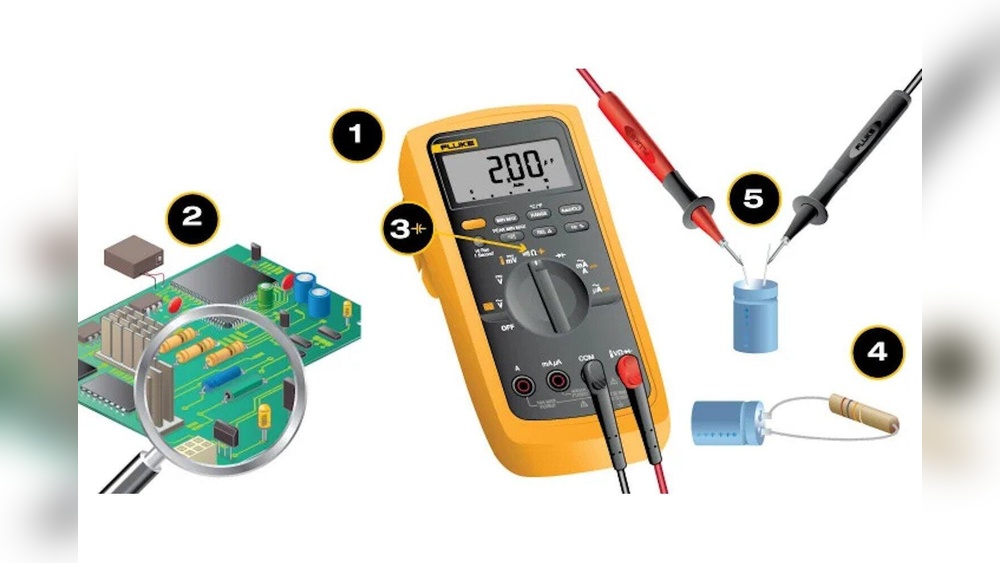
Measuring capacitance accurately is a crucial skill for electronics enthusiasts, technicians, engineers, and anyone interested in diagnosing or building electronic circuits. Whether you’re troubleshooting a faulty appliance or assembling a DIY project, understanding how to use a multimeter to measure capacitance can save time, money, and effort.
Yet, for many beginners, the process can seem daunting, with confusing symbols, settings, and potential pitfalls. Even seasoned professionals occasionally make mistakes that lead to inaccurate readings or even damaged components.
This comprehensive guide provides a step-by-step approach to measuring capacitance with a multimeter, suitable for both novices and advanced users. You’ll learn not just the basics, but also advanced troubleshooting tips, common errors, and practical examples from real-world scenarios. By the end, you’ll have the confidence and knowledge to tackle capacitance measurement tasks effectively, ensuring both accuracy and safety.
Key Takeaways
- Capacitance measurement is essential for diagnosing and verifying electronic circuits.
- Most modern digital multimeters offer a dedicated capacitance mode, streamlining the process.
- Proper preparation, discharging capacitors and selecting the right settings, is vital for both safety and accuracy.
- Advanced techniques help troubleshoot ambiguous readings and test in-circuit components.
- Understanding common pitfalls and best practices can prevent equipment damage and personal injury.

Credit: www.youtube.com
Understanding Capacitance And Its Importance
Capacitance is the ability of a component or circuit to store an electrical charge. The unit of measurement is the farad (F), with practical values often in microfarads (μF), nanofarads (nF), or picofarads (pF). Capacitors, the most common components with capacitance, play vital roles in smoothing power supplies, filtering signals, timing circuits, and more.
What Is Capacitance?
In simple terms, capacitance measures how much charge a device can hold at a given voltage. The formula is:
C = Q / V
where:
- C is capacitance (farads)
- Q is charge (coulombs)
- V is voltage (volts)
Capacitors can be found in nearly every electronic device, from smartphones to industrial machinery, making their accurate measurement indispensable.
Why Measure Capacitance?
There are several scenarios where you might need to measure capacitance:
- Testing for component failure in circuits, such as a faulty motor start capacitor
- Verifying new or salvaged capacitors before installation
- Matching capacitance values in precision circuits
- Troubleshooting issues like power supply ripple or timing errors
Incorrect capacitance can lead to circuit malfunction, reduced efficiency, or complete failure.
Types Of Capacitors
The two main families of capacitors are:
- Polarized capacitors (e.g., electrolytic): Marked with positive and negative leads, used for larger values.
- Non-polarized capacitors (e.g., ceramic, film): Can be installed in either direction, often used for signal filtering or timing.
Understanding capacitor types helps in selecting the correct measurement technique and avoiding damage.
Capacitance In Real Circuits
Capacitance is rarely isolated, parasitic capacitance from traces and nearby components can affect readings. Advanced users often need to account for these factors, especially in high-frequency or precision applications.
Types Of Multimeters And Their Capacitance Features
Not all multimeters are created equal. The ability to measure capacitance depends on the model and its features.
Digital Vs. Analog Multimeters
- Digital multimeters (DMMs): Most modern DMMs offer a dedicated capacitance measurement mode. They display results in standard units, reducing user error.
- Analog multimeters: Rarely support capacitance measurement directly; require external adapters or bridges.
Digital models are strongly recommended for both beginners and professionals due to their accuracy and ease of use.
Capacitance Measurement Ranges
Different multimeters provide varying capacitance ranges. Typical ranges include:
- 200 pF to 20 μF for basic models
- Up to 2000 μF or more for advanced models
Selecting the correct range is critical for accuracy.
| Multimeter Type | Capacitance Range | Typical Accuracy | Best For |
|---|---|---|---|
| Basic DMM | 200 pF, 20 μF | ±2%, ±5% | Hobbyists, Home Repair |
| Advanced DMM | 20 pF, 2000 μF | ±1%, ±2% | Technicians, Engineers |
| LCR Meter | 0.01 pF, 100,000 μF+ | ±0.2%, ±1% | Precision Labs |
Symbols And Settings
The capacitance symbol on most multimeters resembles two parallel lines (similar to the schematic symbol for a capacitor). On rotary dial models, rotate the selector to the symbol or “CAP” position.
Pro Tip: If your multimeter lacks a dedicated capacitance setting, consider using a specialized LCR meter or a DIY bridge circuit.
Key Features For Capacitance Measurement
- Auto-range: Automatically selects the optimal range, reducing manual error.
- Zero/relative mode: Allows subtraction of stray capacitance from leads.
- Data hold: Lets you freeze the displayed value for easier reading.
Review your multimeter’s manual for model-specific instructions.

Credit: www.allumiax.com
Preparing For Accurate Capacitance Measurement
Proper preparation is essential for safety and reliable results. Skipping these steps can lead to inaccurate readings or even injury.
Safety Precautions
Capacitors can store a dangerous charge, especially large or high-voltage types. Before handling:
- Disconnect power to the circuit.
- Discharge capacitors safely using a resistor (10kΩ, 1W is common) across the leads.
- Use insulated tools and wear safety glasses.
Never short-circuit large capacitors directly, as this can cause sparks or damage.
Tools And Accessories Needed
To measure capacitance, gather:
- Digital multimeter with capacitance mode
- Test leads or alligator clips
- Small resistor for safe discharge
- Tweezers (for small SMD capacitors)
- Manual or datasheet for reference values
Optional: LCR meter for high-precision or very low-value measurements.
Removing Or Isolating Capacitors
For the most accurate measurement:
- Desolder and remove the capacitor from the circuit, or
- Isolate one leg by lifting it from the PCB
In-circuit measurements can be affected by parallel paths and other components.
Example: In my experience, measuring a capacitor in-circuit often resulted in readings 10, 15% higher than the actual value due to parallel resistors and stray capacitance.
Zeroing The Multimeter
To minimize the effect of test lead capacitance:
- Connect the leads together.
- Press the “zero” or “rel” button (if available).
- Proceed with measurement.
This step is crucial for measuring small-value capacitors (pF range).

Credit: www.electricaltechnology.org
Step-by-step Guide: Measuring Capacitance With A Multimeter
Here’s a detailed walkthrough for beginners and advanced users.
Step 1: Identify The Capacitor
- Locate the capacitor on the PCB or in your kit.
- Note its value and voltage rating (printed on the body or in the datasheet).
- Check polarity for electrolytic types (marked with a stripe for negative).
Step 2: Power Off And Discharge
- Turn off all power to the circuit.
- Safely discharge the capacitor by connecting a resistor across the leads for several seconds.
Warning: Failing to discharge can result in electric shock or damage to your multimeter.
Step 3: Remove Or Isolate The Capacitor
- For best results, desolder at least one lead.
- Use tweezers for small or surface-mount (SMD) capacitors.
If you cannot remove the capacitor, be aware that in-circuit readings may be less accurate.
Step 4: Set Up The Multimeter
- Select capacitance mode (the parallel lines symbol).
- Insert the test leads into the correct jacks (often marked “Cx” or similar).
- Zero the meter if possible.
Some meters have dedicated sockets for small capacitors, consult your manual.
Step 5: Connect The Capacitor
- Insert or clip the capacitor leads into the multimeter sockets, or use the test leads.
- Observe polarity if required (most meters tolerate either direction for measurement).
Step 6: Read And Interpret The Value
- Wait a few seconds for the reading to stabilize.
- Compare the result to the marked or expected value.
If the reading is significantly off, double-check preparation steps and repeat if necessary.
Step 7: Record And Analyze
- Log the measured value for maintenance records.
- If the value is outside tolerance (typically ±10, 20% for general-purpose capacitors), consider replacement.
Pro Tip: Use a table to track measured vs. specified values for quality control.
| Capacitor Marked Value | Measured Value | Status | Action |
|---|---|---|---|
| 10 μF | 9.5 μF | Within 5% | OK |
| 47 μF | 36 μF | 23% Low | Replace |
| 220 nF | 225 nF | Within 2% | OK |
Advanced: Measuring Small Or Large Capacitance Values
Some multimeters struggle with values under 10 pF or over 2000 μF. For these:
- Use a specialized LCR meter for high accuracy.
- For very small capacitors, keep leads short and zero the meter.
- For very large capacitors, ensure the meter supports the range and observe longer stabilization times.
Advanced: Measuring In-circuit Capacitance
In-circuit readings can be useful for quick checks but are less accurate:
- Readings may be higher due to parallel paths.
- Use “relative” mode to subtract baseline circuit capacitance if your meter allows.
- For critical applications, always measure out-of-circuit.
Example: When I tested a 470 μF capacitor in-circuit, the meter read 520 μF due to parallel traces. After removal, the value was 465 μF, within spec.
Common Mistakes And Troubleshooting
Even experienced users make errors. Here’s how to avoid the most frequent pitfalls.
Mistake 1: Not Discharging The Capacitor
- Can damage the multimeter or cause personal injury.
- Always use a resistor to discharge before measurement.
Mistake 2: Measuring In-circuit Without Isolation
- Produces inaccurate readings due to parallel resistors or capacitance.
- Remove or isolate one lead whenever possible.
Mistake 3: Using The Wrong Range
- Over-range leads to “OL” or zero reading.
- Under-range can lead to slow or unstable readings.
Select the correct range before measurement, or use auto-range.
Mistake 4: Failing To Zero The Meter
- Test leads add stray capacitance, especially for small values.
- Use the “zero” or “relative” function to compensate.
Mistake 5: Misinterpreting The Display
- Microfarads (μF), nanofarads (nF), picofarads (pF), mixing these units can lead to confusion.
- Double-check the unit displayed on your meter.
Troubleshooting Steps
If your readings are inconsistent:
- Check battery voltage in your multimeter.
- Clean capacitor leads to ensure good contact.
- Try a different multimeter to cross-verify.
- Consult the datasheet for expected tolerance.
Example: I once received erratic readings due to oxidized capacitor leads. Cleaning with fine sandpaper restored proper contact.
When To Replace A Capacitor
Replace if:
- Value is outside manufacturer’s tolerance (often ±20%).
- Physical signs of damage: Bulging, leaking, or discoloration.
- ESR (Equivalent Series Resistance) is high (test with an ESR meter).
Real-world Examples And Case Studies
Understanding how capacitance measurement works in real scenarios helps solidify the process.
Example 1: Diagnosing A Faulty Power Supply
A technician suspects a failed capacitor in a desktop computer power supply. The 470 μF, 25V capacitor shows only 120 μF on the multimeter, a clear indication of failure. Replacing the capacitor restores functionality.
Example 2: Testing Salvaged Components
A hobbyist salvages capacitors from an old stereo. He measures a 10 μF capacitor at 8. 8 μF, within 12%, which is acceptable for many non-critical uses. Another 1000 μF capacitor reads 400 μF and is discarded.
Example 3: Quality Control In Manufacturing
A production engineer verifies random samples of 220 nF capacitors from a supplier. Measurements range from 217 nF to 225 nF, all within the specified ±10% tolerance. The batch passes inspection.
Example 4: Measuring Small Smd Capacitors
An advanced user measures a tiny 10 pF SMD capacitor using tweezers and a zeroed meter. The value reads 9. 7 pF, confirming the part is functional.
Example 5: Automotive Repair Scenario
An automotive technician checks the start capacitor in an air conditioning compressor. The measured value matches the marked 30 μF within 5%, ruling out the capacitor as the cause of the malfunction.
Advanced Tips For Accurate Capacitance Measurement
Beyond the basics, advanced techniques can boost accuracy and reliability.
Use Short Leads For Small Values
For measurements under 100 pF, use the shortest possible leads to reduce stray capacitance. Specialty SMD tweezers are helpful for tiny components.
Compensate For Temperature
Capacitance can vary with temperature. For critical applications:
- Measure at a standard temperature (typically 20°C/68°F).
- Use meters with temperature compensation if available.
Account For Parasitic Effects
In high-frequency circuits, nearby traces and components add parasitic capacitance. Use shielded probes and measure out-of-circuit.
Esr And Dissipation Factor
Some advanced meters provide Equivalent Series Resistance (ESR) and dissipation factor (DF) readings. High ESR indicates a degraded capacitor even if capacitance is within range.
Document And Track Data
For maintenance and QA, log measured values, dates, and locations. This helps identify patterns of failure or batch issues.
Pro Tip: Use spreadsheet templates to track capacitor health across equipment or production batches.
| Date | Equipment | Capacitor Value | Measured | Status |
|---|---|---|---|---|
| 2026-06-01 | Audio Amplifier | 1000 μF | 970 μF | OK |
| 2026-06-05 | Power Supply | 470 μF | 380 μF | Replace |
| 2026-06-10 | Control Board | 47 nF | 46 nF | OK |
Consult Authoritative Resources
When in doubt, refer to:
- Your multimeter’s user manual for model-specific instructions
- Capacitor datasheets for tolerance and ratings
- Authoritative electronics references, such as Wikipedia: Capacitance or electronics tutorials
Choosing The Right Multimeter For Capacitance Measurement
Selecting a suitable multimeter can make capacitance measurement easier and more accurate.
Features To Look For
- Dedicated capacitance mode
- Wide measurement range
- High accuracy (low percentage error)
- Auto-range and zeroing functions
- Sockets for small capacitors (Cx input)
Popular Brands And Models
Some well-regarded models for capacitance measurement include:
- Fluke 117: Trusted by professionals, robust build, accurate readings
- Extech EX570: Wide range, data hold, auto-ranging
- UNI-T UT61E: Affordable, reliable, suitable for beginners
For very high-precision work, consider a bench-top LCR meter.
Price Vs. Performance Comparison
| Model | Capacitance Range | Accuracy | Price (Approx.) | Best For |
|---|---|---|---|---|
| Fluke 117 | 1 nF, 10,000 μF | ±1.5% | $200 | Professional Technicians |
| Extech EX570 | 10 pF, 20,000 μF | ±2.0% | $120 | Advanced Hobbyists |
| UNI-T UT61E | 1 nF, 22,000 μF | ±2.0% | $60 | Beginners |
Where To Buy
Official distributors, reputable electronics retailers, and online platforms like Digi-Key provide genuine products and support.
Pro Tip: Avoid very cheap, unbranded meters for capacitance measurement. They often lack accuracy and safety features.
Frequently Asked Questions
What Does “ol” Mean When Measuring Capacitance With A Multimeter?
“OL” stands for “overload” or “out of limit. ” It means the capacitor’s value exceeds the selected range or the component is open (not conducting). Try selecting a higher range or verifying the capacitor is properly connected.
Can I Measure Capacitance In-circuit Without Removing The Capacitor?
While some multimeters can provide an approximate reading in-circuit, parallel components may skew the result. For the most accurate measurement, at least one lead should be isolated from the circuit.
Why Does My Measured Value Differ From The Capacitor’s Marked Value?
Factors include:
- Manufacturer’s tolerance (often ±10, 20%)
- Parasitic capacitance from the circuit or test leads
- Aging or damage to the capacitor
- Incorrect range or un-zeroed meter
Always compare readings to the datasheet tolerance.
Is It Safe To Measure High-voltage Capacitors With A Standard Multimeter?
High-voltage capacitors can retain dangerous charges even after power-off. Discharge them safely using a resistor and verify with a voltmeter before handling. For values above your multimeter’s rating, use a specialized instrument or consult a professional.
What If My Multimeter Doesn’t Have A Capacitance Mode?
If your multimeter lacks this function, you can use a dedicated LCR meter or build a simple test circuit. Some analog meters offer external adapters. For critical work, upgrading to a model with capacitance measurement is recommended.
Mastering capacitance measurement with a multimeter is a valuable skill for anyone working with electronics, from beginners to advanced professionals. By following a structured approach, preparing properly, understanding your tools, and applying advanced tips, you’ll ensure accurate, reliable, and safe results.
With practice and attention to detail, you’ll confidently tackle capacitor testing in any application, enhancing your troubleshooting and diagnostic capabilities.