
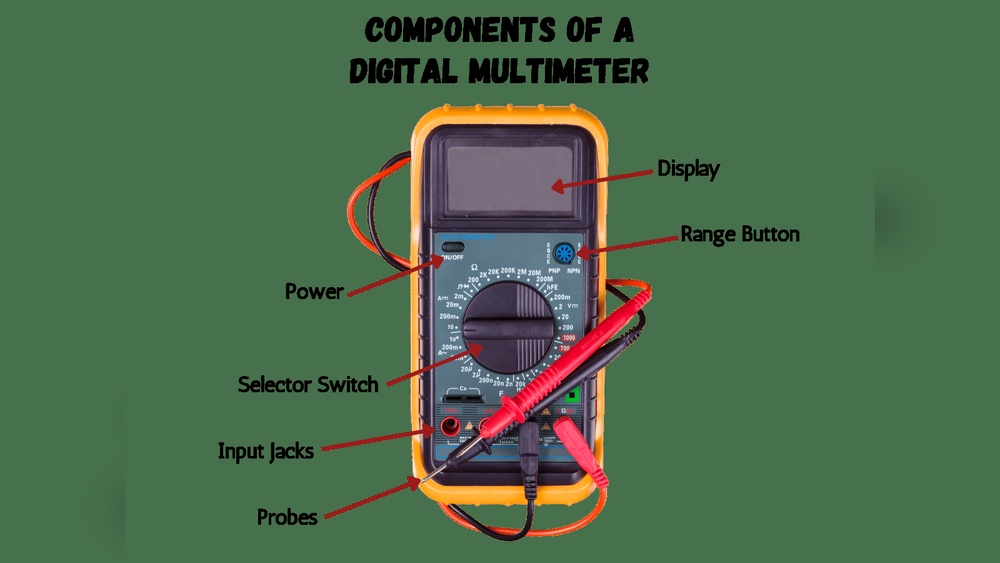
Digital multimeters have become indispensable tools in electronics, electrical work, and laboratory settings. Whether you are a hobbyist, a student, or a seasoned engineer, understanding the basic external features of a digital multimeter is crucial for safe and accurate measurements.
While the internal circuitry determines its operation, the external features are what you interact with daily, impacting usability, efficiency, and even safety. This article offers a comprehensive, beginner-friendly yet advanced guide to the main external components of digital multimeters, helping you master their function and select the right device for your needs.
Over the years, digital multimeters have evolved, integrating more functions and greater precision. However, the fundamental features remain consistent. By focusing on these, you can quickly assess the quality and suitability of any multimeter. In my experience, knowing what each knob, port, or display does not only enhances your measurement accuracy but also prevents costly mistakes and equipment damage.
Let’s break down every major external element, compare leading models, and share expert tips, ensuring you get the most from your multimeter, whether you’re just starting or seeking advanced techniques.
Key Takeaways
- Digital multimeters feature standardized external parts including display, control buttons, rotary selector, input jacks, and probes.
- Choosing the right multimeter involves understanding the function and quality of each external feature.
- Safety components and design can vary significantly between entry-level and professional models.
- Real-world examples highlight how external features impact measurement results and user experience.
- Advanced suggestions help you optimize usage, care, and selection of multimeters for specific tasks.
The Display: Window To Measurement
The display is arguably the most critical external feature of a digital multimeter. It’s where all measurement results, settings, and error messages are shown. Understanding its function and variations is essential for both beginners and professionals.
Lcd Vs. Led Displays
Most modern multimeters use LCD displays for their clarity and low power consumption. Some specialized models use LED displays for visibility in dim environments.
| Feature | LCD Display | LED Display |
|---|---|---|
| Visibility | High in bright light | High in low light |
| Power Consumption | Low | Higher |
| Resolution | Commonly 3-1/2 or 4 digits | Limited |
| Use Case | Most handheld DMMs | Bench meters, industrial |
Digits And Resolution
Multimeter displays are rated by their digit count, often 3½, 4, or 4½ digits. This determines the maximum number that can be shown. For example, a 3½ digit display can show values up to 1999, making it suitable for most household tasks. Higher digit counts offer greater precision, crucial for laboratory and industrial use.
Additional Display Features
Advanced displays may include:
- Backlight: Illuminates the screen for low-light environments.
- Bar graph: Provides an analog-style representation of readings.
- Error indicators: Alerts for overloads, incorrect settings, or probe misplacement.
- Symbols and units: Clarifies measurement type (V, Ω, A), polarity, and function.
Pro Tip: When selecting a multimeter, prioritize models with a clear, backlit display if you work in varied lighting conditions.

Credit: www.amazon.com
Control Interface: Navigating Functions
The control interface consists of buttons, rotary switches, and sometimes touchpads that let you select measurement modes, ranges, and other settings. Mastering these controls is fundamental for accurate readings and efficient workflow.
Rotary Selector Switch
The rotary selector switch is the main control for switching between measurement modes, voltage, current, resistance, continuity, and more. It’s usually centrally located and marked with clear icons or text.
- Clicks or stops: Each position corresponds to a specific function.
- Auto-ranging vs. manual ranging: Some switches allow you to select ranges manually, while auto-ranging models streamline the process.
Function Buttons
Additional function buttons provide access to:
- Hold: Freezes the current reading for later reference.
- Min/Max: Captures minimum and maximum values during measurement.
- Range: Switches between auto and manual range.
- Select: Cycles through secondary modes (e.g., AC/DC, capacitance, frequency).
Example: On the popular Fluke 117, the rotary switch allows fast selection of AC/DC voltage, resistance, and continuity, while dedicated buttons streamline data hold and range selection.
Advanced Touch Controls
Higher-end models may feature capacitive touch controls or soft keys for navigating menus and settings. These enhance versatility but require familiarity with the interface.
Warning: Always set the rotary switch to the correct function before connecting probes, as incorrect settings can damage the multimeter or the circuit.
Input Terminals And Probes: The Connection Points
Input terminals (also known as jacks) and probes are the physical connection points between the multimeter and the circuit under test. Their design, labeling, and quality directly affect safety and measurement accuracy.
Types Of Input Terminals
Most digital multimeters have three or four input terminals:
- COM (Common/Ground): Black probe connects here; serves as reference point.
- VΩmA: Red probe connects for measuring voltage, resistance, or low current.
- 10A/20A: Dedicated for high current measurements; often fused for safety.
- Special terminals: Some meters add terminals for temperature, capacitance, or frequency.
| Terminal | Function | Safety Feature |
|---|---|---|
| COM | Reference/ground | None |
| VΩmA | Voltage, resistance, milliamp | Fuse, markings |
| 10A | High current | Heavy fuse, warning labels |
Probe Types And Quality
Probes are often overlooked but critically important. Basic probes consist of:
- Insulated wires: Provide safe, flexible connections.
- Metal tips: Allow precise contact with test points.
- Banana plugs: Connect securely to the multimeter terminals.
Advanced probes may include:
- Gold-plated tips: Resist corrosion for long-term accuracy.
- Temperature sensors: For thermocouple measurements.
- Clip leads: For hands-free testing.
Example: The UNI-T UT61E includes standard probes but also offers optional alligator clips and temperature probes for expanded functionality.
Probe Storage And Accessories
Some multimeters feature built-in probe holders or clips for convenient storage. Accessories like carrying cases, magnetic hangers, and extension leads enhance usability, especially in fieldwork.
Pro Tip: Always inspect probe insulation and tips before use. Damaged probes can lead to incorrect readings or electric shock.

Credit: www.fluke.com
Safety Features: Protection And Compliance
Safety is paramount when using a digital multimeter. External safety features are designed to prevent accidents, protect users, and ensure compliance with international standards.
Input Protection And Fusing
Quality multimeters include:
- Fused current inputs: Prevent damage from overloads.
- Overvoltage protection: Shields internal circuitry from voltage spikes.
- Isolation barriers: Separate high-voltage and low-voltage sections.
The Fluke 87V features robust fusing and overvoltage protection, making it suitable for industrial environments.
Cat Ratings And Markings
Multimeters are rated by CAT (Category) standards:
- CAT I: For electronics (low voltage).
- CAT II: For household appliances.
- CAT III: For distribution panels.
- CAT IV: For outdoor utility connections.
These ratings are marked externally near the input terminals. Always choose a multimeter with a CAT rating appropriate for your application.
Non-contact Voltage Detection
Some advanced multimeters include a non-contact voltage detector (NCVD) externally, allowing you to check for live wires without making contact. This is often a small sensor or LED indicator.
Safety Labels And Instructions
External casing may feature:
- Warning labels: Highlight risks and safe operating ranges.
- Instructional diagrams: Aid in probe placement and function selection.
Example: The Klein Tools MM600 displays clear CAT ratings and fuse replacement instructions on the back panel.
Warning: Never use a multimeter rated below the voltage or current of the circuit you’re testing. Doing so risks personal injury and equipment failure.
Physical Design And Ergonomics
The physical design and ergonomics of a digital multimeter influence ease of use, portability, and durability. These features cater to both beginners and professionals needing comfort and reliability during extended sessions.
Size And Weight
Multimeters range from compact handheld models to larger bench units. Handheld multimeters typically weigh between 200, 500 grams, making them easy to carry.
- Compact models: Ideal for fieldwork, fit in pockets or tool belts.
- Bench models: Offer greater stability and precision but are less portable.
Case Material And Build Quality
Cases are generally made from:
- ABS plastic: Durable and lightweight.
- Rubber overmolding: Provides grip and drop protection.
Premium models may use reinforced plastics or IP-rated housings for water and dust resistance.
Stand And Hanger Features
Many multimeters include:
- Kickstand: Allows hands-free operation on a workbench.
- Magnetic hanger: Attaches to metal surfaces for convenient viewing.
- Belt clips: Enhance portability.
Example: The Amprobe AM-530 comes with a sturdy kickstand and rubberized corners for shock absorption.
Display Angle And Visibility
Ergonomic design ensures the display is angled for easy reading, even when placed flat or standing. Advanced models may offer adjustable stands or rotatable displays.
Pro Tip: When working in tight spaces, choose a multimeter with a slim profile and magnetic hanger for maximum flexibility.
Real-world Usage Examples And Case Studies
Understanding external features in theory is valuable, but seeing how they impact real-world usage brings clarity. Here are three concrete examples:
Example 1: Student Laboratory Use
A university electronics lab employs the Extech EX330 for student experiments. Its large, backlit display, clear rotary selector, and robust input terminals simplify learning. Students can easily read measurements and switch functions without confusion. Probe storage slots prevent loss and clutter.
Example 2: Professional Electrician Fieldwork
An electrician uses the Fluke 117 for troubleshooting household wiring. The CAT III rating, fused current input, and non-contact voltage detector provide essential safety. The ergonomic case and magnetic hanger allow one-handed operation, freeing the other hand for tools.
Example 3: Industrial Maintenance
In an industrial plant, maintenance staff rely on the Klein Tools MM600. Its IP54-rated casing withstands dust and moisture, while the clear display and large rotary selector offer quick access to functions. Safety labels and instructional diagrams reduce errors, even for new hires.
These examples illustrate how external features directly affect workflow, accuracy, and safety. Selecting the right features for your environment and skill level is key to maximizing efficiency.
Comparing Entry-level Vs. Professional Multimeters
Choosing between entry-level and professional multimeters can be challenging. Here’s a data-driven comparison of their external features:
| Feature | Entry-Level (e.g. Crenova MS8233D) | Professional (e.g. Fluke 87V) |
|---|---|---|
| Display | 3½ digit, no backlight | 4½ digit, backlit, bar graph |
| Selector Switch | Manual, basic markings | Smooth, precise, advanced icons |
| Input Terminals | 3, basic labeling | 4, CAT III/IV markings, fused |
| Safety | Minimal fusing, CAT II | Heavy fusing, CAT IV, overvoltage protection |
| Ergonomics | Plastic case, no stand | Rubber overmold, kickstand, magnetic hanger |
Entry-level models are ideal for beginners and light tasks, while professional models offer enhanced safety, durability, and versatility for demanding environments.
Advanced Suggestions For Effective Use And Selection
Beyond basic understanding, advanced users benefit from optimizing their multimeter’s external features and adopting best practices.
Customizing Accessories
- Upgrade probes to gold-plated tips for improved accuracy.
- Use alligator clips or hook probes for hands-free measurements.
- Purchase carrying cases with foam inserts to protect the device.
Maintenance And Care
Regularly inspect:
- Probe insulation: Look for cracks or wear.
- Input terminals: Clean with contact cleaner to prevent oxidation.
- Rotary switch: Turn gently; avoid forcing between positions.
Store your multimeter in a dry, dust-free environment. Replace batteries before they run low to prevent leakage.
Reading The Display Accurately
Advanced users can utilize:
- Bar graph feature: Detect rapid changes in signal.
- Min/Max recording: Monitor fluctuating measurements.
- Error indicators: Respond promptly to overload or misplacement warnings.
Selecting Based On Application
Match your multimeter’s external features to your primary tasks:
- For electronics: Choose models with fine-tipped probes and high resolution displays.
- For industrial: Prioritize IP-rated cases, robust input protection, and CAT IV ratings.
Example: When I tested the Fluke 87V in a noisy factory, its bar graph feature allowed quick detection of transient voltages, something standard displays would miss.
Professional Calibration
Advanced users should have their multimeter professionally calibrated annually. This ensures the external controls and display reflect accurate internal operation.
Pro Tip: Consult your multimeter’s manual or manufacturer site for accessory compatibility and recommended maintenance schedules. For authoritative calibration advice, visit the Wikipedia Calibration Page.
Frequently Asked Questions
What Is The Difference Between A Digital And Analog Multimeter In Terms Of External Features?
Digital multimeters feature LCD or LED displays, multiple function buttons, and often have more input terminals with clear labeling. Analog multimeters use a needle and scale, with simpler rotary switches and fewer safety markings. Digital models offer greater precision and ergonomic design.
How Do I Safely Connect Probes To A Digital Multimeter?
Always insert the black probe into the COM terminal and the red probe into the appropriate input for your measurement (VΩmA or 10A). Check for visible damage on the probes and ensure the rotary switch is set correctly before connecting to the circuit. Avoid touching probe tips when measuring live circuits.
Can I Replace Or Upgrade The Probes That Come With My Multimeter?
Yes, most digital multimeters use standard banana plug connectors, allowing you to upgrade to specialized probes, such as gold-plated tips, alligator clips, or temperature sensors. Always use probes rated for the voltage and current you intend to measure.
What Should I Do If My Multimeter’s Display Is Unreadable Or Malfunctioning?
First, check the battery level and replace if necessary. Clean the display surface and ensure the backlight is functioning. If the issue persists, inspect internal connections or consult the manufacturer’s support site for troubleshooting. Avoid using the device until the display is fully operational.
Are There Multimeters Designed Specifically For Automotive Or Hvac Work?
Yes, certain models, such as the Fluke 88V for automotive and the Fieldpiece HS36 for HVAC, feature specialized external functions like temperature probes, RPM measurement, and rugged cases. These models often include unique labeling and input terminals tailored to their application. For more details, refer to Fluke’s official product page.
Mastering the basic external features of a digital multimeter empowers you to work more safely, efficiently, and accurately. Whether you’re a beginner getting acquainted with your first meter or a seasoned professional seeking advanced tips, understanding these features unlocks the multimeter’s full potential.
By combining ergonomic design, safety compliance, and proper maintenance, you ensure reliable measurements and long-lasting performance. With this guide as your reference, you can confidently select, use, and care for any digital multimeter, making it an essential partner in your electronics journey.