
A multimeter is one of the most versatile and essential tools in any electrical toolkit, bridging the gap between simple DIY projects and advanced troubleshooting. Among the most recognized and widely used brands, Craftsman multimeters stand out for their accuracy, durability, and user-friendly design. Whether you are a hobbyist, homeowner, or a professional electrician, learning how to use a Craftsman multimeter can empower you to diagnose, maintain, and repair a vast array of electrical and electronic devices.
Mastering a multimeter may seem daunting at first, especially with the array of buttons, dials, and symbols. However, with a clear, step-by-step approach, even beginners can confidently use the device to measure voltage, current, resistance, and more. This guide provides both foundational knowledge and advanced techniques, equipping you with actionable skills and expert insights.
By the end, you’ll be able to safely use your Craftsman multimeter for everyday tasks and complex electrical troubleshooting.
Key Takeaways
- Craftsman multimeters are highly reliable tools for measuring voltage, current, resistance, and continuity in electrical circuits.
- Learning to use each function safely and accurately is crucial for both beginners and experienced users.
- Regular calibration and proper care extend the lifespan and accuracy of your multimeter.
- Understanding advanced features like data hold, min/max recording, and auto-ranging can improve troubleshooting efficiency.
- Real-world examples and expert tips will help you avoid common mistakes and get professional-quality results.

Credit: www.amazon.com
Understanding The Craftsman Multimeter: Components And Features
A Craftsman multimeter typically combines the functions of a voltmeter, ammeter, and ohmmeter, along with several additional features. To use the tool effectively, it’s essential to understand its main components and the role each plays.
Display And Dial Overview
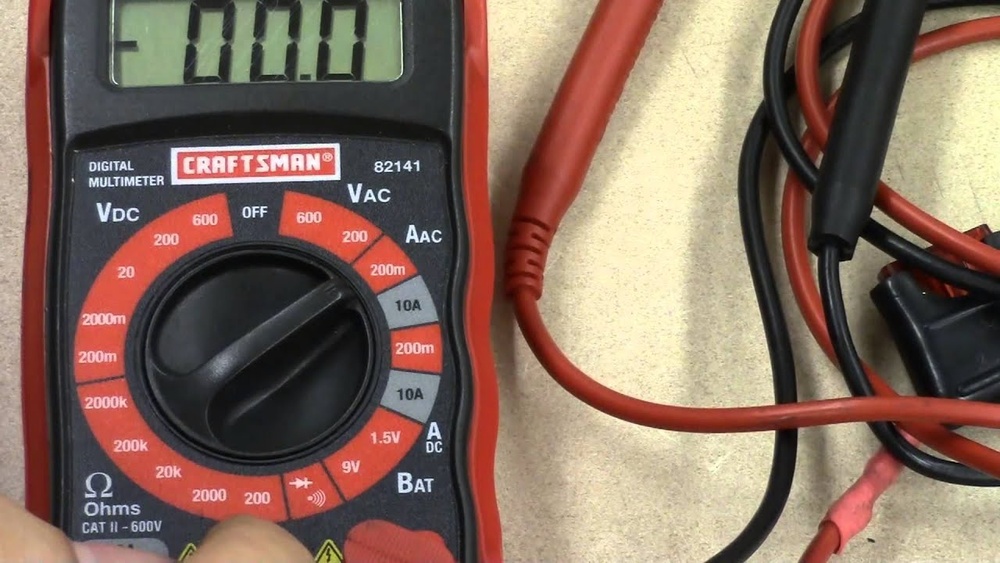
The digital display is the most prominent feature, showing measurement readings in real time. Most Craftsman models feature a large, backlit LCD for easy viewing in various lighting conditions. The rotary dial, or selector switch, allows users to choose between measurement modes, such as AC/DC voltage, current, resistance, and sometimes more specialized settings like diode or continuity testing.
Input Terminals
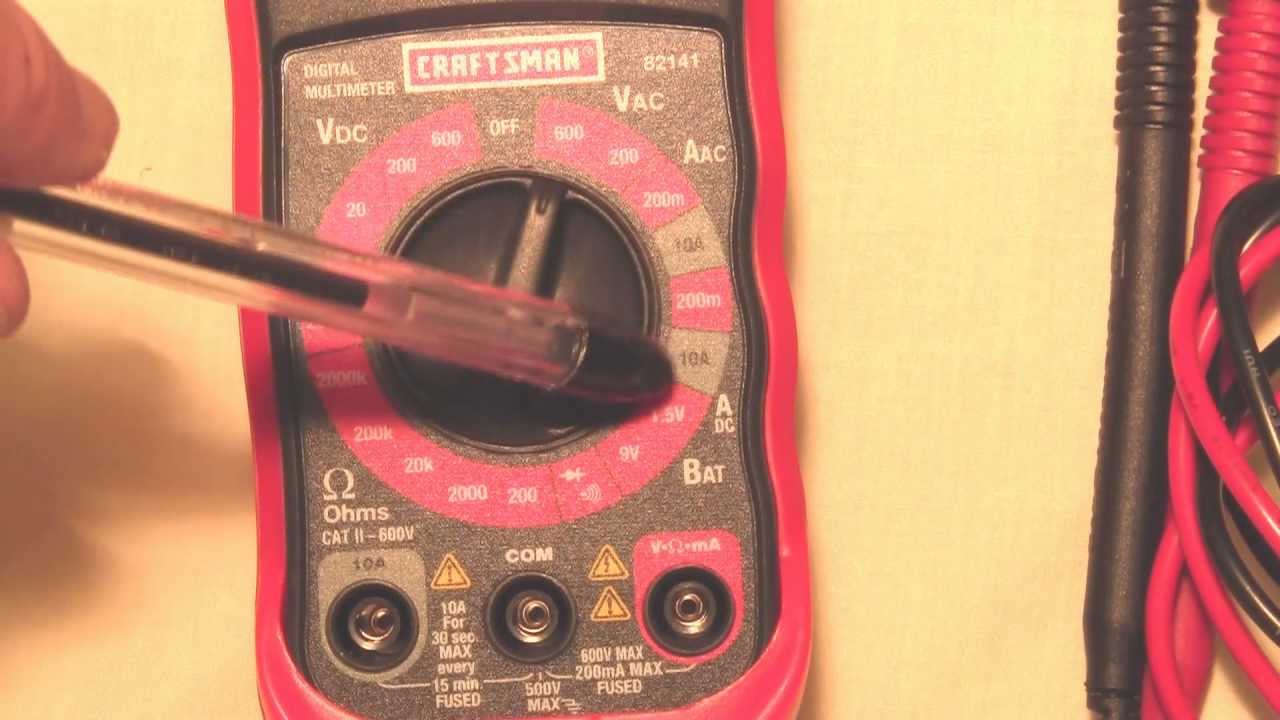
Typically, Craftsman multimeters include three input jacks:
- COM (Common): The black lead plugs in here; it’s the reference point for all measurements.
- VΩmA: The red lead plugs in for most measurements (voltage, resistance, continuity, and low-current measurements).
- 10A/20A: A separate port for high current measurements, protecting the device from overload.
Probes And Accessories
Test leads are flexible, insulated wires with metal probes. High-quality leads ensure accurate readings and user safety. Some models come with additional accessories like alligator clips or temperature probes.
Specialized Features
Advanced models may include:
- Auto-ranging: Automatically selects the correct range for the measurement.
- Data hold: Freezes the displayed reading for easier recording.
- Backlit display: Essential for low-light environments.
- Min/Max recording: Captures the highest and lowest readings over time.
Example: Unboxing And Initial Setup
When I first used a Craftsman 82141 multimeter, the clear labeling of ports and the intuitive dial made the setup straightforward, even as a beginner. The included quick-start guide provided step-by-step instructions, making the initial experience both informative and confidence-boosting.

Credit: www.youtube.com
Basic Multimeter Functions: Voltage, Current, And Resistance
Understanding how to measure voltage, current, and resistance is fundamental. Each function serves a distinct purpose and requires specific safety precautions.
Measuring Voltage (ac/dc)
Voltage is the potential difference between two points in a circuit. Craftsman multimeters can measure both alternating current (AC) and direct current (DC) voltages.
Steps:
- Set the dial to the appropriate voltage symbol (V~ for AC, V⎓ for DC).
- Insert the black probe into the COM port and the red probe into the VΩmA port.
- Touch the probes to the circuit points being tested (black to ground or negative, red to positive).
- Read the value displayed.
Pro Tip: Always start with the highest voltage range, then step down for more precise readings to avoid damaging the meter or blowing a fuse.
Measuring Current (amperage)
Current measurement is vital for diagnosing issues like overdrawn circuits or battery drain. Craftsman multimeters typically offer two current measurement modes: low-current (mA) and high-current (10A or 20A).
Steps:
- Turn off power and break the circuit where you will measure current.
- Set the dial to the correct current range (A⎓ for DC, A~ for AC).
- Move the red probe to the correct current port (VΩmA or 10A/20A).
- Connect probes in series with the circuit.
- Restore power and read the measurement.
Warning: Never attempt to measure current by touching the probes across a voltage source; this can damage the meter and create safety hazards.
Measuring Resistance
Resistance testing helps identify faulty wiring, damaged components, or improper connections.
Steps:
- Power off the circuit.
- Set the dial to the Ω symbol.
- Place probes across the component or wire.
- Read the resistance value.
Example: When troubleshooting a non-functioning lamp, I measured the resistance across the bulb’s terminals. A very high reading indicated a blown filament, confirming the need for replacement.
Continuity Testing
Continuity checks whether a circuit is complete. Craftsman multimeters emit a beep if the circuit is closed (resistance is very low).
Steps:
- Set the dial to the continuity symbol (often a soundwave icon).
- Touch probes to the ends of the circuit.
- Listen for the beep indicating continuity.
This feature is especially useful for testing fuses, wires, and switches.
Data Table: Basic Measurement Functions
| Function | Dial Symbol | Typical Range | Probe Ports | Use Case Example |
|---|---|---|---|---|
| Voltage (AC/DC) | V~ / V⎓ | 200 mV, 600 V | COM & VΩmA | Wall socket, battery check |
| Current (AC/DC) | A~ / A⎓ | 200 µA, 10A/20A | COM & 10A/20A or VΩmA | Car fuse, appliance draw |
| Resistance | Ω | 0.1 Ω, 20 MΩ | COM & VΩmA | Wire, resistor, bulb |
| Continuity | Soundwave/diode | 0, 50 Ω (beep) | COM & VΩmA | Wire, fuse, switch |
Advanced Multimeter Techniques And Features
While basic measurements cover most day-to-day needs, understanding advanced features can elevate your troubleshooting and diagnostic capabilities. Craftsman multimeters, especially mid- to high-end models, offer several enhancements.
Auto-ranging Vs Manual Ranging
Auto-ranging automatically selects the optimal measurement range, simplifying the process and preventing overload. Manual ranging requires the user to set the expected range, which is beneficial for precise tasks or when working with known values.
Comparison Table: Auto-Ranging vs Manual Ranging
| Feature | Auto-Ranging | Manual Ranging |
|---|---|---|
| User Input | Minimal | Required |
| Speed | Faster for beginners | Faster for experts |
| Risk of Overload | Lower | Higher if range is set too low |
| Precision Control | Less customizable | High |
Pro Tip: For beginners, auto-ranging minimizes mistakes. Advanced users may prefer manual for tighter control and faster readings when working with known values.
Using Data Hold, Min/max, And Backlight Functions
- Data Hold freezes the current reading, allowing you to note the value even after removing the probes.
- Min/Max Recording tracks the highest and lowest values during testing, especially helpful for monitoring voltage dips or current surges.
- Backlit Display ensures visibility in low-light environments, such as attics or vehicle engine bays.
Diode And Transistor Testing
Some Craftsman models feature settings specifically for testing diodes and transistors. These functions help verify that these components are not shorted or open.
Steps:
- Set dial to diode symbol.
- Place probes on the diode’s terminals.
- A typical forward voltage drop for silicon diodes is 0.6, 0.7V; a reading outside this range may indicate a faulty component.
Measuring Frequency And Capacitance
Advanced models may allow for frequency (Hz) and capacitance (F) measurements, valuable in electronics repair and design.
- Frequency: Used to verify the oscillation rate of AC signals, such as those from inverters or signal generators.
- Capacitance: Useful for diagnosing faulty capacitors in appliances or circuit boards.
Example: Diagnosing A Faulty Appliance
A user noticed their washing machine occasionally failed to start. By measuring voltage at the control board and using min/max recording, a voltage drop during startup was detected. Further continuity testing revealed a failing door switch, which was then replaced, demonstrating the value of advanced features for efficient troubleshooting.
Credit: www.youtube.com
Safety Guidelines And Best Practices
Electrical testing carries inherent risks. Craftsman multimeters are designed with safety in mind, but following best practices is essential for both beginners and experts.
Personal Safety Precautions
- Always start with the highest range when unsure of the measurement value.
- Never touch exposed metal on the probes during measurement.
- Inspect test leads for cracks or damage before every use.
- Use insulated gloves and safety glasses when working with high-voltage circuits.
Device Protection
- Check fuse rating in the multimeter before measuring current; replace blown fuses only with the correct type.
- Disconnect power before measuring resistance or continuity to protect the multimeter.
- Avoid moisture: Never use a multimeter in wet environments.
Proper Storage And Maintenance
- Store the multimeter in a dry, dust-free location.
- Remove the batteries if the tool will be unused for extended periods.
- Periodically calibrate the device according to the manufacturer’s instructions.
Warning: Common Mistakes To Avoid
- Measuring voltage with the dial set to current can damage the meter and cause injury.
- Attempting to test current in parallel across a voltage source creates a short circuit risk.
- Using incorrect probe ports can result in inaccurate readings or blown fuses.
Step-by-step Guide: Performing Common Electrical Tests
To bridge theory with practice, here’s a sequence of real-world tasks that demonstrate key multimeter applications, suitable for both beginners and advanced users.
Testing Household Batteries
- Set dial to DC voltage (V⎓).
- Insert probes into COM and VΩmA ports.
- Touch black probe to battery’s negative terminal, red to positive.
- Compare the reading to the battery’s rated voltage (e.g., 1.5V for AA).
Example: A reading below 1.2V for a 1.5V AA battery typically means it’s time for replacement.
Checking Fuses In Appliances
- Power off and unplug the appliance.
- Remove the fuse.
- Set dial to continuity mode.
- Touch probes to each end of the fuse.
- Listen for the beep; no beep indicates a blown fuse.
Diagnosing Automotive Electrical Issues
- Testing Car Battery Voltage:
- Set dial to DC voltage.
- Place black probe on negative terminal, red on positive.
- A healthy car battery should read 12.6V or higher.
- Checking Alternator Output:
- Start the engine.
- Measure voltage across the battery terminals.
- A reading of 13.8, 14.4V indicates proper charging.
Verifying Wall Outlet Voltage
- Set dial to AC voltage (V~).
- Insert probes into the two vertical slots of the outlet.
- Standard US outlets should read about 120V.
Warning: Use one hand only when measuring high voltage to reduce shock risk.
Example: Diagnosing A Non-functioning Lamp
A user’s lamp would not turn on. Using a Craftsman multimeter:
- Checked bulb continuity, no beep, bulb was burnt out.
- Verified socket voltage, 120V present, so wiring was intact.
- Confirmed lamp switch continuity, switch was faulty and replaced.
Table: Common Electrical Tests And Expected Readings
| Test | Dial Setting | Expected Result | Action If Out of Range |
|---|---|---|---|
| AA Battery | DC V | 1.5V | Replace if <1.2V |
| Car Battery | DC V | 12.6V+ | Charge or replace |
| Wall Outlet | AC V | 120V | Check wiring |
| Fuse Continuity | Continuity | Beep | Replace fuse |
Calibration, Troubleshooting, And Maintenance
Keeping your Craftsman multimeter in top condition ensures measurement accuracy and extends its lifespan. Regular calibration and timely troubleshooting are key.
Calibration Procedures
- Craftsman recommends calibration at least once a year, or after heavy use.
- Calibration typically involves comparing the multimeter’s readings to a known standard (such as a reference voltage or resistance).
- Some advanced models can be calibrated at home; others require professional service.
Example: After a year of frequent use, my Craftsman 82141 began reading slightly low on voltage tests. Sending it for calibration restored its accuracy, highlighting the importance of regular maintenance.
Troubleshooting Common Problems
- Display shows “OL” (overload): Measurement exceeds selected range. Move to a higher range.
- No reading or erratic numbers: Check battery, replace if low. Inspect leads for damage.
- Fuse blown: Replace with the specified type; never bypass the fuse.
Battery Replacement And Fuse Access
- Most models have a battery compartment secured by screws.
- Use only recommended battery types (usually 9V or AA).
- Fuses are located inside the back panel; replace only with same rating and type.
Storage And Environmental Considerations
- Avoid exposing the multimeter to extreme temperatures or humidity.
- Store with probes detached to prevent lead wear.
- If not used for months, remove batteries to prevent leakage.
Advanced Applications: Beyond The Basics
For those seeking to leverage their Craftsman multimeter for complex diagnostics, several advanced applications can help you get the most from your tool.
Measuring Small Currents In Electronics Projects
- Use the lowest current range for delicate electronics.
- Always connect in series and double-check probe placement.
Testing Semiconductor Components
- Use the diode setting to check for forward voltage drop in diodes and LEDs.
- For transistors, some models offer an hFE socket for direct measurement.
Ac Line Frequency And Signal Tracing
- Advanced models can measure AC frequency, helpful for troubleshooting generators and uninterruptible power supplies.
- For audio or radio projects, use the frequency setting to verify oscillator circuits.
Data Logging And Pc Connectivity
Some higher-end Craftsman multimeters allow data logging or USB connectivity for real-time monitoring and analysis.
Example: In a solar power project, I used a multimeter with data logging to monitor panel output throughout the day, identifying the best placement for maximum efficiency.
Working With High Voltage And Three-phase Circuits
Only attempt these tasks if you have advanced training. Always use personal protective equipment and follow OSHA guidelines. Measure one phase at a time and never work alone.
Warning: Incorrect measurements in high-voltage environments can be fatal. Consult a licensed electrician for advanced diagnostics.
Frequently Asked Questions
What Is The Difference Between A Craftsman Analog And Digital Multimeter?
Analog multimeters use a moving needle to display readings, offering continuous real-time response, which can be beneficial for observing trends or fluctuations. Digital multimeters (DMMs) like most Craftsman models use an LCD to display precise numeric values, are easier for beginners, and include advanced features such as auto-ranging and data hold. Digital models are generally more accurate and user-friendly.
Can I Measure Temperature With A Craftsman Multimeter?
Some Craftsman multimeter models include a temperature measurement function, requiring a thermocouple probe (usually provided with the device). To use, connect the probe to the dedicated input, set the dial to the temperature symbol (°C/°F), and place the probe on or near the object.
Always refer to your model’s manual for compatible accessories and procedures.
How Do I Ensure My Readings Are Accurate Over Time?
To maintain accuracy, calibrate your multimeter annually, use only high-quality test leads, and replace the batteries when the low-battery indicator appears. Store the device in a protective case and avoid exposing it to moisture or extreme temperatures. Regularly check for firmware updates or service bulletins on the Craftsman official website.
What Should I Do If My Craftsman Multimeter Gets Wet?
Immediately power off the device, remove the batteries, and allow the multimeter to dry completely in a warm, well-ventilated area. Do not use the multimeter until you are certain it is fully dry inside and out. If moisture remains or if the device was exposed to saltwater, consider having it inspected by a professional for internal corrosion.
Are Craftsman Multimeters Safe For Use On Live Circuits?
Yes, provided you follow all safety guidelines. Craftsman multimeters are designed with safety in mind, including insulated cases and fused inputs. Always use one hand when testing live circuits, stand on an insulated surface, and use probes with intact insulation. For more on electrical safety standards, consult the Wikipedia multimeter article.
Mastering your Craftsman multimeter opens up a world of diagnostic and troubleshooting possibilities, from simple household fixes to advanced electronics projects. With the right techniques and safety precautions, you can approach every measurement with confidence and precision. Whether you’re just starting out or advancing your skills, regular practice and maintenance will ensure your multimeter remains a reliable partner for years to come.