
Accurately measuring electrical current is a fundamental skill for anyone working with electronics, from hobbyists and students to professional engineers and technicians. Whether you’re troubleshooting a household appliance, assessing battery drain in a circuit, or diagnosing automotive electrical issues, knowing how to use a multimeter to check current is essential.
Yet, many beginners feel intimidated by the process, while advanced users often overlook critical safety steps and optimization techniques.
This comprehensive guide demystifies current measurement with a multimeter. We break down every step, from selecting the right tool and understanding measurement principles, to advanced troubleshooting methods and real-world examples. By combining practical advice, clear explanations, and expert-level insights, you’ll gain the confidence and competence to measure current safely and accurately in virtually any scenario.
Key Takeaways
- Multimeters measure current by connecting in series with the circuit; never in parallel.
- Safety precautions are critical, always check the meter rating and fuse before measuring high current.
- Choosing the right multimeter and range prevents damage and increases accuracy.
- Advanced users can leverage features like clamp adapters and logging functions for complex troubleshooting.
- Real-world examples and data tables help illustrate best practices and common mistakes.
- Beginner tips and advanced suggestions are integrated for a well-rounded learning experience.
Understanding Electrical Current And Multimeters
Before diving into measurement techniques, it’s important to grasp what current is and how multimeters function in this context.
What Is Electrical Current?
Electrical current is the flow of electrons through a conductor, typically measured in amperes (A). In direct current (DC) circuits, electrons flow in one direction, while in alternating current (AC) circuits, the direction reverses periodically. Current is a crucial parameter, as it determines how much energy is delivered to devices and components.
- DC current: Found in batteries, electronics, and automotive systems.
- AC current: Used in household power outlets and industrial settings.
Types Of Multimeters
Multimeters are versatile tools capable of measuring voltage, resistance, and current. There are two main types:
- Analog multimeter: Uses a needle to display readings; less common today.
- Digital multimeter (DMM): Shows values on an LCD screen; preferred for precision and ease of use.
Some advanced multimeters include features like auto-ranging, True RMS (root mean square) measurement, and data logging. Choosing the right multimeter depends on your application and budget.
| Feature | Analog Multimeter | Digital Multimeter | Advanced DMM |
|---|---|---|---|
| Display | Needle/Scale | LCD | LCD/Graphical |
| Accuracy | Moderate | High | Very High |
| Auto-ranging | No | Sometimes | Yes |
| True RMS | No | No | Yes |
| Data Logging | No | No | Yes |
| Price Range | $15-40 | $20-100 | $100-500+ |
How Multimeters Measure Current
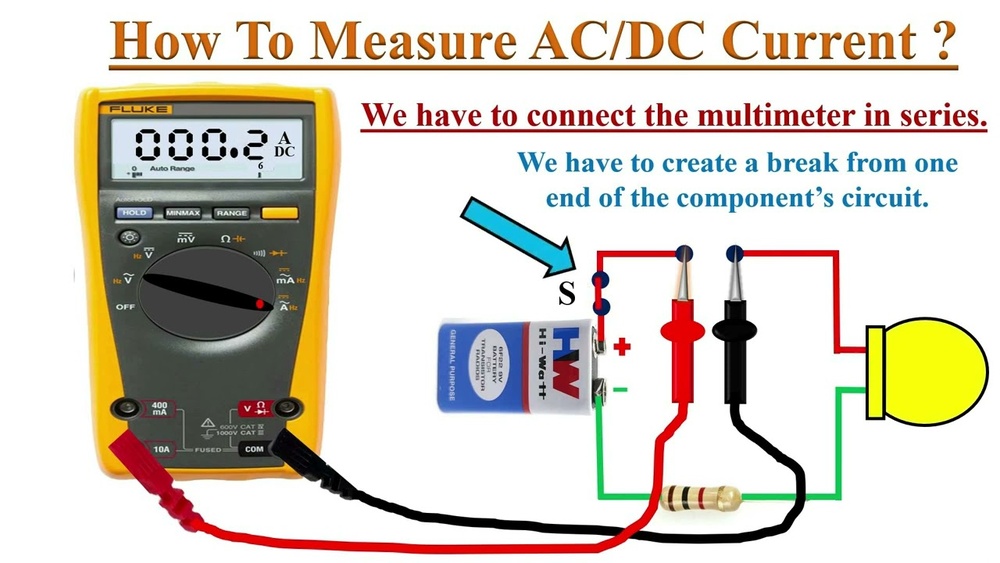
To measure current, a multimeter must be connected in series with the circuit. This allows the meter to count the electrons passing through, rather than simply detecting voltage differences. Attempting to measure current in parallel can damage your meter and the circuit.
Pro Tip: Always double-check your circuit diagram before connecting the meter in series, especially in complex or multi-branch circuits.

Credit: electropeak.com
Preparing To Measure Current: Tools, Setup, And Safety
Preparation is essential for accurate and safe current measurement. This section guides you through tool selection, circuit setup, and critical safety checks.
Choosing The Right Multimeter
Select a multimeter based on:
- Maximum current rating: Ensure it can handle the expected current without blowing the internal fuse.
- Range selection: Auto-ranging DMMs simplify the process, while manual meters require you to select the appropriate range.
- Accuracy: For sensitive electronics, higher accuracy (often quoted as ±% of reading) is important.
- Features: Advanced features like clamp adapters, logging, and True RMS are valuable for professionals.
Example: For automotive troubleshooting, a multimeter with a 10A rating and fast fuse is recommended.
Gathering Required Accessories
You may need:
- Test leads: Rated for the current and voltage of your circuit.
- Alligator clips: Useful for hands-free measurements.
- Clamp adapter: For non-invasive current measurement, especially on AC mains or large wires.
Safety Precautions
Current measurement can be hazardous, especially with high-current circuits.
- Check meter fuses: Always inspect the fuse status in your multimeter before measuring. A blown fuse can give false readings or expose you to risk.
- Inspect test leads: Look for cracks or exposed wires.
- Wear safety gear: For high-voltage or industrial circuits, wear insulated gloves and eye protection.
- De-energize circuits: If possible, turn off power before connecting the meter; re-energize afterward.
Warning: Never attempt to measure current on circuits exceeding your meter’s rating. Consult the manual and, for complex tasks, a qualified electrician.
Setting Up The Circuit
- Identify the path: Determine where you want to measure current, usually across a device or branch.
- Break the circuit: Disconnect one side of the component or wire where you’ll insert the meter.
- Connect meter leads: Plug the red lead into the current (A or mA) port, black lead into the COM port.
Example: When testing LED current draw, disconnect one wire from the LED, then connect the meter leads to each side.

Credit: www.build-electronic-circuits.com
Step-by-step Guide: Measuring Current With A Multimeter
This beginner-to-advanced walkthrough covers every step, with tips for optimizing accuracy and avoiding common pitfalls.
Step 1: Insert Test Leads And Select Current Mode
- Plug the red lead into the current port (often labeled ‘A’ or ‘mA’).
- Plug the black lead into ‘COM’.
- Turn the dial to the correct current measurement setting, usually ‘A’ for amperes (DC or AC as needed).
Pro Tip: For low-current circuits, use the ‘mA’ (milliampere) setting for greater resolution.
Step 2: Break The Circuit And Connect The Meter In Series
- Identify the section where you want to measure current.
- Disconnect one side of the wire/component.
- Connect the meter leads so the current flows through the meter.
Example: In my experience, measuring battery drain in a microcontroller project required breaking the positive wire and inserting the meter.
Step 3: Power On And Observe Reading
- Re-energize the circuit.
- Observe the reading on the display.
- If using a manual meter, adjust the range as needed. If the reading is overloaded, switch to a higher range.
Step 4: Record And Interpret Results
- Note the value (e.g., 0.025A = 25mA).
- Compare with expected values from datasheets or circuit design.
- For advanced troubleshooting, repeat measurements at different points or under varying loads.
Step 5: Remove Meter And Restore Circuit
- Turn off power.
- Remove meter leads.
- Reconnect wires/components.
Warning: Leaving the meter connected can disrupt circuit operation or drain batteries.
Common Mistakes And How To Avoid Them
- Connecting in parallel: Always connect in series.
- Exceeding meter rating: Check the expected current before measuring.
- Using wrong port/range: Ensure leads are in correct ports and range is appropriate.

Credit: www.youtube.com
Advanced Techniques: Professional Measurement And Troubleshooting
For experienced users and professionals, advanced techniques can enhance accuracy, safety, and efficiency.
Using Clamp Meters And Adapters
Clamp meters measure current without breaking the circuit. Simply clamp around a wire to read AC or DC current. This is ideal for high-current or industrial applications.
- Advantages: Non-invasive, fast, safe for large wires.
- Limitations: Less accurate for low currents; only works on single conductors.
| Method | Accuracy | Safety | Ease of Use | Best For |
|---|---|---|---|---|
| Direct Series (DMM) | High | Moderate | Intermediate | Small circuits, electronics |
| Clamp Meter | Moderate | High | Easy | High-current, mains |
Measuring Current In Complex Circuits
- Multiple branches: Measure each branch separately.
- High-frequency or pulsed current: Use True RMS meters to account for waveform variations.
- Logging and graphing: Advanced meters can record current over time for analysis.
Minimizing Measurement Error
- Use short leads: Reduces resistance and voltage drop.
- Calibrate meter: Regularly check accuracy against known standards.
- Temperature compensation: For sensitive circuits, account for ambient temperature effects.
Troubleshooting Common Issues
- Unexpected readings: Check for loose connections, blown fuses, or incorrect setup.
- Meter fuse blows: Immediately stop and investigate; high current may have exceeded rating.
- Noise/interference: Shield leads or use filtering functions on advanced meters.
Example: A technician measuring current in a solar inverter found erratic readings due to electrical noise, using shielded leads improved stability.
Real-world Examples And Case Studies
Practical examples illustrate how current measurement is applied in various scenarios.
Example 1: Testing Led Current Draw
A beginner wanted to check the current consumed by a single LED:
- Setup: Break the positive wire and connect the meter in series.
- Result: Reading showed 18mA, matching manufacturer specs.
- Lesson: Proper series connection and range selection ensured accuracy.
Example 2: Diagnosing Automotive Fuse Failure
An advanced user suspected a short circuit in a car:
- Setup: Used a clamp meter around the fuse wire.
- Result: Detected 12A, above fuse rating.
- Solution: Identified and replaced faulty wiring, preventing further damage.
Example 3: Monitoring Battery Drain In Iot Device
A professional monitored current over time to optimize battery life:
- Setup: Connected a logging multimeter in series with the device.
- Result: Recorded current spikes during data transmission.
- Action: Adjusted firmware to reduce peak current, extending battery life.
Example 4: Measuring Current In A Home Appliance
A homeowner checked a toaster’s current draw:
- Setup: Used a clamp meter on the power cord.
- Result: Found 8A, confirming safe operation.
- Tip: Clamp meters simplify household appliance testing.
Comparing Multimeter Models For Current Measurement
Choosing the right multimeter can impact safety, accuracy, and convenience. Below is a comparison of three popular models.
| Model | Max Current | Accuracy | Auto-Ranging | True RMS | Data Logging | Price |
|---|---|---|---|---|---|---|
| Fluke 117 | 10A | ±1.0% | Yes | Yes | No | $200 |
| Extech EX330 | 10A | ±1.5% | Yes | No | No | $70 |
| UNI-T UT61E | 10A | ±1.0% | Yes | Yes | Yes | $120 |
Pro Tip: For frequent current measurement and data analysis, choose a model with logging and True RMS features.
Optimizing Measurement Accuracy And Safety
Both beginners and advanced users benefit from strategies that improve measurement reliability and protect equipment.
Tips For Accurate Measurement
- Select correct range: Start with the highest range, then switch down for precise readings.
- Zero the meter: Some digital meters allow you to offset small errors.
- Avoid external interference: Keep leads away from strong electromagnetic fields.
Safety Best Practices
- Check meter rating: Never exceed the maximum specified current.
- Inspect circuit: Look for shorts or high-resistance connections before measuring.
- Use proper leads: High-current measurements demand thick, insulated leads.
Warning: Always follow manufacturer instructions and consult a professional for industrial or high-voltage circuits.
Advanced Troubleshooting Techniques
- Current profiling: Use logging meters to profile current over time.
- Waveform analysis: For AC circuits, True RMS meters ensure accuracy with complex waveforms.
- Remote monitoring: Wireless meters can transmit readings for hands-free operation.
Example: An engineer used a wireless multimeter to monitor current in a hazardous location, enhancing safety and data collection.
Common Questions And Troubleshooting Scenarios
Even the most experienced users encounter issues. Here are common scenarios and how to address them.
Meter Shows Zero Current
- Possible causes: Incorrect series connection, blown fuse, or circuit not energized.
- Action: Verify connections, check meter fuse, and confirm power is on.
Meter Fuse Blows
- Possible causes: Excessive current or accidental parallel connection.
- Action: Replace fuse, review circuit design, and ensure correct setup.
Erratic Readings
- Possible causes: Electrical noise or loose connections.
- Action: Use shielded leads, tighten connections, and use filtering features.
Low Accuracy
- Possible causes: Wrong range or low-quality meter.
- Action: Switch to proper range, upgrade meter, or calibrate regularly.
No Display
- Possible causes: Dead battery or internal fault.
- Action: Replace battery, check for internal damage, or consult manufacturer.
Frequently Asked Questions
How Do I Safely Measure Current Above 10a?
To measure currents above 10A, use a clamp meter designed for high-current applications. Clamp meters are non-invasive and safer for large wires. Always check the meter’s rating and use leads rated for the expected current. For industrial circuits, consult a qualified electrician to ensure proper safety procedures.
Can I Measure Current Without Breaking The Circuit?
Yes, you can use a clamp meter or clamp adapter to measure current without breaking the circuit. These tools detect the magnetic field generated by current flow, allowing non-invasive measurement. However, they may be less accurate for low-current applications and work best with single conductors rather than cables containing multiple wires.
What Is True Rms, And Why Does It Matter For Current Measurement?
True RMS (Root Mean Square) measures the effective value of AC current, accounting for waveform variations. It’s crucial for circuits with non-sinusoidal or variable loads, such as motors or electronic devices. Meters without True RMS may give inaccurate readings in these situations. Always choose a True RMS meter for complex or high-frequency AC circuits.
How Often Should I Calibrate My Multimeter?
Regular calibration is essential for maintaining accuracy. Professional guidelines recommend annual calibration for most users, but heavy industrial use may require more frequent checks. Calibration should be performed by an accredited laboratory or according to the manufacturer’s instructions. For critical measurements, verify accuracy against known standards before each use.
Why Is My Multimeter Reading Negative Current?
Negative readings typically indicate that current is flowing in the opposite direction relative to the meter’s orientation. Swap the meter leads or reverse the meter position in the circuit to correct this. For advanced troubleshooting, negative readings can help identify reversed polarity or unexpected current paths.
Measuring electrical current with a multimeter is a foundational skill that unlocks deeper understanding and safer troubleshooting of electronic and electrical systems. By following the step-by-step guide, observing safety best practices, and employing advanced techniques when needed, you can confidently assess current in everything from simple circuits to complex industrial installations. Whether you’re a beginner testing your first LED or a professional optimizing battery life in IoT devices, mastering current measurement empowers you to diagnose issues, verify performance, and keep your equipment safe and efficient. For more advanced study, explore resources from Wikipedia and official manufacturer manuals like Fluke.