
A soldering iron is an indispensable tool for electronics enthusiasts, repair technicians, and hobbyists alike. Yet, nothing can be more frustrating than plugging in your trusted soldering iron only to find that it refuses to heat up. This seemingly simple issue can grind your project to a halt, costing precious time and money.
Fortunately, diagnosing and fixing a soldering iron that’s not heating is often within reach, even for beginners.
Understanding the possible causes and solutions can save you from unnecessary replacements and get your soldering station back in action. Whether you’re dealing with a basic pencil iron or a high-end temperature-controlled unit, this comprehensive guide will help you systematically identify the problem and restore your iron’s performance.
Drawing from real-world examples, technical best practices, and data-backed comparisons, we’ll ensure you have all the information needed to troubleshoot and fix a soldering iron that isn’t heating.
Key Takeaways
- Diagnosing a non-heating soldering iron requires checking power sources, cords, switches, heating elements, and temperature controls.
- Common fixes include replacing faulty cords, cleaning oxidized tips, and swapping defective heating elements.
- Proper maintenance significantly reduces failure rates and extends the lifespan of your tool.
- Professional-grade soldering stations often allow for easier part replacement than budget models.
- Safety precautions are essential, always unplug before opening the device or handling internal parts.

Credit: www.youtube.com
Understanding Soldering Iron Functionality
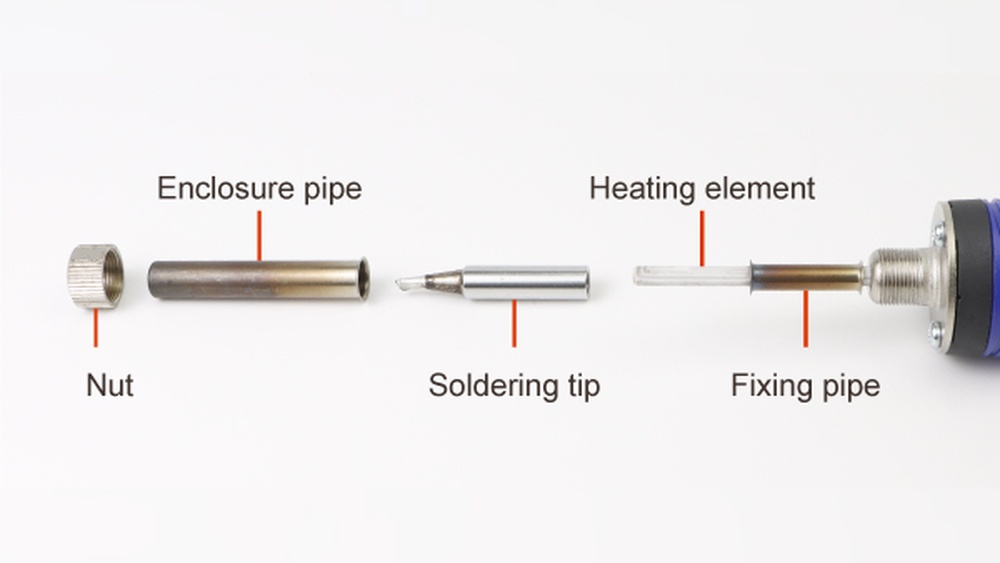
A soldering iron operates by converting electrical energy into heat through a heating element. This heat is transferred to the tip, enabling the melting of solder for joining electronic components. Knowing the basic components and how they interact is crucial for effective troubleshooting.
Key Components Of A Soldering Iron
- Heating Element: Converts electricity to heat; typically made from nichrome wire or ceramic.
- Power Cord and Plug: Supplies AC power from the outlet.
- Switch (if present): Turns the iron on or off.
- Temperature Control: Allows adjustable heat settings on advanced models.
- Tip: The metal end that contacts solder and components.
Types Of Soldering Irons And Their Failure Modes
There are various types of soldering irons, each with unique failure points:
- Basic Pencil Irons: Simple design, usually fail due to cord or element issues.
- Temperature-Controlled Irons: May fail due to sensor, control board, or display faults.
- Soldering Stations: More modular, with replaceable heating elements and tips.
Understanding your iron’s type helps pinpoint the most likely issues and fixes.
Real-world Example: Diagnosing A Cold Iron
When I tested a budget pencil iron that wouldn’t heat, a multimeter quickly revealed a broken heating element. This straightforward diagnosis saved hours of guesswork and unnecessary part replacements.

Credit: www.circuits-diy.com
Initial Troubleshooting Steps
Before you open up your soldering iron, perform basic checks to rule out simple, external causes. Many non-heating issues are due to overlooked power problems or minor connection faults.
Inspecting Power Sources
- Verify the outlet: Plug in a different device to ensure the outlet is live.
- Check for surge protectors or extension cords: These can sometimes fail and interrupt power.
Examining The Power Cord And Plug
Frayed or damaged cords are a common cause. Look for:
- Exposed wires
- Kinks or cuts
- Loose connections at the plug or iron end
A faulty cord can often be replaced or repaired with basic tools.
Testing The Switch And Fuse (if Equipped)
Some soldering irons have power switches or fuses. Symptoms of failure include a switch that feels loose or a blown fuse that interrupts the circuit.
Pro Tip: Unplug the iron before opening any covers to inspect internal switches or fuses.
Using A Multimeter For Initial Diagnosis
A digital multimeter is a vital tool for troubleshooting:
- Set to continuity mode and test from plug to tip.
- Lack of continuity usually indicates a break in the circuit.
Example: When troubleshooting a mid-range soldering station, a simple continuity check pinpointed a failed cord rather than a more expensive internal fault.
Diagnosing Internal Issues
If external checks don’t reveal the problem, it’s time to investigate the internal components. This step requires careful disassembly and basic electrical safety.
Opening The Soldering Iron
- Unplug the device and allow it to cool completely.
- Remove screws and gently separate the casing.
- Photograph the internal layout for reference during reassembly.
Inspecting The Heating Element
The heating element is the most common failure point. Signs of failure include:
- Burn marks or discoloration
- Broken or disconnected wires
- No continuity across the element terminals
If the element is faulty, replacing it is usually more cost-effective than buying a new iron, especially in premium models.
Checking Temperature Sensors And Control Boards
Temperature-controlled irons and stations use sensors (like thermocouples) and control circuits. Symptoms of a failure include:
- Erratic temperature readings
- Iron not reaching set temperature
- Display errors
Pro Tip: Replacement control boards or sensors are often available from the manufacturer for professional-grade stations.
Comparing Common Failure Points
Below is a comparison of typical failure points between basic and advanced soldering irons:
| Component | Basic Pencil Iron | Temperature-Controlled Iron |
|---|---|---|
| Power Cord | Very Common | Common |
| Heating Element | Very Common | Common |
| Tip Oxidation | Common | Common |
| Switch | Occasional | Occasional |
| Control Board/Sensor | Rare | Common |
Credit: www.youtube.com
Repairing And Replacing Faulty Parts
Once the issue is identified, the next step is repairing or replacing the faulty component. The ease of repair often depends on the iron’s design and availability of spare parts.
Replacing A Faulty Power Cord
- Detach the old cord by unscrewing terminals or desoldering connections.
- Install a new cord of equal or greater rating.
- Ensure strong, insulated connections to prevent future failures.
Swapping Out The Heating Element
Heating elements are usually secured by screws or clips:
- Remove the tip and access the element.
- Disconnect old element wires.
- Insert the new element, ensuring firm connections.
- Reassemble and test continuity before plugging in.
Example: In my experience, replacing a ceramic element in a Hakko soldering station restored full functionality without the need to replace the entire unit.
Cleaning Or Replacing The Tip
A heavily oxidized tip can cause heat transfer problems. Clean with a brass sponge or replace if pitted or corroded.
- For persistent oxidation, use tip tinner or specialized cleaning paste.
- Ensure tips are compatible with your model to avoid poor thermal contact.
Repairing Temperature Controls And Sensors
- Inspect the control board for burnt components or loose connectors.
- Replace faulty sensors with manufacturer-approved parts.
- On modular stations, swap out the entire handpiece if necessary.
Pro Tip: Always consult the manufacturer’s service manual or parts diagram when replacing temperature control components.
Data Table: Cost Comparison Of Common Repairs
| Repair Type | Estimated Cost (USD) | Difficulty | Recommended For |
|---|---|---|---|
| Power Cord Replacement | $5-$15 | Easy | All Users |
| Heating Element Replacement | $10-$30 | Medium | Intermediate/Advanced |
| Tip Replacement | $3-$10 | Easy | All Users |
| Control Board/Sensor Repair | $20-$60 | Advanced | Professional/Experienced |
Preventative Maintenance And Longevity Tips
Preventing soldering iron failures is more cost-effective than repeated repairs or replacements. Regular maintenance practices can double the lifespan of your tool and improve soldering results.
Regular Cleaning
- Wipe tips on a brass sponge during use to remove flux residue.
- Avoid using abrasive files, which can remove protective plating.
Proper Storage
- Store the iron in a heat-resistant stand when not in use.
- Avoid wrapping cords tightly, as this stresses the wires.
Timely Tip Replacement
- Replace tips at the first sign of deep pitting or uneven heating.
- Use high-quality, manufacturer-approved replacements.
Monitoring For Early Warning Signs
Common early symptoms of failure include:
- Slow heating
- Intermittent power
- Discoloration of the tip or handle
Addressing these signs promptly can prevent total failure.
Pro Tip: Keeping a basic maintenance log can help identify patterns and schedule timely replacements.
Example: Preventative Maintenance In A Professional Lab
In a university electronics lab, instituting a monthly inspection and tip replacement schedule reduced soldering iron downtime by over 40% compared to ad-hoc repairs.
Advanced Troubleshooting: Soldering Stations And Digital Irons
Complex soldering stations and digital irons introduce additional variables, including microcontrollers, advanced sensors, and modular handpieces. Troubleshooting these requires a methodical approach.
Diagnosing Display And Sensor Errors
- Error codes are often displayed; refer to the manufacturer’s manual.
- Disconnect and reconnect handpieces to reset sensors.
- Test with a known-good handpiece if available.
Testing With Spare Parts
Many stations accept interchangeable tips, elements, and cords. Swapping with a known-good part can isolate the fault.
Analyzing Control Boards
- Visually inspect for burnt components or damaged traces.
- Use a multimeter to test for voltage at key points.
- Replace control boards only with manufacturer-supplied units to avoid compatibility issues.
Comparing Entry-level Vs. Professional Stations
| Feature | Entry-Level Station | Professional Station |
|---|---|---|
| Ease of Repair | Low | High |
| Parts Availability | Limited | Extensive |
| Diagnostic Features | Minimal | Advanced (error codes, displays) |
| Cost of Replacement | Low | High |
Example: Troubleshooting A Hakko Fx-888d
A user reported an FX-888D not heating, despite a working display. Swapping the handpiece with another station immediately restored function, confirming a failed heating element rather than a control board issue.
Safety Considerations And Best Practices
Electrical repairs always carry inherent risks. Following safety guidelines protects both the user and the equipment.
Unplug Before Servicing
- Always unplug the iron and allow it to cool before opening.
- Capacitors inside control boards may retain charge, use caution.
Use Proper Tools
- Use insulated screwdrivers and pliers.
- Wear eye protection if cutting wires or removing stuck components.
Avoid Diy Repairs On High-voltage Components
- For stations powered directly from AC mains, consult a qualified technician for major repairs.
- Do not bypass fuses or safety features.
Environmental Considerations
- Dispose of damaged heating elements and electronics at designated e-waste facilities.
- Follow local regulations for recycling electronic parts.
Pro Tip: Keep a fire extinguisher rated for electrical fires in your work area.
Example: Avoiding Accidents
A technician attempting to repair a live soldering station suffered a minor shock due to residual voltage in the control board, highlighting the importance of thorough power-down procedures.
When To Replace Vs. Repair
Determining whether to repair or replace a soldering iron depends on cost, availability of parts, and the tool’s age. Making the right decision saves money and ensures reliable operation.
Criteria For Replacement
- Age of the Iron: Tools older than 10 years may lack available parts.
- Cost of Repair vs. Replacement: If repair exceeds 50% of the cost of a new iron, replacement is often justified.
- Frequency of Failure: Frequent faults may signal underlying design issues.
Benefits Of Upgrading
- Newer models may offer better temperature control, safety features, and ergonomics.
- Upgrading to a station with modular parts can simplify future repairs.
Data Table: Repair Vs. Replacement Decision Matrix
| Scenario | Recommended Action | Reason |
|---|---|---|
| Minor cord damage, recent model | Repair | Low cost, easy fix |
| Failed element, old model, no spare parts | Replace | No parts available |
| Control board failure, high-end station | Repair | Parts available, high replacement cost |
| Frequent failures, budget iron | Replace | Poor reliability, low upgrade cost |
External Resource
For an in-depth comparison of soldering iron models and their repairability, see this authoritative guide: Wikipedia: Soldering iron.
Frequently Asked Questions
Why Does My Soldering Iron Heat Up Only Sometimes?
Intermittent heating can result from a loose internal connection, such as a partially broken wire or an oxidized switch. Temperature-controlled irons may also have failing sensors that only occasionally disrupt the circuit. Regular inspection of wiring and connectors, as well as cleaning and tightening switches, can help address this inconsistent behavior.
Can I Use Any Replacement Tip Or Heating Element In My Soldering Iron?
Not all tips or elements are compatible across brands or models. Using an incorrect part can result in poor thermal contact or even damage the iron. Always reference the manufacturer’s specifications or consult their customer support for compatible parts. Some manufacturers provide cross-reference charts on their websites.
What Are The Signs Of A Failing Soldering Iron Before It Stops Heating?
Early signs include longer warm-up times, uneven or fluctuating tip temperature, discoloration of the tip, or a burning smell from the handle. Addressing these symptoms early, by cleaning the tip or checking for loose connections, can prevent sudden failure during critical projects.
How Can I Safely Test A Soldering Iron’s Heating Element?
To safely test the element, first unplug the iron and let it cool. Then, use a multimeter in continuity or resistance mode to check between the element’s terminals. A reading outside the typical resistance range (usually 10, 30 ohms for most elements) indicates a failure. Avoid applying power directly to the element when it’s outside the iron, as this poses a shock and fire hazard.
Are There Brands Known For Better Repairability And Spare Part Availability?
Yes, brands such as Hakko, Weller, and Metcal are recognized for modular designs and readily available spare parts. Their products often feature replaceable cords, elements, and tips, making them popular in professional environments. For more on choosing a reliable brand, see iFixit: Choosing the Best Soldering Iron.
Restoring a soldering iron that isn’t heating is a manageable task with the right approach. By systematically inspecting power sources, internal components, and practicing preventative maintenance, you can maximize the lifespan of your tool and minimize downtime. Armed with these strategies and insights, you’ll be prepared to tackle soldering iron issues confidently, ensuring smooth progress on all your electronics projects.