
Using a digital multimeter (DMM) is an essential skill for anyone interested in electronics, automotive repair, electrical work, or DIY projects. Whether you’re troubleshooting a faulty circuit, checking a battery, or verifying home wiring, a DMM offers precise measurements of voltage, current, resistance, and more.
With digital accuracy, safety features, and user-friendly displays, these devices have become indispensable tools for both beginners and professionals.
Despite their prevalence, many people find digital multimeters intimidating at first. The array of symbols, probes, and settings can seem complex. However, learning to use a DMM step by step unlocks a world of diagnostic capabilities. This comprehensive guide walks you through everything you need to know, from the basics of setup to advanced measurement techniques, ensuring you can confidently operate a digital multimeter and interpret its readings accurately.
Key Takeaways
- Digital multimeters measure voltage, current, resistance, and often additional values like continuity and temperature.
- Proper setup, understanding of symbols, and selecting the right mode are crucial for accurate measurements.
- Safety precautions such as checking for damage, using rated equipment, and correct probe placement are vital.
- Advanced features like data hold, auto-ranging, and testing diodes or capacitance enhance a DMM’s utility.
- Real-world examples illustrate troubleshooting processes and measurement interpretation for both beginners and experienced users.

Credit: technicaltoomuch.com
Understanding The Digital Multimeter
A digital multimeter combines several measurement functions into one portable device. Understanding its parts, display, and basic operation will set a strong foundation for accurate and safe usage.
Components And Symbols
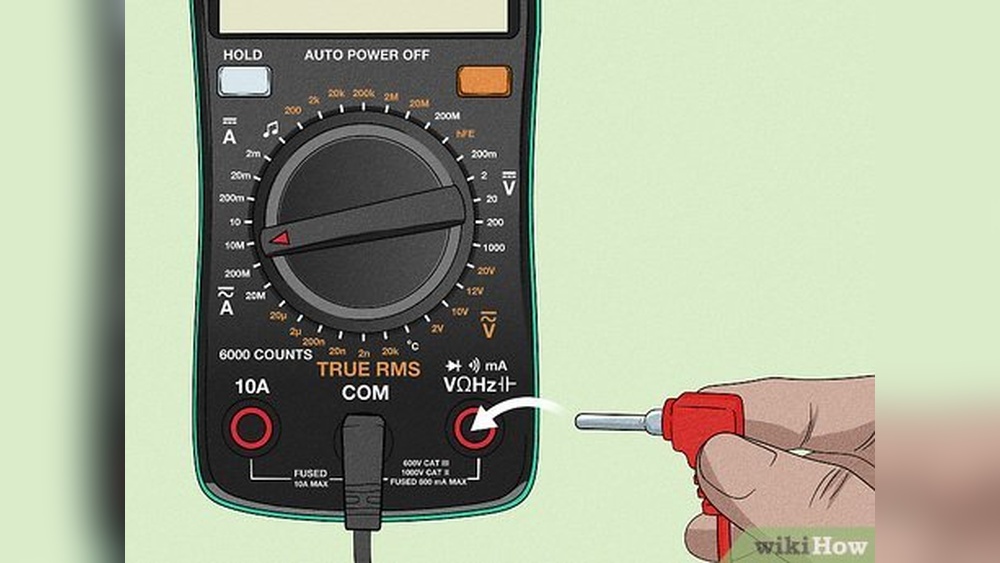
A typical DMM includes:
- Digital display: Shows measured values, symbols, and sometimes bar graphs.
- Rotary selector switch: Chooses the function (voltage, current, resistance, etc. ).
- Input jacks: Common (COM, usually black), Voltage/Resistance (VΩ, usually red), and sometimes a separate jack for high current (10A or mA).
- Probes: Red and black wires with pointed metal tips for contacting circuits.
Common symbols include:
- V: Voltage (DC marked by a straight line, AC by a wavy line)
- A: Current (DC/AC as above)
- Ω: Resistance
- Diode symbol: For diode testing
- Speaker symbol: For continuity testing
- Capacitor symbol: For capacitance testing (on advanced models)
Types Of Measurements
DMMs can measure:
- DC Voltage (V, ): Batteries, circuits powered by DC supplies
- AC Voltage (V~): Wall outlets, AC-powered devices
- DC Current (A, ): Flow of electrons in DC circuits
- AC Current (A~): Flow in AC circuits (some meters only)
- Resistance (Ω): Value of resistors, circuit continuity
- Continuity: Checks if a circuit is complete (audible beep)
- Additional functions: Capacitance, frequency, temperature, diode check
Manual Vs. Auto-ranging
Some DMMs require you to select the measurement range manually, while auto-ranging models detect the appropriate range automatically. Auto-ranging is more beginner-friendly, but manual range selection gives more control in advanced scenarios.
Example: When testing a 1.5V battery, auto-ranging finds the best scale, while manual lets you select, say, 2V for higher precision.
Safety Features
Modern DMMs often include:
- Fused current inputs: Protects against overcurrent
- Overload protection: Prevents damage from excessive voltage
- CAT ratings: Indicate the level of transient protection for different environments (CAT I, IV, per IEC 61010 standards)
Pro Tip: Always check your meter’s CAT rating before measuring mains or industrial power.

Credit: www.youtube.com
Setting Up Your Digital Multimeter
Before making any measurements, it’s crucial to set up your DMM correctly. This includes choosing the right probes, installing batteries, and performing safety checks.
Installing Batteries And Checking The Meter
Most digital multimeters run on 9V or AA batteries. Open the back cover to install or replace batteries as needed.
- Check display: Turn on the meter to verify the screen shows numbers and symbols.
- Inspect leads: Ensure the probes are not frayed or damaged.
- Check fuse: If your meter has a removable fuse (usually for current measurement), check it’s intact.
Example: A user once spent 30 minutes troubleshooting a non-working meter, only to find the fuse had blown from a previous overcurrent test.
Connecting The Probes
- Black probe: Always goes into the COM (common) jack.
- Red probe: Goes into the VΩmA jack for most measurements (voltage, resistance, continuity). For high current (10A), use the dedicated 10A (or similar) jack.
Warning: Never insert the red probe into the high-current jack unless measuring current. Incorrect placement can damage the meter or cause injury.
Selecting The Measurement Function
Turn the rotary selector to the desired measurement type:
- For voltage: Set to V (select DC or AC as appropriate)
- For resistance: Set to Ω
- For current: Set to A (DC/AC as needed)
- For continuity: Set to the speaker symbol
On manual-ranging meters, select the closest higher range to your expected value.
Multimeter Comparison Table
Here’s a comparison of three popular beginner-to-advanced digital multimeters:
| Model | Auto/Manual Range | Max Voltage | Current Range | Additional Features | CAT Rating |
|---|---|---|---|---|---|
| Fluke 117 | Auto | 600V | 10A | Non-contact voltage, True RMS | CAT III 600V |
| Klein Tools MM400 | Manual/Auto | 600V | 10A | Temperature, Capacitance | CAT III 600V |
| INNOVA 3320 | Auto | 600V | 10A | Battery Test, Large Display | CAT II 600V |
Measuring Voltage Step By Step
Measuring voltage is one of the most common uses for a digital multimeter, applicable to batteries, power supplies, and household circuits.
Dc Voltage Measurement
- Insert probes: Black into COM, red into VΩ.
- Set selector: Turn the dial to DC voltage (V, ).
- Select range: If manual, choose a range above your expected voltage (for a 9V battery, use 20V).
- Connect probes: Touch the black probe to the negative terminal, red to the positive.
- Read display: The number shows the voltage. A negative value means the probes are reversed.
Example: When I tested a standard AA battery, the display read 1.48V, indicating it was nearly full. A reading below 1.2V would suggest it’s time to replace the battery.
Ac Voltage Measurement
- Insert probes: As above.
- Set selector: Turn to AC voltage (V~).
- Select range: For household outlets (usually 120V or 230V), select the appropriate range.
- Insert probes: Carefully insert the probes into the outlet slots (one at a time).
- Read display: Voltage should be close to your national mains standard.
Warning: Be extremely careful when measuring mains AC voltage. Use only meters with a suitable CAT rating and avoid touching metal probe tips.
Common Problems And Solutions
- Zero reading: Check probe connection, selector position, and battery.
- Flashing display: Indicates overload; select a higher range or check the circuit.
Example: Troubleshooting A Power Adapter
Suppose a laptop isn’t charging. Measuring the adapter’s output with a DMM set to DC voltage can confirm if the adapter is faulty or if the issue is elsewhere.

Credit: www.youtube.com
Measuring Current Step By Step
Measuring current is more complex than voltage or resistance because the meter must become part of the circuit, not just touch across it.
Dc Current Measurement
- Move red probe: Insert into the 10A or mA jack (as appropriate).
- Set selector: Turn to DC current (A, ).
- Select range: Use the highest range to start.
- Break the circuit: Disconnect a wire or remove a component to insert the meter in series.
- Connect probes: One probe to each side of the break.
- Read display: The current in amperes or milliamperes.
Example: Checking the current draw of a small DC motor, I measured 0.35A while running, which matched the manufacturer’s specification.
Ac Current Measurement
- Red probe: As above.
- Set selector: Turn to AC current (A~).
- Break circuit: As with DC, insert the meter in series.
- Connect probes and read: Same process.
Warning: Many basic DMMs only measure small AC currents or none at all. For mains AC, use a clamp meter or DMM with appropriate rating and protection.
Current Measurement Tips
- Always start with the highest range to avoid blowing the fuse.
- Never try to measure current by placing probes across a voltage source (parallel), this shorts the circuit and can damage the meter.
Example: Diagnosing Parasitic Draw
In automotive repair, a DMM can be used to identify “parasitic draw”, electrical leakage draining a car battery overnight. By measuring current between the battery terminal and cable, you can pinpoint excessive drain sources.
Measuring Resistance, Continuity, And More
Beyond voltage and current, DMMs test resistance, circuit continuity, and sometimes additional parameters.
Resistance Measurement
- Insert probes: Black into COM, red into VΩ.
- Set selector: Turn to Ω (resistance).
- Select range: For manual meters, estimate the resistor’s value and select a higher range.
- Connect probes: Touch across the resistor/component.
- Read display: Value in ohms (Ω).
Pro Tip: Remove power from the circuit before measuring resistance to prevent damage or incorrect readings.
Continuity Testing
- Set selector: Turn to the continuity (speaker) symbol.
- Touch probes together: The meter should beep, confirming the function works.
- Test circuit/component: Touch probes to both ends. A beep indicates a complete path (low resistance).
Example: Finding a broken wire in a lamp cord, the DMM did not beep when the probes were placed at each end, confirming the wire was open.
Diode And Semiconductor Testing
Some DMMs test diodes and transistors:
- Set selector: Diode symbol.
- Connect probes: Red to anode, black to cathode.
- Read display: A value (typically 0.5, 0.7V for silicon diodes) means the diode is good; “OL” or no reading means it’s open.
Capacitance And Frequency (advanced)
Higher-end DMMs can measure:
- Capacitance: Useful for testing capacitors. Set to the capacitor symbol and connect the leads.
- Frequency: Measures the frequency of AC signals, useful for audio or radio circuits.
Pro Tip: Discharge capacitors before testing to avoid damaging the meter.
Data Table: Measurement Types And Typical Ranges
| Measurement Type | Common Range | Application Example |
|---|---|---|
| DC Voltage | 200mV, 1000V | Battery, circuit supply |
| AC Voltage | 2V, 750V | Wall outlet, appliances |
| DC Current | 200μA, 10A | LED, motors |
| Resistance | 200Ω, 20MΩ | Resistors, continuity |
| Continuity | Audible at <50Ω | Wiring, fuses |
| Capacitance | nF, mF | Capacitors |
Advanced Multimeter Techniques And Features
As you gain confidence with basic DMM functions, leveraging advanced features can provide deeper insight and efficiency.
Using Hold, Max/min, And Backlight
- Data Hold: Freezes the current reading on the display for easier viewing.
- Max/Min Recording: Captures the highest and lowest readings, useful for monitoring fluctuating values.
- Backlight: Illuminates the display for use in low-light environments.
Example: While testing a solar panel, using the Max/Min function helped track voltage changes as clouds passed overhead.
Auto-ranging Vs. Manual Ranging
- Auto-ranging: Ideal for beginners, as the meter selects the best scale automatically.
- Manual ranging: Allows experienced users to speed up measurements by pre-selecting expected ranges, reducing display lag.
Pro Tip: For rapid troubleshooting in known circuits, manual range selection can save time.
Using Relative (rel) Mode
- REL mode: Sets a reference value (zero offset), displaying only the difference from that point. Useful for subtracting background voltage or resistance.
Example: Measuring small voltage changes across a sensor by zeroing out the baseline voltage first.
Testing Temperature (if Equipped)
Some DMMs include a thermocouple input for temperature measurement:
- Plug in thermocouple: Usually into a dedicated jack or adapter.
- Set selector: To temperature (°C/°F) mode.
- Place probe: At the measurement point (e.g., on a heatsink).
- Read display: Shows temperature directly.
Using A Clamp Meter Attachment
Some advanced DMMs support clamp attachments for non-contact AC current measurement, ideal for electricians.
- Open clamp: Place around a single conductor.
- Set meter: To the clamp or AC current mode.
- Read display: Shows current without disconnecting wires.
Real-world Case Studies And Examples
Applying DMM techniques in practical scenarios reinforces understanding and builds troubleshooting skills.
Case Study 1: Diagnosing A Faulty Power Supply
A desktop computer wouldn’t power on. Using a DMM set to DC voltage, the user tested the power supply output connectors. The 12V rail read only 9. 5V, indicating a failing power supply.
- Action: Replaced the power supply.
- Outcome: Computer powered up normally.
Case Study 2: Checking Continuity In A Home Outlet
A wall outlet stopped working. With the circuit breaker off, the user set the DMM to continuity mode and tested between the outlet terminals and the panel’s neutral bar. No beep indicated a broken wire.
- Action: Located and replaced damaged wiring.
- Outcome: Outlet restored.
Case Study 3: Measuring Parasitic Draw In A Car
A car battery kept dying overnight. The user disconnected the negative battery cable, set the DMM to DC current, and connected it in series. The display showed 0. 12A (120mA) draw, higher than acceptable.
- Action: Pulled fuses one by one until the draw dropped to 0.02A.
- Outcome: Identified a glove compartment light staying on.
Case Study 4: Testing An Led Strip
An LED strip wasn’t lighting evenly. The user measured voltage at each segment, finding a significant drop after several feet.
- Action: Upgraded to a thicker wire for reduced resistance.
- Outcome: Even brightness throughout the strip.
Safety Guidelines And Best Practices
Using a digital multimeter safely is critical. Even experienced users must follow strict protocols to prevent injury and equipment damage.
Inspecting Equipment Before Use
- Check for cracked housing, damaged probes, or missing insulation.
- Verify the correct fuse is installed.
- Confirm the meter is rated for the voltage/current you plan to measure.
Understanding Cat Ratings
- CAT I: Low-energy circuits (electronics, protected devices)
- CAT II: Household appliances, portable tools
- CAT III: Distribution panels, fixed installations
- CAT IV: Utility connections, outdoor lines
Always use a meter with a higher CAT rating for potentially hazardous environments.
Safe Measurement Practices
- Never measure resistance or continuity on a live circuit.
- When measuring high voltage or current, keep fingers behind probe guards.
- Disconnect power before switching modes or changing probe positions.
- Avoid working alone when testing live circuits.
Example: According to the US Consumer Product Safety Commission, improper use of multimeters has resulted in numerous preventable electrical injuries each year (CPSC Home Electrical Safety).
Handling Unexpected Readings
- If the display reads “OL” or “1,” the value is out of range; select a higher scale.
- If the meter behaves erratically, check batteries and connections before proceeding.
- For any suspected malfunction, discontinue use until the device is checked by a qualified technician.
Maintenance And Calibration
To ensure accuracy and longevity, regular care and calibration are essential.
Cleaning And Storage
- Wipe the meter and probes with a dry or slightly damp cloth.
- Store in a protective case, away from moisture and direct sunlight.
Battery And Fuse Replacement
- Replace batteries when the display dims or the low-battery symbol appears.
- If the meter stops measuring current, check and replace the internal fuse as needed.
Calibration
Professional calibration is recommended annually for meters used in critical applications. Some manufacturers offer calibration services or recommend certified labs.
Pro Tip: Mark the calibration date on your meter for easy tracking.
Upgrading And Accessories
Consider upgrading to a DMM with True RMS, data logging, or wireless connectivity for advanced applications. Accessories like alligator clips, temperature probes, and carrying cases enhance versatility.
For authoritative guidance, the Wikipedia Multimeter Article provides detailed background and technical information.
Frequently Asked Questions
How Do I Know If My Digital Multimeter Is Accurate?
Accuracy depends on the meter’s specifications, calibration, and condition. Check the manufacturer’s datasheet for accuracy ratings (often ±0. 5% to ±2%). For critical measurements, compare your meter’s readings against a known reference or have it calibrated by a certified lab annually.
Can I Measure Both Ac And Dc With Any Digital Multimeter?
Most modern DMMs measure both AC and DC voltage and resistance. However, only some models measure AC current directly, and many entry-level meters do not measure high AC currents. Always check your meter’s capabilities before use.
What Is The Difference Between True Rms And Average Responding Meters?
True RMS meters provide accurate readings for both pure and non-sinusoidal AC waveforms, while average responding meters can only measure pure sine waves accurately. For modern electronic devices (with variable speed drives, inverters), a True RMS meter is essential for correct measurement.
Why Does My Multimeter Display ‘ol’ Or ‘1’ When Measuring Resistance?
‘OL’ (Over Limit) or ‘1’ means the resistance is higher than the meter’s current range can measure, or the circuit is open. Try selecting a higher range or check if the component is disconnected or faulty.
How Should I Choose The Best Digital Multimeter For My Needs?
Consider your primary application (electronics, automotive, home wiring), required measurement ranges, safety ratings (CAT II-IV), and additional features like auto-ranging, temperature, or data logging. For beginners, a reliable auto-ranging meter with clear instructions is ideal, while professionals may need advanced features and higher safety ratings.
Learning to use a digital multimeter opens up powerful diagnostic capabilities, whether for simple household tasks or advanced electronics projects. By understanding your meter’s functions, following systematic measurement steps, and practicing safe handling, you can confidently tackle troubleshooting and repair tasks.
As you progress, exploring advanced features and real-world applications will deepen your expertise and make your multimeter an indispensable tool in your toolkit.