
Understanding The Basic Functions Of A Multimeter: A Comprehensive Guide
Whether you’re a DIY enthusiast, student, or a seasoned electrical engineer, the multimeter is an indispensable tool in your toolkit. Its ability to measure and diagnose various electrical values makes it one of the most versatile and essential devices for anyone working with electronics or household wiring. From troubleshooting a faulty appliance to verifying circuit integrity in advanced projects, mastering the functions of a multimeter can save time, money, and ensure safety.
Despite its widespread use, many users, especially beginners, find multimeters daunting, with their cryptic symbols, modes, and test leads. However, with clear explanations, practical examples, and advanced tips, anyone can confidently leverage a multimeter’s core capabilities. This guide breaks down the basic functions, demonstrates real-world applications, and provides insights for both novices and those looking to expand their skills.
Key Takeaways
- A multimeter measures voltage, current, and resistance, serving as three tools in one.
- Digital and analog multimeters offer different user experiences, digital is more common for beginners.
- Proper usage and safety are critical when working with live circuits.
- Advanced features like continuity, diode, and capacitance testing expand a multimeter’s utility.
- Understanding the right settings and interpreting readings is essential for accurate measurements.
- Regular calibration and maintenance ensure reliable performance over time.
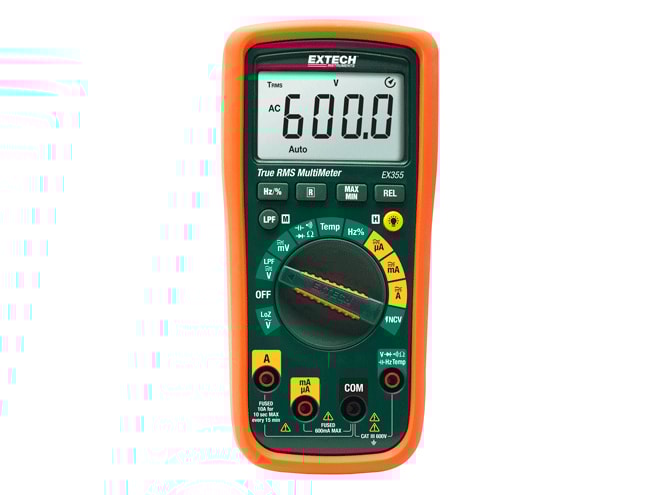
Credit: www.instrumart.com
What Is A Multimeter? Types And Core Components
A multimeter is an electronic measuring instrument that combines several measurement functions into one unit. At its core, it can measure voltage (volts), current (amperes), and resistance (ohms). Over the years, multimeters have evolved to include additional features and digital displays, making them more accurate and user-friendly.
Analog Vs. Digital Multimeters
While both types perform similar functions, the way they display data differs significantly:
| Feature | Analog Multimeter | Digital Multimeter (DMM) |
|---|---|---|
| Display | Needle and scale | Numeric LCD/LED |
| Accuracy | Lower, prone to parallax error | High, easy-to-read numbers |
| Durability | Fragile, sensitive to drops | Robust, portable |
| Price | Generally cheaper | Varies, basic models affordable |
| Best for | Trend observation | General troubleshooting |
Digital multimeters (DMMs) are now the standard for most users due to their ease of use and precision.
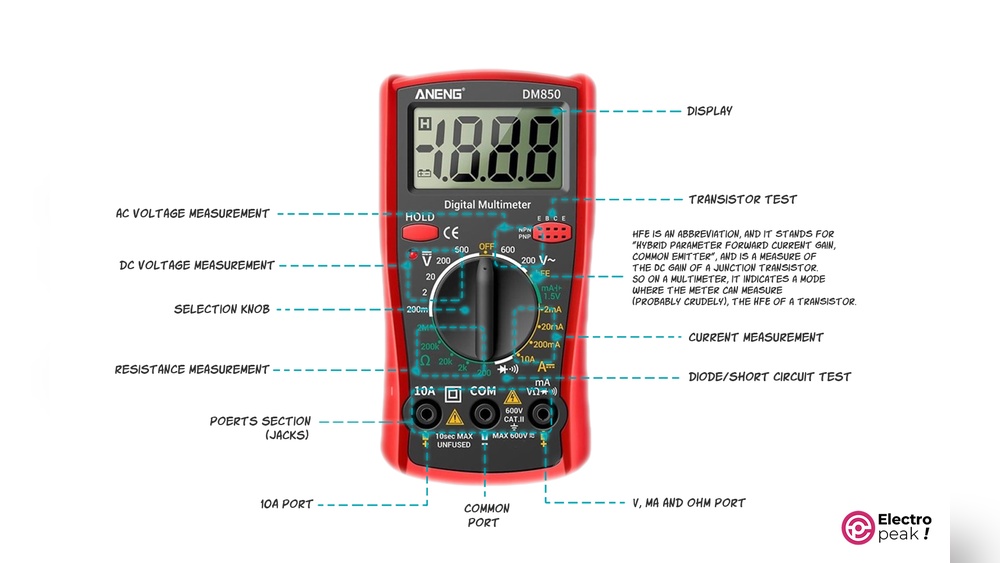
Core Components Of A Multimeter
- Display: Shows measurements numerically.
- Rotary Switch/Selector Dial: Selects the measurement function (voltage, current, resistance, etc. ).
- Test Leads: Typically red (positive) and black (negative/com).
- Input Jacks: Ports for inserting test leads, labeled as COM, VΩ, and mA/A.
- Buttons: For functions such as hold, backlight, or mode switching (on advanced models).
Understanding these elements is crucial for safe and effective multimeter use.
Measuring Voltage: Ac And Dc Applications
Voltage measurement is one of the most fundamental uses of a multimeter. Voltage is the electrical potential difference between two points in a circuit.
Measuring Dc Voltage
Direct current (DC) voltage is commonly found in batteries and electronics. Here’s how to measure it:
- Turn the selector dial to the DC voltage setting (often indicated by a ‘V’ with a straight line).
- Insert the black lead into the COM port and the red lead into the VΩ port.
- Touch the probes to the circuit: Black to the negative/ground, red to the positive.
- Read the display for the voltage value.
Example: Checking a AA battery, healthy batteries read around 1.5V.
Measuring Ac Voltage
Alternating current (AC) voltage is typical in household outlets:
- Set the dial to the AC voltage setting (often ‘V~’).
- Insert leads as above.
- Carefully touch the probes to the outlet slots (do not touch the metal with your hands).
- Read the voltage, in the US, typical outlets should be around 120V.
Warning: Always ensure the multimeter and probes are rated for the voltage being measured to avoid accidents.
Advanced Tips For Voltage Measurement
- For high-voltage circuits, use CAT-rated meters and leads.
- Some DMMs have auto-ranging; if yours doesn’t, always start at the highest range to protect the device.
- Avoid measuring voltage if you suspect a short circuit.
Measuring Current: Understanding Amperage
Current measurement, or amperage, helps diagnose issues like excessive power draw or open circuits.
Measuring Dc And Ac Current
Current is measured by connecting the multimeter in series with the circuit, meaning the current must flow through the meter.
- Turn off power to the circuit.
- Move the red lead to the correct port (usually labeled mA or 10A, depending on expected current).
- Set the dial to the appropriate current setting (A with a straight or wavy line).
- Break the circuit and connect the probes so that current flows through the meter.
- Restore power and observe the reading.
Pro Tip: Never attempt to measure current by placing the probes across a voltage source; this will create a short and possibly damage the meter.
Choosing The Right Range
If your meter is not auto-ranging, always begin with the highest range to prevent blowing an internal fuse.
Example: Diagnosing A Faulty Device
Suppose a device isn’t working, and you suspect a blown fuse. By measuring the current draw, you can confirm if the circuit is open or if there’s an overload.
Advanced Suggestions For Current Measurement
- Use clamp meters for non-contact AC current measurement on large conductors.
- For tiny currents (microamps), select the lowest range for better resolution.
- Replace blown fuses inside the meter only with manufacturer-recommended parts.
Measuring Resistance: Testing Continuity And Circuit Integrity
Resistance measurement is crucial for checking wires, resistors, and the integrity of a circuit.
Measuring Resistance
- Power off the circuit completely (never measure resistance in a live circuit).
- Insert leads into COM and VΩ.
- Set the dial to the Ω (ohms) setting.
- Touch the probes across the component or wire.
- Read the value, zero or near-zero means continuity; very high or infinite means open circuit.
Continuity Testing
Most digital multimeters have a continuity mode (audible beep):
- Set dial to the continuity symbol (diode or sound wave).
- Test across the connection; a beep means a good connection.
Example: Testing a light switch, no beep in ON position means faulty wiring.
Advanced Resistance Measurements
- For in-circuit resistance checks, remember parallel paths may affect readings.
- Some advanced DMMs can measure resistance up to megaohms for insulation testing.
- Four-wire (Kelvin) measurement is used in high-precision applications to eliminate lead resistance.
Additional Functions: Diode, Capacitance, Frequency, And More
Beyond the basics, modern multimeters offer advanced test functions, broadening their use for electronics troubleshooting and repair.
Diode Testing
- Set the dial to diode mode (triangle with a line).
- Place probes on diode terminals; display shows voltage drop (~0.6V for silicon).
- Reverse probes; a good diode shows “OL” (open loop) in one direction.
Example: Checking diodes in a power supply to locate shorts.
Capacitance Measurement
- Set dial to the capacitance symbol (, | |, ).
- Discharge the capacitor fully before testing.
- Connect probes; the meter shows capacitance in microfarads (µF).
Pro Tip: For electrolytic capacitors, polarity matters, match the probe colors to the capacitor’s terminals.
Frequency Measurement
Some DMMs measure frequency (Hz):
- Set to Hz setting, connect probes across signal source.
- Useful for testing oscillators, signal generators, or AC line frequency.
Temperature Measurement
Advanced models include thermocouple ports for temperature readings, ideal for HVAC or electronics cooling analysis.
Data Table: Multimeter Advanced Features Comparison
| Feature | Basic DMM | Advanced DMM |
|---|---|---|
| Voltage/Current/Resistance | Yes | Yes |
| Continuity/Diode | Yes | Yes |
| Capacitance | No | Yes |
| Frequency/Temperature | No | Yes |
| Data Logging/PC Interface | No | Yes |
Practical Use Cases And Real-world Examples
Understanding the theory is important, but seeing multimeters in action cements their value. Here are a few concrete scenarios where these tools shine.
Example 1: Troubleshooting A Non-working Lamp
- Step 1: Measure AC voltage at the outlet. If voltage is present, the outlet is good.
- Step 2: Test continuity of the lamp cord and switch; a break indicates the fault.
- Step 3: Check the bulb for continuity to confirm if it’s blown.
Example 2: Automotive Fuse Testing
- Set the meter to continuity or low resistance.
- Probe across each fuse, if the meter beeps, the fuse is good.
- Saves time compared to visual inspection, as some fuses may have hairline breaks.
Example 3: Checking A Power Adapter
- Switch to DC voltage mode.
- Measure voltage at the adapter output.
- If reading matches the label, the adapter is functional; lower/no voltage indicates a failure.
Example: Diagnosing Solar Panel Output
In my experience, when testing a solar panel for a DIY project, I measured both open-circuit voltage and short-circuit current to evaluate panel health. A sharp drop in current compared to the manufacturer’s specs indicated a faulty cell.
Safety Tips And Best Practices
While multimeters are designed with user safety in mind, improper usage can lead to equipment damage or personal injury.
General Safety Guidelines
- Always inspect test leads for cracks or exposed wires before use.
- Set the range higher than the expected value if not auto-ranging.
- Never switch functions with the probes connected to a live circuit.
- Use only on circuits within the meter’s rated voltage and current limits.
Handling High-energy Circuits
- Use CAT-rated multimeters and test leads for industrial or panel work.
- Stand on an insulated mat and wear rubber-soled shoes.
- Avoid measuring current in high-voltage (mains) circuits unless absolutely necessary.
Maintenance And Calibration
- Store the meter in a dry, dust-free environment.
- Replace batteries promptly to avoid leakage.
- Calibrate annually for professional applications; refer to the manufacturer or a certified lab.
Pro Tip: Label your test leads with their maximum voltage/current rating to avoid confusion.
Selecting The Right Multimeter For Your Needs
Choosing the best multimeter depends on your application, budget, and future needs.
For Beginners
- Look for a basic digital multimeter with auto-ranging, clear labeling, and a robust case.
- Essential functions: Voltage, current, resistance, continuity, and diode test.
- Large display and simple interface aid learning.
For Advanced Users
- Consider models with capacitance, frequency, and temperature functions.
- True RMS capability for accurate AC measurements, especially with non-sinusoidal signals.
- Data logging and PC connectivity for long-term monitoring.
Table: Multimeter Selection Guide
| User Profile | Recommended Features | Price Range (USD) |
|---|---|---|
| Beginner/DIY | Auto-range, basic measurements, continuity | 10, 40 |
| Student/Electronics Hobbyist | Capacitance, frequency, temperature | 30, 100 |
| Professional/Electrician | True RMS, CAT III/IV rating, data logging | 80, 300+ |
Brands And Certification
Choose multimeters from reputable brands (e.g., Fluke, Extech, Klein Tools) and ensure they have relevant safety certifications. For more details, visit the Wikipedia page on Multimeters.
Advanced Multimeter Techniques And Troubleshooting Tips
Once you master the basics, multimeters can support more complex diagnostic tasks.
Measuring Small Signals And High Precision
- Use the lowest range for microvolt or microamp readings for better resolution.
- Shield the meter and leads from electromagnetic interference for high-precision work.
Relative Measurement Mode
Many advanced DMMs have a relative (REL) mode, allowing you to zero out lead resistance or compare changes in signal.
Data Logging
For trend analysis, some DMMs interface with computers or smartphones. This is invaluable for:
- Monitoring battery discharge curves.
- Logging temperature changes.
- Capturing intermittent faults.
Troubleshooting Common Multimeter Problems
- Meter shows ‘OL’ or overload: Value exceeds selected range; switch to a higher range.
- No reading during current measurement: Possible blown fuse inside the meter.
- Erratic readings: Check for loose connections or replace the battery.
Pro Tip: If you suspect your meter is inaccurate, test a known-good battery or resistor and compare the reading to its labeled value.
Learning Resources And How To Practice
Becoming proficient with a multimeter requires hands-on practice and ongoing learning.
Beginner Practice Ideas
- Measure batteries of different voltages.
- Test continuity of household cords.
- Practice measuring known resistors and compare to color codes.
Advanced Practice
- Build simple circuits and measure voltage drops across components.
- Diagnose real faults in old gadgets.
- Experiment with frequency and capacitance measurements.
Online Tutorials And Courses
Many free and paid courses are available online. For structured learning, consider the resources at Fluke’s Multimeter Basics.
Community And Forums
Platforms like Electronics Stack Exchange and Reddit’s r/AskElectronics provide support from experienced users worldwide.
Frequently Asked Questions
What Does “auto-ranging” Mean On A Multimeter?
Auto-ranging is a feature where the multimeter automatically selects the appropriate measurement range for the value being tested. This means you don’t need to manually set the range dial for voltage, current, or resistance. It simplifies measurements and helps prevent errors, especially for beginners.
Can I Use A Multimeter To Test Household Appliances?
Yes, a multimeter can test appliances for voltage at outlets, continuity in cords, and fuses inside the device. However, always unplug the appliance or turn off power when checking resistance or continuity, and ensure your multimeter is rated for the mains voltage you’re testing.
How Do I Calibrate A Multimeter?
Calibration involves comparing and adjusting your multimeter’s readings against a known standard. For most users, sending the device to a certified calibration lab annually is sufficient. If you notice inconsistent readings, professional calibration is recommended for accuracy and safety.
Why Does My Multimeter Show A Negative Voltage?
A negative reading typically means the test leads are reversed, the black lead is on a higher potential relative to the red. Swap the probes, or if you’re measuring a battery or DC circuit, simply note the polarity.
What Are Cat Ratings And Why Do They Matter?
CAT ratings (Category ratings) indicate the maximum voltage and energy level the multimeter can safely handle in different environments, CAT I (low energy) up to CAT IV (high energy, like main panels). Always use a meter with a CAT rating suitable for your application to prevent equipment damage or injury.
A multimeter is much more than a simple measuring device, it’s a gateway to understanding, troubleshooting, and mastering electrical systems. By learning its basic and advanced functions, practicing safe measurement techniques, and selecting the right tool for your needs, you lay a solid foundation for any electronics or electrical project.
Whether you’re diagnosing a household issue or building sophisticated circuits, the skills you develop with a multimeter will serve you throughout your technical journey.