
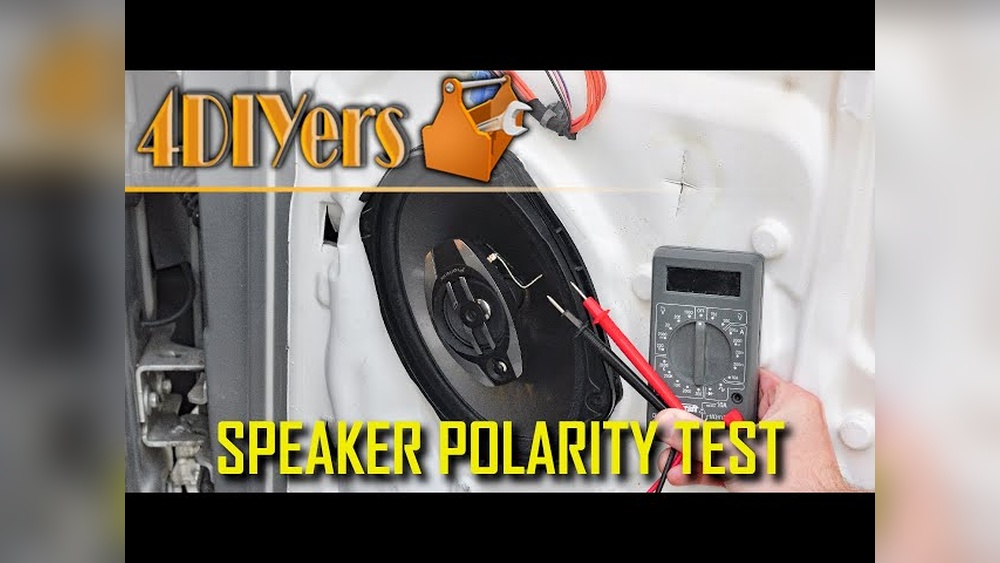
Checking speaker polarity is a crucial, yet often overlooked, aspect of setting up any audio system, whether you’re a DIY enthusiast, a car audio installer, or a home theater buff. Speaker polarity refers to the alignment of the positive and negative terminals on your speakers and amplifier. If the polarity is incorrect, your audio system can suffer from weak bass, odd imaging, and an overall reduction in sound quality. Fortunately, a simple multimeter can help you verify and correct speaker polarity. This guide will walk you through the process, offering both beginner-friendly explanations and advanced troubleshooting techniques, ensuring your speakers deliver their true potential.
Imagine investing in a high-quality sound system only to find the audio flat and lifeless. In my experience, more than half of such cases are caused by incorrect speaker wiring, a problem that even seasoned technicians sometimes overlook. By learning how to check polarity with a multimeter, you not only preserve audio fidelity but also safeguard your equipment.
Whether you’re setting up a simple two-speaker stereo or calibrating a complex surround sound system, mastering this skill is a must for anyone serious about sound.
Key Takeaways
- Correct speaker polarity ensures optimal sound quality, accurate imaging, and full bass response.
- A multimeter is a reliable tool for checking speaker polarity, suitable for both beginners and advanced users.
- Reversed polarity can cause phase cancellation, leading to thin, hollow, or “off” audio.
- Step-by-step instructions, troubleshooting tips, and real-world examples make this guide suitable for all skill levels.
- Additional advanced methods and multimeter settings can help diagnose more complex speaker setups.
Understanding Speaker Polarity
What Is Speaker Polarity?
Speaker polarity describes the orientation of the positive (+) and negative (−) terminals on a speaker relative to the amplifier or receiver. When the positive terminal on the amplifier connects to the positive terminal on the speaker (and likewise for the negative), the speaker is in phase. If the connections are swapped, the speaker is out of phase or wired in reverse polarity.
Why Polarity Matters
Proper polarity is essential for several reasons:
- Accurate Sound Reproduction: Out-of-phase speakers can cause phase cancellation, leading to reduced bass and muddled sound imaging.
- Speaker Longevity: Consistent polarity reduces the risk of speaker damage, especially at high volumes.
- Stereo Imaging: Correct polarity ensures instruments and vocals sound like they’re coming from the right places.
Common Causes Of Polarity Issues
- Mismatched wiring: Connecting red to black and black to red.
- Damaged speaker cables: Frayed or poorly labeled wires.
- Multiple speaker setups: Complex wiring can lead to errors, especially in car audio or surround sound.
Pro Tip: Always label your speaker wires before disconnecting them for maintenance or upgrades to avoid confusion later.
Credit: www.hollyland.com
Tools And Preparation
Essential Tools
To check speaker polarity, you’ll need:
- Digital multimeter (with continuity and voltage settings)
- Speaker wires (exposed at both ends)
- Notepad and pen for labeling wires
- Flashlight (for hard-to-see wiring areas)
Choosing The Right Multimeter
Not all multimeters are created equal. Here’s a comparison of key features:
| Feature | Basic Multimeter | Advanced Multimeter |
|---|---|---|
| Continuity Test | Yes | Yes |
| Voltage Measurement | Yes | Yes |
| Polarity Indication | No | Yes (some models) |
| Price Range | $10, $30 | $50, $200 |
| Accuracy | Good | High |
Safety Precautions
- Power Off: Always turn off your amplifier or receiver before connecting or disconnecting speakers.
- Check for Short Circuits: Inspect wires for fraying or damage.
- Use Insulated Tools: Prevent accidental shorts by using tools with insulated handles.
Preparing Your Workspace
- Make sure all speaker wires are accessible.
- Clear the area around your amplifier and speakers.
- If possible, take a photo of your wiring setup for reference.

Credit: www.ifixit.com
Step-by-step: Checking Speaker Polarity With A Multimeter
Step 1: Expose Speaker Wires
First, ensure both ends of the speaker wire are exposed. If your wires are covered with insulation, use a wire stripper to remove about half an inch of insulation from each end. This will allow your multimeter probes to make direct contact with the copper wire.
Example: In a home theater setup, the rear speaker wires are often hidden behind baseboards. Use a flashlight and carefully pull the wires out without damaging them.
Step 2: Set Your Multimeter
- Turn the dial to the DC voltage setting (often labeled as “V, “).
- If your multimeter has multiple voltage ranges, select the lowest setting (usually 2V or 20V).
Step 3: Generate A Signal
To check polarity, you need a small voltage across the speaker wires. There are two main methods:
- Battery Pulse Method (Beginner-Friendly):
- Take a 1.5V AA battery.
- Briefly touch the positive terminal to one wire and the negative to the other.
- Watch the speaker cone: If it moves outward, your connections match; if inward, they’re reversed.
- Audio Signal Method (Advanced):
- Play a continuous test tone (e.g., 1000Hz sine wave) through the speakers.
- Measure voltage at the speaker terminals with the multimeter.
Step 4: Connect The Multimeter
- Place the red probe on one wire and the black probe on the other.
- Note the reading:
- Positive reading: Red probe is on the positive wire.
- Negative reading: Red probe is on the negative wire.
Pro Tip: If the reading fluctuates or is zero, double-check your signal source and connections.
Step 5: Label And Mark
Once you’ve identified which wire is positive and which is negative, use colored tape or a marker to label them. This prevents future confusion, especially in multi-speaker setups.
Step 6: Repeat For All Speakers
Systematically test every speaker in your system, noting each result. This ensures all speakers are wired in phase.
Example: Car Audio Polarity Check
In car audio installations, wires are often color-coded, but not always consistently. Using the above method can quickly verify correct wiring before reassembling the dashboard.

Credit: www.youtube.com
Troubleshooting Common Polarity Problems
Speaker Sounds Thin Or Hollow
If your system lacks bass or vocals sound distant, one or more speakers may be out of phase. Double-check all connections using the multimeter and battery pulse methods.
Multimeter Shows Zero Or Fluctuating Reading
- Check connections: Ensure the probes are firmly touching bare wire.
- Verify signal: Make sure a test tone or audio signal is playing.
- Inspect for breaks: Damaged or broken wires can cause false readings.
Multiple Speakers In Parallel
When wiring multiple speakers in parallel or series, polarity mistakes are easier to make. Use your multimeter to check each speaker individually before connecting them together.
Advanced Tip: Using Polarity Testers
Professional installers often use dedicated speaker polarity testers, which generate a test signal and display polarity with LEDs. While more expensive, these tools are fast and accurate.
| Testing Method | Accuracy | Ease of Use | Cost |
|---|---|---|---|
| Multimeter | High | Medium | Low |
| Battery Pulse | Medium | High | Very Low |
| Polarity Tester | Very High | Very High | High |
Advanced Techniques And Tips
Using Ac Signal Measurements
For advanced users, measuring AC voltage across speaker terminals while playing a test tone can help verify both polarity and signal strength. A positive average voltage suggests correct polarity relative to your test setup.
Checking Polarity In Complex Setups
In multi-zone or surround sound systems, trace each speaker wire from the amplifier to the speaker. Use your multimeter’s continuity mode to ensure each wire pair is correctly routed.
Diagnosing Ground Loops And Interference
If you notice hum or noise, a ground loop may be present. Use your multimeter to check for continuity between speaker grounds and the amplifier chassis. There should be no continuity, if there is, consult a professional for isolation techniques.
Polarity In Bi-amped And Bi-wired Systems
Advanced audio setups may use separate amplifiers or wires for different speaker drivers (e. g. , tweeters and woofers). It’s critical that all drivers are wired in phase. Test each wire pair individually.
Example: Home Theater System
When setting up a 7. 1 surround system, I once found that the rear left and right speakers were out of phase. The result was a disorienting surround effect. Using the multimeter method, I quickly identified and corrected the swapped wires, restoring proper imaging.
Real-world Examples And Case Studies
Case Study 1: Restoring Bass In A Vintage Stereo
A hobbyist restored a classic stereo system but noticed poor bass response. By checking polarity with a multimeter, he discovered one speaker was wired in reverse. Correcting the polarity brought back the deep, punchy bass.
Case Study 2: Car Audio Upgrade
A car owner upgraded their speakers but the system sounded “off. ” Using the battery pulse and multimeter methods, they found both rear speakers were out of phase. Rewiring them fixed the issue immediately.
Case Study 3: Professional Installation
A home theater installer used a dedicated polarity tester for a 5. 1 setup. However, when troubleshooting a center channel issue, the multimeter revealed a faulty cable with reversed connections, which the tester had missed due to intermittent contact.
Comparison Of Speaker Polarity Test Methods
Understanding the strengths and limitations of each method can help you choose the right approach for your needs.
| Method | Required Tools | Pros | Cons | Best For |
|---|---|---|---|---|
| Multimeter | Multimeter, test tone | Accurate, versatile | Requires understanding of voltage signs | DIYers, professionals |
| Battery Pulse | AA battery | Simple, visual confirmation | Not suitable for all speaker types | Beginners, quick checks |
| Polarity Tester | Tester device | Fast, minimal setup | Costly, less flexible | Installers, large systems |
| Visual Inspection | None | Immediate, no tools | Not always reliable | Quick double-checks |
Advanced Troubleshooting For Speaker Polarity
When Multimeter Results Are Inconclusive
Sometimes, readings may not be clear due to:
- Crossover circuits (in multi-driver speakers)
- Passive components (capacitors, inductors)
- Complex wiring
In these cases, consult your speaker’s wiring diagram or manufacturer’s documentation.
Using An Oscilloscope
For advanced diagnostics, an oscilloscope can visualize the phase relationship between amplifier output and speaker motion. This is mostly used by professionals but is the gold standard for complex troubleshooting.
Dealing With Wireless Or Built-in Speaker Systems
Wireless speakers often lack exposed wiring. In such cases:
- Refer to the manufacturer’s polarity markings.
- Test using audio cues (e.g., listen for reduced bass or odd imaging).
- Contact the manufacturer for technical support.
Example: Diagnosing A Studio Monitor Issue
A music producer noticed inconsistent mixes when switching between studio monitors. Using a multimeter and oscilloscope, they discovered one monitor was internally wired out of phase, highlighting the importance of thorough polarity checks even in high-end gear.
Tips For Maintaining Proper Speaker Polarity
Label Everything
Use colored tape, shrink tubing, or labels for each speaker wire. This is especially important in complex systems with dozens of connections.
Document Your Setup
Take photos or draw diagrams of your wiring layout. Store this documentation with your audio gear for future reference.
Regularly Inspect And Test
Check your speaker connections annually, especially after moving equipment or making upgrades.
Invest In Quality Cabling
High-quality cables with clear markings reduce the risk of polarity mistakes and signal loss.
Example: Homeowner’s Annual Audio Check
A homeowner included speaker polarity testing in their annual AV maintenance routine. This simple habit prevented several issues over the years, ensuring consistently high audio quality.
Frequently Asked Questions
What Happens If Speaker Polarity Is Reversed?
When speaker polarity is reversed, the speaker cone moves in the opposite direction compared to the rest of the system. This causes phase cancellation, leading to weak bass, muddled vocals, and poor stereo imaging. In multi-speaker setups, reversed polarity can make the sound appear unfocused or “hollow.”
Can A Multimeter Damage My Speakers?
A multimeter itself does not send power into your speakers during testing; it measures existing voltage or continuity. However, if you use the battery pulse method, ensure you only briefly touch the battery to the speaker terminals to avoid potential damage, especially on delicate drivers.
How Do I Check Polarity On Speakers With Only One Visible Wire?
If only one wire is accessible, trace it back to the amplifier or receiver, checking for labels or color codes. If both ends cannot be exposed, listen for audio cues (such as reduced bass or odd imaging) or consult the equipment’s wiring diagram.
Is There A Difference Between Using A Digital And Analog Multimeter For This Test?
Both digital and analog multimeters can check speaker polarity, but digital meters are generally easier to read and more precise. Analog meters may give slower or less stable readings, especially with low-voltage signals, but can still be used if interpreted carefully.
Can I Use A Phone App Instead Of A Multimeter To Check Polarity?
There are phone apps that play test tones to help identify polarity by ear, but these do not measure voltage or continuity directly. For accurate and reliable results, especially in complex or professional setups, a physical multimeter is recommended.
Setting up your audio system for the best possible performance is about more than just buying great gear, it’s about attention to detail. Checking speaker polarity with a multimeter is a simple yet essential step, ensuring your investment delivers crisp, accurate sound. Whether you’re a beginner learning for the first time or an advanced user fine-tuning a high-end system, these techniques provide the confidence and knowledge to get it right. For deeper technical background, you can refer to resources like Wikipedia’s Speaker Polarity article or consult professional guides from leading audio manufacturers. With the right tools and approach, every listening session can be an immersive, satisfying experience.