
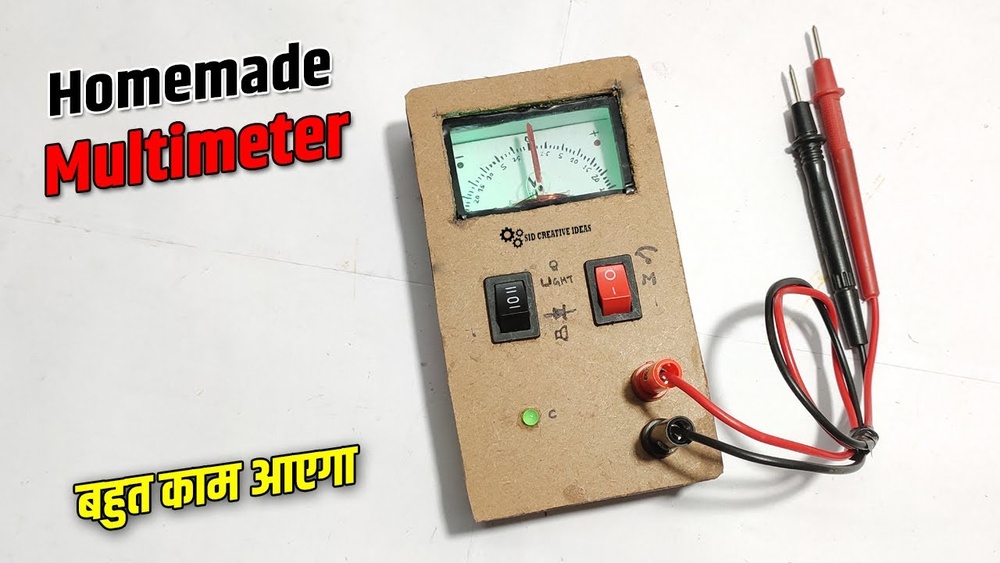
Building your own multimeter at home is a rewarding way to deepen your understanding of electronics while creating a practical tool for measuring voltage, current, and resistance. Whether you’re a hobbyist, student, or an experienced engineer, constructing a DIY multimeter provides hands-on experience with fundamental electronic components and circuit design.
It also offers the flexibility to customize features, learn troubleshooting, and appreciate the precision behind everyday measurement devices.
Many beginners are intimidated by the thought of building a multimeter, but with the right guidance and a methodical approach, it’s entirely achievable. This comprehensive guide walks you through each step of the process, from assembling basic circuits to integrating advanced features.
You’ll find beginner-friendly explanations, expert tips, real-world examples, comparison tables, and actionable advice to help you succeed. By the end, you’ll not only have a functional multimeter, but also a deeper insight into electronics measurement principles.
Key Takeaways
- Building a DIY multimeter reinforces essential electronics skills and understanding.
- Beginner and advanced instructions are included, making the guide accessible and scalable.
- Component selection and circuit design are crucial for accuracy and safety.
- Practical examples and troubleshooting tips ensure a smooth construction process.
- Customization opportunities allow you to expand your multimeter’s capabilities.
- A FAQ section addresses common challenges and advanced modifications.

Credit: www.amazon.com
Understanding Multimeter Basics
Before diving into construction, it’s essential to grasp what a multimeter is and how it works. A multimeter is an instrument used to measure electrical parameters such as voltage (V), current (A), and resistance (Ω). Modern digital multimeters (DMMs) also include features like diode and continuity testing, capacitance, and frequency measurements.
What Does A Multimeter Measure?
A typical multimeter can function as:
- Voltmeter: Measures voltage across two points.
- Ammeter: Measures current through a circuit.
- Ohmmeter: Measures electrical resistance.
Advanced models may also measure:
- Capacitance
- Temperature
- Frequency
Analog Vs. Digital Multimeters
Understanding the difference between analog and digital multimeters is important for your DIY project. While analog multimeters use a moving coil meter and pointer, digital multimeters display results as numerical values on an LCD or LED.
Digital multimeters are preferred for home builds due to their accuracy, ease of reading, and integration with microcontrollers.
| Feature | Analog Multimeter | Digital Multimeter |
|---|---|---|
| Display Type | Needle & Scale | LCD/LED Numeric |
| Accuracy | Moderate | High |
| Power Requirement | None (for voltage/current) | Battery or External |
| Complexity | Simpler circuit | Microcontroller-based |
| Cost (DIY) | Lower | Higher |
Why Build A Multimeter At Home?
- Educational Value: Reinforces theory with practice.
- Customization: Add or remove features as desired.
- Cost: Potentially cheaper for basic models.
- Repair Skills: Enables troubleshooting and repair of your own device.

Credit: www.youtube.com
Essential Components And Tools
Selecting quality components and having the right tools is key to building an accurate and reliable multimeter. For beginners, sourcing parts that are widely available and easy to use is recommended. Advanced users may opt for more specialized or precision components.
Core Components
To build a basic digital multimeter, you’ll typically need:
- Microcontroller (e.g., Arduino Nano, ESP32, PIC)
- Resistors and precision shunt resistors
- Voltage divider networks
- Operational amplifiers (Op-Amps)
- Analog-to-digital converter (ADC) or built-in MCU ADC
- Display unit (16×2 LCD, OLED, or seven-segment display)
- Switches (rotary or push-button) for mode selection
- Probes and test leads
- Battery or DC power supply
- Enclosure (plastic or project box)
For an analog build, you’ll need:
- Moving coil meter (galvanometer)
- Resistors and shunt resistors
- Selector switch
- Probes
- Battery (for resistance measurement)
Optional Advanced Add-ons
- Bluetooth/Wi-Fi module for data logging or remote monitoring
- Buzzer for continuity testing
- Temperature sensor (e.g., LM35, thermistor)
- High-precision voltage references
- Protection diodes and fuses for safety
Tools Needed
- Soldering iron and solder
- Breadboard (for prototyping)
- Wire cutter/stripper
- Screwdrivers
- Multimeter (for calibration/reference)
- Computer (for programming microcontroller)
Sourcing Components
Most components are readily available at online electronics retailers, local hardware stores, or from salvaged electronics. For beginners, component kits tailored for Arduino or basic electronics projects are highly recommended.
Example: When I tested my first DIY multimeter, I used an Arduino Nano and a standard 16×2 LCD, both sourced from a starter kit, which made prototyping and debugging much easier.
Step-by-step Guide To Building A Basic Multimeter
Constructing a basic digital multimeter is ideal for beginners and provides a strong foundation for adding advanced features later. This section outlines each key stage, from circuit design to final assembly.
Designing The Circuit
A basic multimeter circuit combines voltage, current, and resistance measurement capabilities. The core principle is to use voltage dividers and shunt resistors to scale input signals into the measurable range of your ADC or moving coil meter.
Voltage Measurement
- Use a voltage divider to step down high voltages within the ADC’s safe input range.
- Calculate resistor values using Ohm’s Law to ensure accurate scaling.
- Example: For measuring up to 50V with a 5V ADC, choose divider resistors so that 50V yields 5V at the ADC input.
Current Measurement
- Insert a precision shunt resistor in series with the load.
- The voltage drop across the shunt is proportional to the current (I = V/R).
- Use an op-amp to amplify the small voltage drop for accurate ADC reading.
Resistance Measurement
- Apply a known voltage across the unknown resistor and a reference resistor in series.
- Measure voltage drop and use the voltage divider formula to calculate resistance.
Building The Prototype
- Assemble the circuit on a breadboard.
- Connect the microcontroller, voltage dividers, shunt resistors, and display.
- Use jumper wires for easy adjustments.
- Upload test code to the microcontroller.
- Start with sample ADC reading code to verify voltage input accuracy.
- Calibrate using a known reference voltage.
- Add mode selection switches.
- Use a rotary switch or push-buttons to toggle between voltage, current, and resistance modes.
- Program the microcontroller to switch calculation routines accordingly.
- Connect probes/test leads.
- Ensure they’re rated for your measurement range.
- Use shielded wire for improved accuracy.
- Power up the circuit.
- Use a battery or regulated DC adapter.
- Test with known values.
- Verify voltage, current, and resistance readings against a commercial multimeter.
Pro Tip: Always double-check circuit connections before powering up to avoid component damage.
Coding The Microcontroller
For a microcontroller-based digital multimeter, programming is critical. Open-source platforms like Arduino offer libraries and sample code to simplify development.
- Read analog values using the microcontroller’s ADC.
- Convert raw readings into voltage, current, and resistance using appropriate formulas.
- Display results on the LCD or OLED.
- Debounce switch inputs for reliable mode selection.
- Implement calibration routines for improved accuracy.
Sample Arduino pseudo-code for voltage measurement:
int sensorValue = analogRead(A0);
float voltage = sensorValue * (referenceVoltage / 1023.0);
Assembling The Final Device
- Transfer the circuit from breadboard to a soldered perfboard or custom PCB for robustness.
- Mount the display and switches on the enclosure.
- Install the battery and secure all components inside the case.
- Label input jacks and switches for user-friendliness.
Calibration And Testing
- Calibrate each range using known reference voltages, currents, and resistances.
- Document correction factors if any deviation is noted.
- Test safety features (e.g., fuses, diodes) to ensure circuit protection.

Credit: www.youtube.com
Advanced Multimeter Features And Modifications
Once your basic multimeter is operational, you can enhance its capabilities with advanced features. These modifications increase measurement accuracy, add new functions, and improve user experience.
Improving Accuracy
- Use high-precision resistors (0.1% tolerance or better) for voltage dividers and shunt resistors.
- Add a voltage reference IC (e.g., LM4040) for stable ADC readings.
- Implement software calibration to correct systematic errors.
Adding Capacitance And Frequency Measurement
- Capacitance: Charge the unknown capacitor through a resistor and measure the time constant (τ = RC) using the microcontroller’s timer.
- Frequency: Use a digital input pin to count pulses per second from an input waveform.
Integrating Data Logging And Wireless Connectivity
- Bluetooth or Wi-Fi modules enable real-time data streaming to a smartphone or computer.
- SD card modules facilitate local data logging for long-term measurements.
Safety Enhancements
- Install input protection diodes to prevent over-voltage damage to the ADC.
- Fuse the input lines to guard against short circuits.
- Add a TVS diode for ESD protection.
User Interface Improvements
- Upgrade to a graphical LCD for clearer readouts.
- Add backlighting for low-light operation.
- Implement a rotary encoder for more precise mode selection.
Example: I upgraded my DIY multimeter with a Bluetooth module, allowing me to view measurements on my phone using a custom app, a useful addition for remote troubleshooting.
| Feature | Basic DIY Multimeter | Advanced DIY Multimeter |
|---|---|---|
| Display | 16×2 LCD | Graphical LCD/OLED |
| Measurement Types | Voltage, Current, Resistance | + Capacitance, Frequency, Temp |
| Data Logging | No | SD Card/Bluetooth/Wi-Fi |
| Protection | Basic Fuse | Input Diodes, TVS, Advanced Fuse |
| Accuracy | Standard resistors | Precision resistors, reference IC |
Troubleshooting And Calibration
Even a well-built multimeter may require troubleshooting and calibration to ensure accurate readings. Understanding common errors and systematic approaches to resolving them is crucial.
Common Issues And Fixes
- No display or incorrect readings:
- Check all connections and power supply.
- Verify that the microcontroller code is correctly uploaded.
- Inaccurate voltage or current readings:
- Re-examine resistor values and solder joints.
- Calibrate ADC input using a known reference.
- Erratic measurements:
- Inspect for loose connections or interference from nearby devices.
- Use shielded wires for sensitive analog signals.
- Display glitches:
- Check for proper LCD initialization in code.
- Ensure sufficient power supply current.
Calibration Procedure
- Voltage Calibration:
- Apply a known voltage (e.g., from a voltage reference module).
- Adjust software correction factor until reading matches the known value.
- Current Calibration:
- Pass a known current through the shunt resistor.
- Adjust calculation in code for exact value.
- Resistance Calibration:
- Measure precision resistors and adjust calculation for accuracy.
- Document correction factors for each range and apply them in your software.
Advanced Troubleshooting Tips
- Use an oscilloscope to check signal integrity at critical points.
- Compare readings with a commercial multimeter for benchmarking.
- Log readings over time to detect drift or instability.
Pro Tip: Always recalibrate after changing hardware components or making significant software updates.
Real-world Examples And Case Studies
Understanding how others have approached DIY multimeter construction can provide valuable insights and practical lessons.
Example 1: Student Science Fair Multimeter
A high school student built a digital multimeter using an Arduino Uno, basic resistors, and a small LCD. The project won a regional science fair due to its educational merit and clear documentation. The student’s main challenge was achieving accurate current measurements, which was solved by using a precision 0.
1Ω shunt resistor and careful calibration.
Example 2: Advanced Hobbyist Multimeter With Data Logging
A hobbyist integrated an ESP32 microcontroller, graphical OLED, and an SD card module for data logging. The device measured voltage, current, resistance, and temperature. Wireless data transfer via Wi-Fi allowed real-time monitoring on a laptop, demonstrating the power of integrating modern connectivity with traditional measurement.
Example 3: Minimalist Analog Multimeter
An electronics enthusiast chose to build a simple analog multimeter using a salvaged moving-coil meter from a broken radio, a rotary switch, and standard resistors. Despite its simplicity, the device offered reliable voltage and current readings for quick bench tests and required no programming.
Example: When I built my first analog multimeter, I encountered scale calibration challenges. Adjusting the pointer to zero with no input and carefully selecting resistor values ensured reliable operation.
| Project Type | Main Components | Key Features | Complexity |
|---|---|---|---|
| Student Science Fair | Arduino, LCD, Resistors | Basic measurements, affordable | Beginner |
| Hobbyist Advanced | ESP32, OLED, SD Card | Data logging, Wi-Fi | Intermediate/Advanced |
| Minimalist Analog | Galvanometer, Switch, Resistors | No programming, no power needed | Beginner |
Safety Considerations
Safety should be your top priority when building and using a homemade multimeter. Incorrect wiring or insufficient protection can result in injury or damage to your device.
Electrical Safety
- Never measure high voltages (>50V) with a DIY multimeter unless it’s specifically designed and tested for such use.
- Always discharge capacitors before measurement to avoid electric shock.
- Use insulated probes and avoid exposed wiring.
Component Ratings
- Select resistors and components rated above the maximum expected voltage and current.
- Fuse the input lines to prevent damage in case of overload.
Enclosure And Handling
- Enclose all circuits in a non-conductive box to prevent accidental contact.
- Label all inputs and switches clearly to avoid confusion.
Software Safety
- Implement input range checks in your code to prevent over-range readings.
- Display error messages for out-of-range inputs or faults.
Warning: Homemade multimeters may lack the certified safety features of commercial devices. Only use them on low-voltage circuits (<50V) unless you have advanced knowledge and have implemented robust protection.
For further details on electrical safety, refer to the relevant guidelines at the Electrical Safety Wikipedia page.
Expanding And Customizing Your Multimeter
A homemade multimeter is a foundation for experimentation and learning. As your skills grow, consider expanding its capabilities or customizing it for specific applications.
Adding Measurement Ranges
- Switchable voltage divider networks allow you to measure higher voltages.
- Multiple shunt resistors enable different current ranges.
Custom Measurement Modes
- Continuity tester: Add a buzzer for instant feedback.
- Diode test mode: Program the microcontroller to apply a small test voltage and measure diode voltage drop.
Integration With Other Tools
- Combine with an oscilloscope for waveform analysis.
- Integrate into a benchtop power supply for simultaneous voltage/current monitoring.
Sharing And Documentation
- Document your build process and share it online for feedback and improvement.
- Join electronics communities to learn from others and contribute your findings.
For more detailed DIY electronics projects, visit the Arduino Tutorials Home Page.
Frequently Asked Questions
What Is The Most Accurate Way To Calibrate A Homemade Multimeter?
The most accurate way to calibrate a homemade multimeter is to use precision reference sources for voltage, current, and resistance. For voltage, use a voltage reference IC or a laboratory-calibrated source. For current, use a precision current source or a commercial multimeter as a reference.
For resistance, use certified precision resistors. Adjust your device’s software or circuit so that readings match the reference values under known conditions.
Can I Use A Homemade Multimeter For Measuring Mains Electricity?
Using a homemade multimeter for mains electricity (typically 110V or 220V AC) is not recommended for beginners or standard DIY designs. Most homemade multimeters lack the necessary isolation, over-voltage protection, and safety certifications required for safe operation at high voltages.
For safety reasons, use only commercial, certified multimeters for mains or high-voltage measurements.
How Can I Add Auto-ranging Capability To My Diy Multimeter?
Auto-ranging is an advanced feature that automatically selects the optimal measurement range based on the input signal. To add auto-ranging, incorporate analog switches or relays controlled by the microcontroller, which can switch between different resistor values for voltage dividers and shunt resistors.
The software must detect the input level and activate the appropriate range. This requires additional programming and circuitry, but greatly enhances usability.
What Is The Best Microcontroller For A Diy Digital Multimeter?
The best microcontroller depends on your requirements. For beginners, the Arduino Nano or Uno offers simplicity and extensive community support. For more advanced features like wireless communication, the ESP32 provides built-in Wi-Fi and Bluetooth with multiple ADC channels. If you need higher accuracy, consider microcontrollers with high-resolution ADCs (12-bit or higher).
Are There Any Open-source Multimeter Projects I Can Reference?
Yes, several open-source projects are available. The “Open DMM” project on GitHub, various Arduino-based multimeter tutorials, and ESP32 multimeter forums provide circuit diagrams, code, and build logs. These resources offer inspiration, troubleshooting help, and community support. Always review source code and circuit diagrams carefully to ensure they meet your requirements and safety standards.
Building a multimeter at home is both educational and practical, offering a unique hands-on experience in electronics. By following step-by-step guidance, choosing the right components, and observing safety measures, you can create a tool that rivals many commercial models for basic measurements.
As your skills advance, the project can evolve with new features and capabilities, making it a long-term asset in your electronics toolkit. Whether for learning, teaching, or experimentation, a DIY multimeter is an excellent entry point into the world of electronic measurement and design.