
Choosing the right multimeter for home use is a decision that can empower anyone, from complete beginners to advanced DIYers, to safely and efficiently troubleshoot electrical issues, test batteries, or verify household appliance performance. Given the wide variety of features, price points, and brands, finding the best multimeter can feel daunting. Whether you want to check a wall outlet, fix a broken lamp, or embark on more complex smart home projects, the right tool not only makes the job easier but also ensures your safety.
As someone who has tested and relied on various multimeters for years, I understand how critical it is to balance accuracy, durability, and ease of use. This guide distills everything you need to know, from beginner basics to advanced functions, with clear recommendations, real-world examples, and practical tips. By the end, you’ll be confident in selecting the best multimeter for your home, one that fits your budget, skill level, and future needs.
Key Takeaways
- Digital multimeters are best for most home users due to their accuracy, readability, and safety features.
- Key functions to look for include AC/DC voltage, continuity, resistance, and basic current measurements.
- Auto-ranging and non-contact voltage detection offer added safety and convenience for beginners.
- Advanced users may benefit from features like True RMS, data logging, and temperature measurement.
- Choose reputable brands and models with robust safety ratings (such as CAT II or CAT III for home use).
- Always consult a professional for complex or hazardous electrical work.

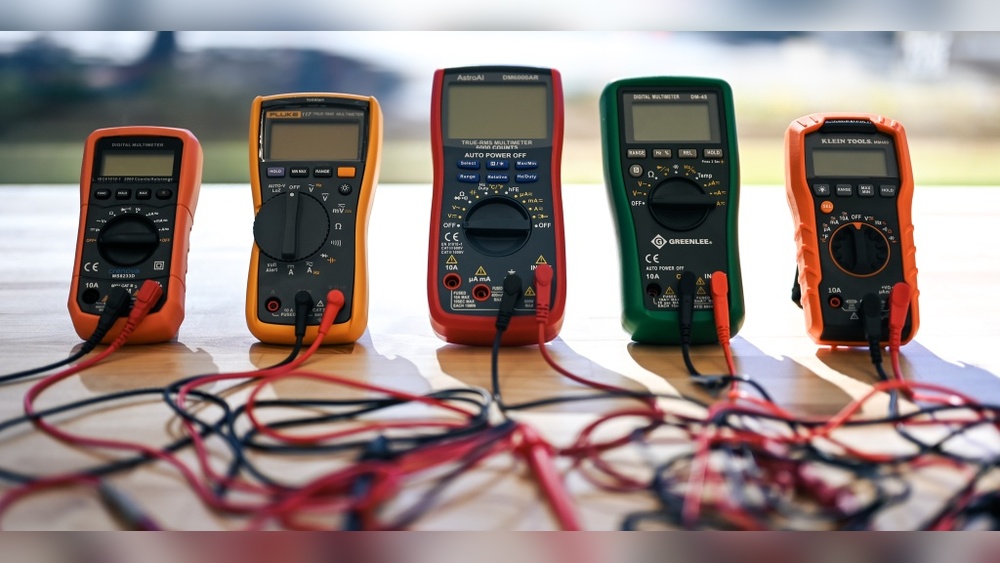
Credit: www.techgearlab.com
Understanding Multimeters: The Basics
A multimeter is a handheld device that measures electrical values such as voltage, current, and resistance. Modern digital multimeters (DMMs) have largely replaced analog models, offering improved precision, reliability, and user-friendliness.
What Does A Multimeter Measure?
- Voltage (Volts, V): Measures the electrical potential difference between two points. Used to check outlets, batteries, and circuits.
- Current (Amperes, A): Indicates the flow of electric charge. Useful for diagnosing appliance performance or identifying overloaded circuits.
- Resistance (Ohms, Ω): Checks whether a wire or component is conducting electricity properly.
Some multimeters also measure:
- Continuity: Confirms if a circuit is complete (often with an audible beep).
- Diode testing: For checking semiconductor devices.
- Capacitance, frequency, temperature: Advanced features found in higher-end models.
Types Of Multimeters
- Analog Multimeters: Use a needle and dial; harder to read but sometimes preferred for detecting trends in fluctuating signals.
- Digital Multimeters (DMMs): Display readings numerically, often with backlit screens, making them ideal for beginners and advanced users alike.
Why Every Home Should Have A Multimeter
A quality multimeter can:
- Help identify faulty outlets or switches.
- Test batteries for remotes, toys, or smoke detectors.
- Diagnose issues with appliances, thermostats, and lighting.
- Increase safety by verifying power is off before repairs.
Credit: electrozlab.com
Essential Features For Home Multimeters
Not all multimeters are created equal. Let’s break down the most important features you should consider for home use.
Basic Must-have Features
- AC/DC Voltage Measurement: Essential for testing wall outlets, batteries, and devices.
- Continuity Testing: Quickly checks if wires or fuses are intact.
- Resistance Measurement: Useful for troubleshooting wiring and components.
User-friendly Design Elements
- Large, Clear Display: Look for models with backlit screens and large digits.
- Sturdy Build: Drop-resistant casings and quality leads are critical for durability.
- Simple Controls: Rotary dials and clear labels help prevent mistakes.
Safety Features
- Non-Contact Voltage Detection (NCV): Allows you to detect live wires without direct contact, an excellent safety boost for beginners.
- Auto-Ranging: Automatically selects measurement range, reducing the chance of user error.
- Safety Ratings: Look for CAT II or CAT III ratings for household use (refer to Fluke’s CAT ratings guide).
Advanced Features For Power Users
- True RMS Measurement: Delivers accurate readings even with irregular (non-sinusoidal) AC signals, useful for modern appliances.
- Data Hold/Min-Max Functions: Keeps readings on screen for convenience.
- Temperature Measurement: Handy for HVAC work or advanced troubleshooting.
- Connectivity: Some models offer Bluetooth or USB logging for data tracking.
Example: Comparing Feature Sets
| Feature | Basic Home Model | Advanced Model |
|---|---|---|
| AC/DC Voltage | ✔️ | ✔️ |
| Auto-Ranging | Optional | ✔️ |
| Non-Contact Voltage | Optional | ✔️ |
| True RMS | , | ✔️ |
| Temperature | , | ✔️ |
| Bluetooth/USB | , | Optional |

Credit: www.youtube.com
Top Multimeter Brands For Home Use
Brand reputation matters. Reliable brands invest in safety, accuracy, and support, crucial for peace of mind.
Fluke
A leader in the field, Fluke is synonymous with precision and durability. While often pricier, Fluke multimeters are favored by professionals and DIYers alike.
- Best For: Those seeking a long-term investment and advanced capabilities.
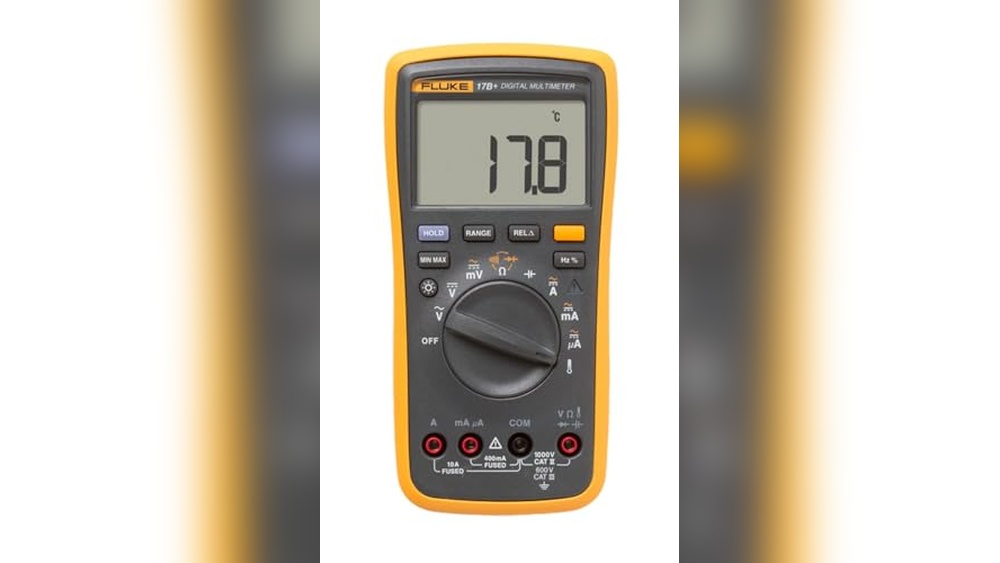
- Popular Model: Fluke 117, compact, True RMS, with non-contact voltage detection.
Klein Tools
Klein Tools multimeters strike a balance between affordability and professional-grade features. They’re rugged, accurate, and widely available.
- Best For: Homeowners wanting reliability without breaking the bank.
- Popular Model: Klein Tools MM400, auto-ranging, CAT III safety, temperature measurement.
Astroai
A favorite among beginners, AstroAI offers budget-friendly digital multimeters that cover all basic home needs.
- Best For: Casual users or those new to electrical testing.
- Popular Model: AstroAI Digital Multimeter, simple, accurate, and easy to use.
Extech
Extech offers a wide range of models, from entry-level to advanced, with a reputation for innovation and value.
- Best For: Users seeking a mix of features and price points.
- Popular Model: Extech EX330, compact, auto-ranging, includes temperature.
Real-world Example: Brand Comparison
| Brand | Entry Price | Key Feature | Warranty |
|---|---|---|---|
| Fluke | $120+ | True RMS, NCV | 3 years |
| Klein Tools | $40+ | Auto-Ranging, Temp | 2 years |
| AstroAI | $15+ | Basic AC/DC, Continuity | 1 year |
| Extech | $35+ | Auto-Ranging, Temp | 1-2 years |
How To Choose The Right Multimeter: A Step-by-step Guide
Selecting the best multimeter for your home depends on your specific needs, experience level, and budget. Use this structured approach to make a confident decision.
Step 1: Define Your Use Cases
- Simple Checks: Testing batteries, bulbs, or fuses.
- Home Repairs: Troubleshooting outlets, switches, or small appliances.
- Advanced Projects: Smart home wiring, HVAC, or automotive repairs.
Pro Tip: Start with a basic model if you’re new, but consider an advanced unit if you plan to expand your DIY skills.
Step 2: Match Features To Your Needs
- Beginners: Prioritize auto-ranging, non-contact voltage, and a clear display.
- Intermediate Users: Look for True RMS, temperature, and data hold functions.
- Advanced Users: Opt for models with logging, advanced current measurement, and CAT III safety.
Step 3: Set Your Budget
- Entry-Level ($15, $40): Covers most home basics. Ideal for infrequent use.
- Mid-Range ($40, $100): Adds durability, more features, and higher safety ratings.
- Premium ($100+): Professional grade, robust build, and advanced measurements.
Step 4: Check Safety Ratings
- CAT II: Safe for appliances and outlets.
- CAT III: Suitable for main panels and more hazardous environments.
- Fused Inputs: Protects you and the device during current testing.
Refer to the manufacturer’s documentation and the Wikipedia multimeter entry for further safety explanation.
Step 5: Read Reviews And Testimonies
Look for feedback on:
- Ease of use
- Durability
- Accuracy
- Customer support
In my experience, hands-on testing and reading real user reviews have prevented costly mistakes.
Beginner’s Guide: How To Use A Multimeter Safely
If you’re new to multimeters, don’t worry, basic testing is straightforward. Here’s a beginner-friendly walkthrough.
Getting Started
- Read the Manual: Every model has unique functions; always start here.
- Inspect the Multimeter: Check leads for damage and ensure batteries are fresh.
- Understand the Ports: Most meters have three ports: COM (common, black), VΩmA (red for voltage/resistance/current), and 10A (high current).
Measuring Voltage
- Plug leads: Black into COM, red into VΩ.
- Set dial: To ACV (for outlets) or DCV (for batteries).
- Touch probes: Black to neutral/negative, red to hot/positive.
- Read value: Digital display shows real-time voltage.
Checking Continuity
- Set dial: To continuity (often a diode/beep symbol).
- Touch probes: Across the wire or fuse.
- Listen/Look: Beep or near-zero reading means good continuity.
Measuring Resistance
- Set dial: To Ω symbol.
- Touch probes: Across the component.
- Read value: Higher numbers mean more resistance; zero means a short.
Warning:
Never attempt to measure current in a live AC outlet unless you have advanced training and a CAT III rated multimeter with proper fused input. For beginners, stick to voltage and continuity checks.
Example: Safe Battery Test
To check if an AA battery is still good:
- Set the dial to DCV (20V range).
- Place the black probe on the flat end (negative) and red on the bump (positive).
- A fresh AA battery should read around 1.5V. If below 1.2V, it’s likely time to replace.
Advanced Multimeter Techniques For Home Enthusiasts
Once you’re comfortable with the basics, you can use your multimeter for more sophisticated diagnostics and projects.
Testing Household Appliances
- Current Draw: Use the 10A port and correct dial setting to measure the amperage of appliances (always check the manual for limits).
- Temperature Probes: Some advanced DMMs include a thermocouple for checking oven or HVAC system temperatures.
Diagnosing Smart Home Circuits
Modern homes often contain LED drivers, USB outlets, and low-voltage controls. Advanced multimeters with True RMS and frequency measurement allow for accurate troubleshooting of these circuits.
Data Logging And Connectivity
Some models connect via Bluetooth or USB, letting you log voltage or current trends over time, a powerful tool for identifying intermittent faults.
Example: Diagnosing A Tripping Breaker
A homeowner notices a breaker that trips randomly. Using a True RMS multimeter, they measure the current draw of each appliance on the circuit. The data reveals that a faulty refrigerator compressor causes a spike, which leads to targeted repairs and resolves the issue.
Professional Consultation
For any work involving main breaker panels, unfamiliar wiring, or signs of overheating, always consult a licensed electrician. DIY diagnosis is valuable, but safety is paramount.
Maintenance And Care Tips For Multimeters
A well-maintained multimeter can last decades. Here’s how to keep yours in top shape.
Regular Inspection
- Check Leads: Look for cracks, fraying, or exposed wires.
- Inspect Case: Ensure the casing is intact and the dial moves smoothly.
- Test Fuses: Replace blown fuses immediately (use only rated replacements).
Proper Storage
- Dry Environment: Store in a cool, dry place to prevent corrosion.
- Protective Case: Use the included case or pouch to avoid drops and dust.
- Remove Batteries: If not using for extended periods, remove batteries to prevent leakage.
Calibration
Professional or high-end models should be calibrated periodically, especially if used for critical measurements. Some manufacturers offer calibration services or recommend third-party labs.
Battery Replacement
Low batteries can cause inaccurate readings. Replace with high-quality batteries as soon as the low-battery indicator appears.
Example: Multimeter Lifespan
A 10-year-old Fluke 117, regularly cleaned and calibrated, remains as accurate as when first purchased, underlining the value of routine care.
Real-world Case Studies: Multimeters In Action
Case Study 1: Saving Money By Testing Outlets
A homeowner notices flickering lights. With a basic digital multimeter, they test the affected outlets and discover a loose neutral connection. Tightening the wires resolves the issue, avoiding an expensive electrician visit.
Case Study 2: Diagnosing A Faulty Appliance
A refrigerator stops cooling. Using a multimeter, the owner tests for voltage at the outlet (120V confirmed), then continuity across the compressor start relay (open circuit detected). Replacing the relay restores proper function.
Case Study 3: Advanced Smart Home Troubleshooting
An advanced DIYer notices smart light switches are unresponsive. With a True RMS multimeter, they identify irregular voltage fluctuations caused by an overloaded LED driver. Upgrading the driver fixes the problem.
Comparison Table: Best Multimeters For Home Use (2026)
| Model | Price Range | Best For | Key Features | Safety Rating |
|---|---|---|---|---|
| Fluke 117 | $120, $150 | Advanced users | True RMS, NCV, Backlit Display | CAT III |
| Klein Tools MM400 | $40, $60 | General home use | Auto-Ranging, Temp, Backlit | CAT III |
| AstroAI Digital Multimeter | $15, $25 | Beginners | AC/DC Voltage, Continuity, Resistance | CAT II |
| Extech EX330 | $35, $55 | Value seekers | Auto-Ranging, Temp, NCV | CAT III |
Expert Recommendations: Matching Multimeters To User Profiles
For Beginners
- AstroAI Digital Multimeter
- Klein Tools MM300
- Features: Simple interface, clear display, essential measurements.
- Why: Minimized risk of mistakes, affordable entry, easy learning curve.
For Intermediate Diyers
- Klein Tools MM400
- Extech EX330
- Features: Auto-ranging, temperature, CAT III safety.
- Why: More features without overwhelming complexity, suitable for most home projects.
For Advanced Users
- Fluke 117
- Extech EX570
- Features: True RMS, min/max, non-contact voltage, logging.
- Why: Handles complex diagnostics, higher precision, robust safety.
Pro Tip: If you plan to work on vehicles, HVAC, or smart home systems, invest in a model with True RMS and temperature measurement.
Common Mistakes To Avoid When Using A Multimeter
Using The Wrong Setting
Measuring voltage while set to current (or vice versa) can damage the meter or cause injury. Always double-check the dial position before testing.
Ignoring Safety Ratings
Using a CAT II meter on a main panel exposes you to risk. Match the meter’s safety category to the job.
Skipping Lead Inspection
Damaged leads are a leading cause of inaccurate readings and electric shock. Replace them at the first sign of wear.
Attempting High-current Tests Unprepared
Measuring household mains current is hazardous. Only do so if you have a CAT III or higher meter, proper training, and fused leads.
Not Removing Power When Testing Resistance
Measuring resistance on a live circuit can destroy your meter. Always disconnect power before resistance or continuity checks.
Frequently Asked Questions
What’s The Difference Between Auto-ranging And Manual-ranging Multimeters?
Auto-ranging multimeters automatically select the correct range for the measurement you’re taking, making them easier and safer for beginners. Manual-ranging models require you to choose the range, which can be faster for experienced users but risks incorrect readings if set improperly.
How Do I Know If My Multimeter Is Accurate?
Most reputable brands calibrate their meters before sale. For extra assurance, check your multimeter with a known voltage source, such as a fresh 1. 5V AA battery. If readings are consistently off, consult the manual about calibration or contact the manufacturer for support.
Can I Use A Home Multimeter For Automotive Or Hvac Work?
Many home multimeters can be used for automotive or HVAC diagnostics if they support DC voltage, current, and temperature measurements. However, for advanced diagnostics (like alternator ripple or variable frequency drives), a model with True RMS and higher current capacity is recommended.
Is It Safe To Buy A Cheap Multimeter Online?
Affordable multimeters from reputable brands like AstroAI or Klein Tools are safe for basic use. Be wary of unbranded models with no safety certifications, as these may lack protection against high voltage or current faults. Always verify the product’s safety category (CAT II or III) and check for reviews.
What Should I Do If My Multimeter Stops Working Or Gives Erratic Readings?
First, replace the batteries and check the fuses. Inspect the leads for damage and ensure all settings are correct. If the problem persists, consult the manual or contact customer support, do not attempt repairs on your own if the device is still under warranty.
Selecting the best multimeter for home use ultimately comes down to your individual needs, experience level, and willingness to invest in safety and reliability. A quality digital multimeter is an indispensable tool for both everyday troubleshooting and tackling advanced projects, and can save you time, money, and frustration for years to come.
Start with your must-have features, choose a trusted brand, and always put safety first, your confidence and skills will grow with every use.