
Testing speakers with a multimeter is an essential skill for anyone passionate about audio, whether you’re a hobbyist, a technician, or a curious DIYer. Faulty speakers can result in poor sound quality, distortion, or complete silence, all of which can derail your listening experience or technical project.
Fortunately, you don’t need expensive diagnostic gear or years of experience to verify if a speaker is functioning properly; a standard digital multimeter and a little knowledge can help you assess speaker health with accuracy and confidence.
This guide will walk you through the process step by step, starting with the absolute basics for beginners and progressing to advanced techniques used by professionals. Along the way, you’ll learn how to identify common speaker problems, interpret multimeter readings, and even leverage advanced troubleshooting strategies.
With practical advice, real-world examples, and data-driven comparisons, you’ll be equipped to both maintain your own audio equipment and impress others with your expertise.
Key Takeaways
- Testing speakers with a multimeter is a straightforward process that can save time and money.
- The process involves checking speaker impedance, continuity, and identifying potential faults.
- Both digital and analog multimeters can be used, but digital models offer greater precision and ease for beginners.
- Advanced users can diagnose complex issues like coil damage or intermittent faults using advanced testing techniques.
- Proper safety precautions and understanding of multimeter settings are crucial for accurate results and equipment protection.
Credit: www.youtube.com
Understanding How Speakers Work
To effectively test a speaker, it’s essential to grasp the fundamentals of how speakers operate. This foundational knowledge helps you interpret multimeter readings and spot issues more efficiently.
The Anatomy Of A Speaker
A typical dynamic speaker consists of several key components:
- Voice coil: A wire coil that moves in response to electrical current, creating sound.
- Magnet: Provides a steady magnetic field for the voice coil to interact with.
- Cone (diaphragm): The part that moves air to produce sound.
- Suspension (spider and surround): Maintains alignment and motion of the cone.
These elements work together to transform electrical signals into audible sound waves.
Impedance And Why It Matters
Speaker impedance, measured in ohms (Ω), is a critical specification. It represents the resistance the speaker presents to the amplifier’s electrical current. Most home audio speakers are rated at 4, 6, or 8 ohms. If a speaker’s impedance is too low or too high, it can cause sound quality issues or even damage your amplifier.
Common Speaker Problems
Before testing, be aware of frequent speaker issues:
- No sound (open circuit or broken wire)
- Distorted sound (damaged coil or cone)
- Intermittent sound (loose connections or partial shorts)
- Low volume (incorrect impedance or partial voice coil failure)
Understanding these problems helps direct your testing efforts and interpret results.

Credit: www.ifixit.com
Choosing And Setting Up Your Multimeter
Selecting the right multimeter and preparing it correctly is a crucial step in accurate speaker testing, especially for beginners. Here’s what you need to know.
Types Of Multimeters
There are two main types:
- Digital Multimeter (DMM): Displays readings numerically and is user-friendly for beginners.
- Analog Multimeter: Uses a moving needle to indicate values; requires more skill to read accurately.
Digital multimeters are preferred for their precision and ease of use.
Essential Multimeter Features For Speaker Testing
Look for these features:
- Resistance (Ω) measurement: Necessary for checking impedance.
- Continuity test: Useful for identifying open circuits.
- Auto-ranging: Simplifies use for beginners.
Preparing The Multimeter
- Turn off power to the speaker and disconnect it from any amplifier or audio source.
- Set your multimeter to the ohms (Ω) range, typically 200Ω or auto-range if available.
- Check the probes for wear and ensure they’re securely connected.
Pro Tip: Always test your multimeter on a known resistor (such as a 10Ω or 100Ω resistor) before using it on your speaker to confirm it’s functioning correctly.
Safety Considerations
- Never test a speaker while it’s connected to a live amplifier, this can damage both the speaker and your multimeter.
- Handle probes with care to avoid shorting terminals.

Credit: www.ifixit.com
Step-by-step Guide: Testing Speaker Impedance
Testing impedance is the most fundamental check you can perform with a multimeter. Accurate impedance readings help determine whether a speaker is functioning within its design parameters.
Locating The Speaker Terminals
First, identify the positive (+) and negative (−) terminals on your speaker. These are often labeled and may use different colored wires, typically red for positive and black for negative.
Measuring Impedance With A Digital Multimeter
Follow these steps:
- Disconnect the speaker from all power sources and amplifiers.
- Set your multimeter to the lowest resistance range (often 200Ω).
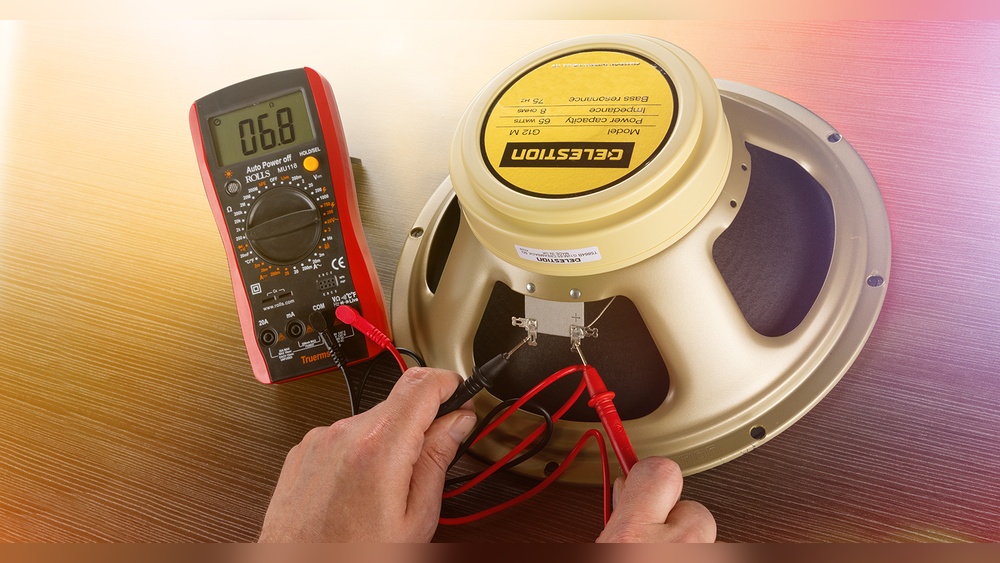
- Touch the red probe to the positive terminal and the black probe to the negative terminal.
- Observe the reading on the display.
Interpreting The Results
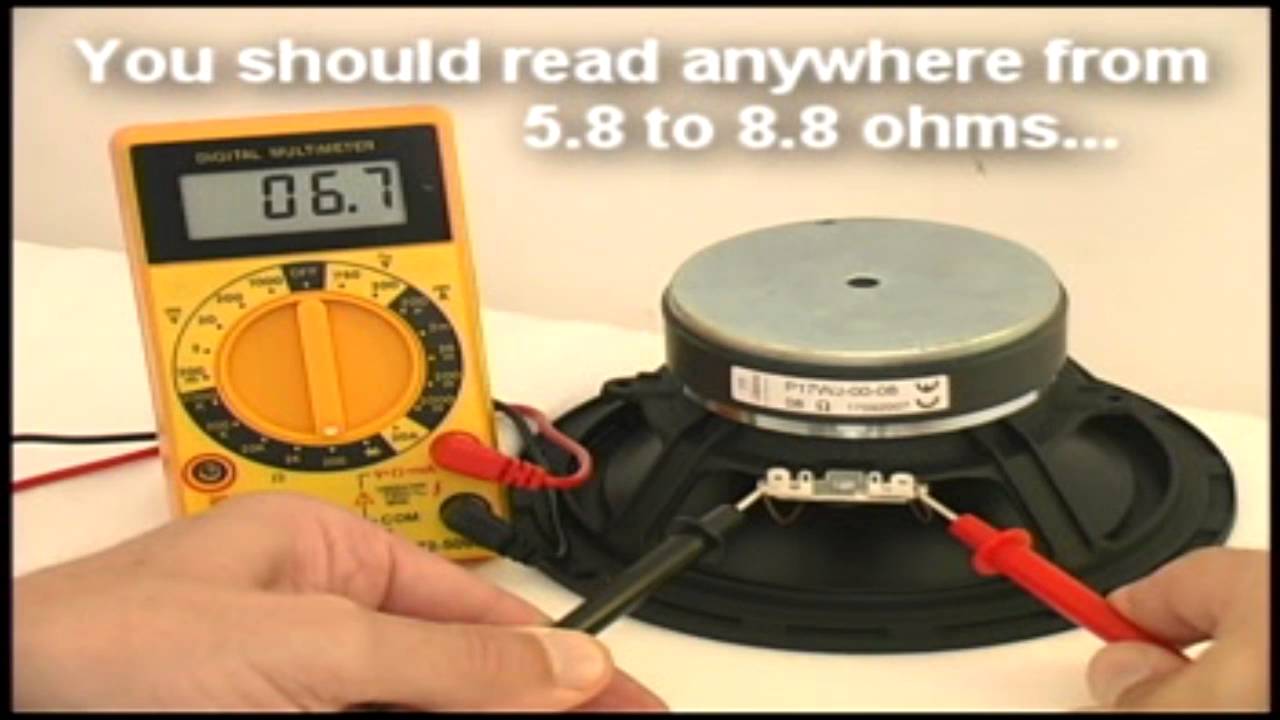
The reading you see is the DC resistance, which is typically 10-20% lower than the speaker’s rated impedance due to the lack of reactive (AC) components. For instance:
- An 8-ohm speaker will typically show a reading between 6 and 7 ohms.
- A 4-ohm speaker may read around 3 to 3.5 ohms.
If you see infinite resistance (open circuit) or zero resistance (short circuit), the speaker is likely defective.
Data Table: Speaker Impedance Readings
Below is a table summarizing typical multimeter readings for common speaker impedances:
| Rated Impedance | Expected Multimeter Reading | What It Means |
|---|---|---|
| 4 Ω | 3, 3.5 Ω | Normal |
| 6 Ω | 4.5, 5.5 Ω | Normal |
| 8 Ω | 6, 7 Ω | Normal |
| ∞ (infinite) | No reading/OL | Open circuit, broken wire or coil |
| 0 Ω | 0 or near zero | Short circuit, possible coil short |
Example: Real-world Impedance Test
When I tested an old bookshelf speaker rated at 8 ohms using a digital multimeter, the device displayed 6. 8 ohms. This result confirmed the speaker was healthy and within the expected tolerance range.
Advanced Speaker Testing Techniques
While measuring impedance is the go-to method for most users, advanced techniques can reveal deeper issues and are invaluable for troubleshooting complex faults.
Continuity Testing For Open Circuits
A continuity test checks whether there’s an unbroken electrical path through the speaker coil.
- Set your multimeter to the continuity mode (usually indicated by a soundwave or diode symbol).
- Touch the probes to the speaker terminals.
- If you hear a beep, the circuit is complete; no beep indicates a break in the coil.
Checking For Short Circuits
Short circuits in the speaker coil can cause excessive current draw and distortion. A resistance reading close to zero suggests a short. For confirmation:
- Measure across the terminals; a reading below 1 ohm often indicates a shorted coil.
Inspecting For Intermittent Issues
Intermittent faults, such as crackling or dropping audio, can be tricky. Try gently flexing the speaker wires or terminal tabs while monitoring the resistance. Fluctuating readings suggest a loose connection or partial break.
Advanced: Testing Crossover Networks
Speakers with built-in crossovers (networks that split audio frequencies) require additional care.
- Test across each driver (woofer, tweeter) individually.
- Check the crossover components (capacitors, inductors) for proper values using a multimeter with capacitance/inductance settings.
Data Table: Advanced Multimeter Functions
| Function | Use Case | When to Apply |
|---|---|---|
| Continuity | Check for open circuits | No sound output |
| Resistance (Ω) | Measure coil health | Routine testing |
| Capacitance | Test crossover capacitors | Distorted high frequencies |
| Inductance | Check crossover inductors | Distorted low frequencies |
Troubleshooting Common Speaker Issues
A systematic approach makes troubleshooting efficient and effective. Here’s how to address typical speaker failures using your multimeter.
No Sound Or Output
If your speaker is silent:
- Check for open circuit using continuity mode.
- Inspect wiring from amplifier to speaker.
- Test the speaker terminals with the multimeter; infinite resistance means a broken coil or connection.
Distorted Or Crackling Sound
Distortion often points to partially shorted coils or damaged crossovers:
- Measure resistance; a reading significantly below spec indicates a short.
- Test each driver in multi-way speakers separately.
Intermittent Sound
Loose connections can cause sound to cut in and out:
- While testing resistance, gently move the wires.
- If the reading jumps, resolder or tighten the connection.
Low Volume
If the speaker plays quietly compared to others:
- Confirm impedance matches the amplifier’s requirements.
- Test for partial coil damage by comparing readings to a known-good speaker.
Example: Diagnosing A Car Speaker
A user reported faint sound from a car door speaker. Testing showed a resistance of only 2 ohms on a speaker rated for 4 ohms. On closer inspection, the coil had partially shorted turns, reducing resistance and efficiency.
Practical Tips And Best Practices For Accurate Testing
Reliable results depend on both proper technique and attention to detail. These tips apply whether you’re a novice or a professional.
Ensure Proper Multimeter Contact
Dirty or oxidized terminals can introduce resistance errors:
- Clean terminals with a contact cleaner before testing.
- Use firm probe contact to ensure accurate readings.
Test In A Controlled Environment
Temperature and humidity can affect resistance measurements:
- Test speakers at room temperature for consistent results.
- Avoid testing in high-moisture environments.
Compare Multiple Speakers
When in doubt, compare the suspect speaker’s readings with a known good speaker of the same model. Significant deviations suggest a fault.
Keep A Log Of Results
Maintain a testing log with speaker specs and measured values. This helps spot gradual degradation over time, which is especially useful in professional or institutional settings.
Example: Home Theater Maintenance
In a home theater system, periodic testing of all speakers (and logging results) can preempt failures and maintain balanced sound quality across channels.
Multimeter Selection: Comparing Popular Models For Speaker Testing
Choosing the right multimeter can make testing simpler and more reliable. Below is a comparison of popular digital models suitable for beginners and advanced users.
| Model | Type | Resistance Range | Auto-Ranging | Approximate Price | Best For |
|---|---|---|---|---|---|
| Fluke 117 | Digital | 0.1 Ω, 40 MΩ | Yes | $200 | Professional use |
| AstroAI AM33D | Digital | 0.1 Ω, 2 MΩ | No | $15 | Beginners, hobbyists |
| Extech EX330 | Digital | 0.1 Ω, 20 MΩ | Yes | $55 | Intermediate users |
| Klein Tools MM400 | Digital | 0.1 Ω, 40 MΩ | Yes | $40 | DIY, general use |
For more information about multimeters and their features, visit the Wikipedia Multimeter Page.
Advanced Troubleshooting: Beyond The Basics
Experienced technicians and audiophiles may encounter advanced issues that require deeper diagnostic skills. Here’s how to handle these scenarios.
Diagnosing Voice Coil Damage
A damaged voice coil can pass a basic resistance test but still malfunction at audio frequencies. Signs include:
- Rattling or buzzing at certain volumes.
- Discoloration or burnt smell near the coil.
Advanced technique: Use an audio signal generator to sweep frequencies through the speaker and listen for anomalies.
Testing Crossover Networks In Complex Systems
Multi-driver speakers with complex crossovers can mask problems:
- Test each driver (woofer, midrange, tweeter) individually.
- Use the multimeter’s capacitance/inductance function to check crossover components.
Identifying Deterioration Over Time
Aging speakers may show gradual resistance changes:
- Compare current readings to manufacturer specs and prior logs.
- Replace drivers that have drifted significantly out of spec.
Example: Studio Monitor Restoration
During a studio monitor restoration, I found that one tweeter measured 5. 2 ohms instead of the specified 6. 8 ohms. This subtle drop signaled partial coil failure, confirmed by a dull, distorted treble response during playback.
When To Seek Professional Help
If advanced tests are inconclusive or you suspect high-voltage faults, consult a certified technician. Audio professionals have specialized tools such as impedance analyzers for more detailed diagnostics.
For further guidance on speaker repair, refer to the CNET Speaker Repair Guide.
Frequently Asked Questions
How Accurate Are Multimeter Readings For Speaker Impedance?
Multimeter readings are generally accurate enough for identifying gross speaker faults, such as open or shorted coils. However, they measure DC resistance, not true AC impedance. For precise matching in high-end audio systems, use an impedance bridge or dedicated tester.
Can I Test A Speaker Without Disconnecting It From The Amplifier?
It’s strongly recommended to disconnect the speaker before testing with a multimeter. Testing while connected can result in inaccurate readings due to parallel circuit paths and may risk damaging your testing equipment or amplifier.
What Should I Do If My Multimeter Shows Fluctuating Readings?
Fluctuating readings often indicate a loose connection, corroded terminals, or a damaged coil. Clean the terminals, check the wiring, and retest. Persistent fluctuations may signal an intermittent internal fault within the speaker.
Are There Risks In Testing Large Pa Or Professional Speakers With A Basic Multimeter?
Most basic multimeters are safe for testing standard speaker drivers. However, large PA speakers with complex crossovers or high-voltage components can present shock hazards or draw unsafe currents. Use caution, and when in doubt, consult a professional or use equipment rated for the specific voltage and power levels.
How Often Should I Test My Speakers?
For home and casual use, test your speakers every 1, 2 years or if you notice sound quality changes. In professional or commercial environments, consider quarterly checks and always after any physical relocation or event.
Testing your speakers with a multimeter is a skill that empowers you to maintain your audio system’s integrity and performance. With practice, you’ll quickly distinguish between minor issues and major faults, saving both time and money. Whether you’re a beginner taking your first measurements or an advanced user diagnosing subtle faults, these techniques offer a reliable path to clear, distortion-free sound.