

Testing batteries is a common task for homeowners, DIY enthusiasts, and professionals alike. Whether you’re troubleshooting why the remote control isn’t working, checking if your car battery is still good, or maintaining rechargeable batteries for tools or electronics, knowing the health of your batteries can save time, money, and frustration. One device frequently recommended for this purpose is the multimeter, a versatile tool found in the toolkit of anyone dealing with electronics. But can you really use a multimeter to test batteries effectively, or are there limitations you need to know?
In my experience, many beginners are uncertain about what a multimeter can do when it comes to batteries. There’s also confusion around what the numbers mean, how to interpret results, and which settings to use. This article breaks down the process step-by-step, explains what you can (and can’t) learn from a multimeter, and offers practical tips for both novices and those seeking deeper insight.
We’ll also examine real-world examples, compare techniques, and provide data-driven tables to support your battery testing journey.
Key Takeaways
- A multimeter can accurately measure battery voltage and give a quick indication of battery health, but understanding its limitations is crucial.
- Both simple and advanced testing methods exist, with load testing offering a more realistic picture for certain battery types.
- Safety precautions are essential when testing high-capacity or rechargeable batteries.
- Interpreting multimeter readings correctly can prevent unnecessary battery replacements and support better electronics maintenance.
- Regular testing with a multimeter can extend the life of devices and save money.
- Choosing the right testing method depends on battery type, application, and the level of accuracy required.
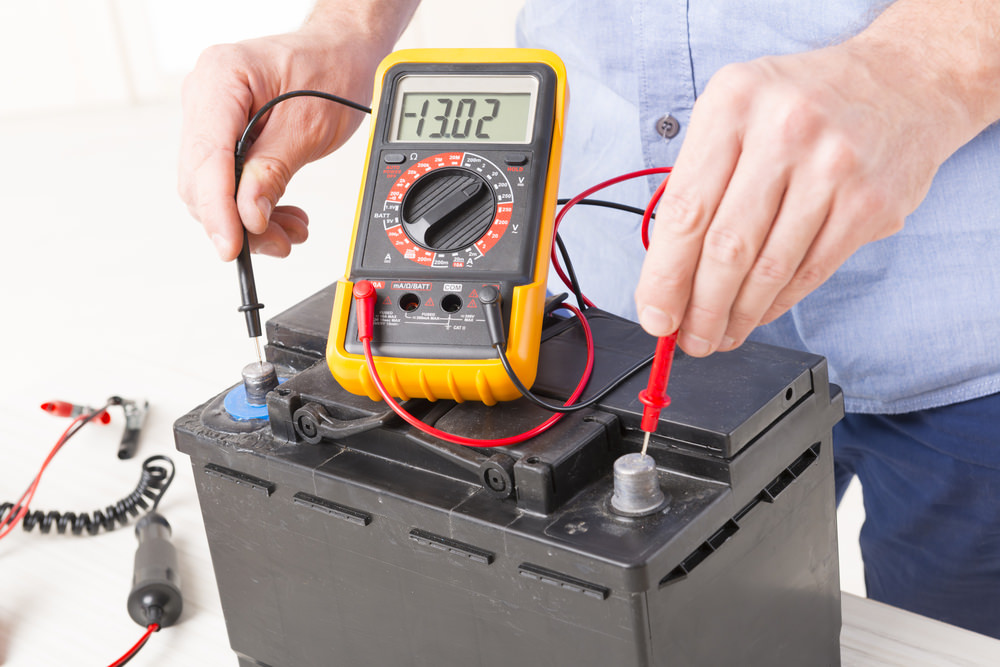
Credit: executivetowingservices.com.au
Understanding Multimeters: Functions And Limitations
Before testing batteries, it’s essential to understand what a multimeter is and what it measures. A multimeter is an electronic measuring instrument that combines several functions in one unit, primarily measuring voltage (volts), current (amperes), and resistance (ohms). Most modern multimeters are digital (DMMs), offering precise readings and easy-to-read displays.
Basic Functions Of A Multimeter
- Voltage Measurement (DC/AC): Used to check the electrical potential difference between two points.
- Current Measurement (Amps): Measures the flow of electric charge.
- Resistance Measurement (Ohms): Indicates how much a component resists the flow of current.
Types Of Multimeters
| Feature | Analog Multimeter | Digital Multimeter (DMM) |
|---|---|---|
| Display | Needle Gauge | Digital LCD/LED |
| Accuracy | Moderate | High |
| Ease of Use | Requires Interpretation | User-Friendly |
| Cost | Lower | Moderate to High |
What A Multimeter Can And Cannot Tell You About Batteries
Multimeters are excellent for measuring voltage, which gives a snapshot of the battery’s state at rest. However, they do not measure a battery’s ability to provide power under load (when powering a device), nor do they test capacity (mAh/Ah rating). For deeper insights, additional methods or tools may be needed.
Pro Tip: For most household and consumer battery checks, a standard digital multimeter provides all the information you need to determine whether a battery is usable.

Credit: www.youtube.com
How To Test Batteries With A Multimeter: Step-by-step
Testing a battery with a multimeter is straightforward if you follow the correct steps. Here’s a beginner-friendly guide, along with advanced suggestions for those seeking more nuanced results.
Step 1: Identify The Battery Type And Nominal Voltage
Common battery types include alkaline (AA, AAA, C, D, 9V), rechargeable NiMH, lithium-ion, and lead-acid (car batteries). Each has a standard (nominal) voltage:
| Battery Type | Nominal Voltage (V) | Common Uses |
|---|---|---|
| Alkaline AA/AAA | 1.5 | Remotes, toys, clocks |
| NiMH AA/AAA | 1.2 | Rechargeable electronics |
| 9V Alkaline | 9.0 | Smoke detectors, meters |
| Lithium-ion (18650, etc.) | 3.6/3.7 | Laptops, flashlights |
| Lead-Acid (Car) | 12.0 | Vehicles, backup power |
Step 2: Set The Multimeter Correctly
- Turn the dial to DC Voltage (V⎓): Most batteries output DC voltage.
- Select the appropriate range: For a 1.5V battery, a 2V or 20V setting works; for car batteries, use 20V or higher.
- Insert the probes: Red for positive (+), black for negative (, ).
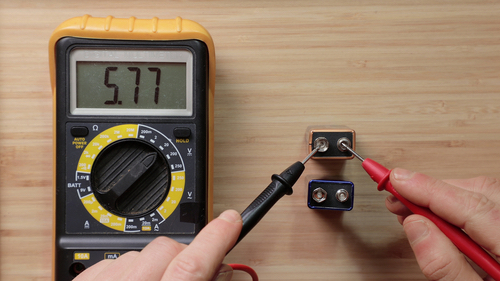
Step 3: Measure The Battery Voltage
- Place the red probe on the battery’s positive terminal.
- Place the black probe on the negative terminal.
- Read the voltage displayed.
Example: If testing a AA battery, a healthy reading is close to 1.5V; if it drops below 1.1V, the battery is usually considered depleted for most applications.
Step 4: Interpret The Results
- Full charge: Voltage at or slightly above nominal.
- Partially used: Voltage slightly below nominal.
- Depleted: Voltage significantly below nominal.
Warning: Some batteries (especially rechargeables) may show higher voltage temporarily after charging but drop quickly under load.
Step 5: Advanced Testing, Load Testing
A “load test” simulates real-world usage by drawing current from the battery during measurement. This method is more accurate for certain battery types.
To perform a basic load test:
- Connect a small resistor (e.g., 10 ohms for AA batteries) in parallel with the battery during measurement.
- Read the voltage as the battery powers the resistor.
Pro Tip: Load testing is especially useful for 9V and larger batteries, where “surface charge” can give a false reading if measured without a load.
Credit: tameson.com
Real-world Examples And Case Studies
Learning from practical scenarios helps solidify understanding. Here are three real-life cases illustrating how multimeter testing applies to common battery situations.
Example 1: Testing Aa Alkaline Batteries In A Remote
Sarah’s TV remote stopped working. She removed the AA batteries and tested them with her digital multimeter. The readings were 1. 48V and 1. 05V. Based on the table above, she realized one battery was nearly full, but the other was depleted.
Replacing just the lower-voltage cell restored the remote’s function.
Example 2: Diagnosing A Car That Won’t Start
John’s car wouldn’t start, and the headlights were dim. Using his multimeter set to 20V DC, he measured the car battery and found it read 11. 8V with the engine off. Since a healthy car battery should be around 12.
6V, this indicated a discharged battery. After charging, the voltage returned to 12. 7V, and the car started reliably.
Example 3: Checking Rechargeable 18650 Lithium-ion Cells
Maria maintained a set of 18650 cells for her electric bike. She tested them after charging and found some read 4. 15V (fully charged), while others were at 3. 4V. Recognizing that lithium-ion cells should not drop below 3. 0V for safety and longevity, she retired the lower-voltage cells, preventing potential battery failure.
Interpreting Multimeter Readings: What The Numbers Mean
Understanding what your multimeter displays is critical for accurate battery assessment. Here’s a breakdown by battery type and a table for quick reference.
Alkaline Batteries
- 1.5V (fresh): New or nearly new.
- 1.3, 1.4V: Good for most devices.
- 1.1, 1.2V: Near end-of-life; may not power high-drain devices.
- Below 1.0V: Depleted.
Rechargeable Nimh/nicd
- 1.4V (just charged): Fully charged.
- 1.2V (nominal): Good condition.
- Below 1.0V: Needs recharging or replacement.
Lithium-ion
- 4.2V (fully charged): Maximum safe voltage.
- 3.7V (nominal): Average.
- Below 3.0V: Risk of damage; do not use.
Car/lead-acid Batteries
- 12.6, 12.8V: Fully charged.
- 12.4V: 75% charged.
- 12.0V: 50% charged.
- Below 11.8V: Discharged.
| Battery Type | Voltage (V) | Status | Action |
|---|---|---|---|
| AA Alkaline | 1.5 | Fresh | Use |
| AA Alkaline | 1.1 | Depleted | Replace |
| 18650 Li-ion | 4.2 | Fully Charged | Use |
| 18650 Li-ion | 3.0 | Low | Recharge/Retire |
| Car Battery | 12.7 | Full | Use |
| Car Battery | 11.8 | Discharged | Charge |
Example: When I tested a set of AA batteries pulled from a wall clock, readings ranged from 1.45V (still good) to 0.97V (completely dead). Swapping only the low-voltage cells restored the clock.
Beyond Voltage: Advanced Battery Testing Techniques
While voltage measurement covers most needs, advanced users may wish to assess battery health more comprehensively. Here are some advanced techniques and tips.
Load Testing In Detail
- Why: Batteries can show normal voltage when not powering a device but fail under load.
- How: Use a resistor or a purpose-built load tester to draw current while measuring voltage. A significant voltage drop under load indicates high internal resistance and poor battery health.
Internal Resistance Measurement
Some advanced multimeters or battery analyzers can measure internal resistance. High resistance means the battery cannot deliver current effectively, even if the voltage appears normal.
- Pro Tip: Internal resistance increases as batteries age, especially in rechargeables.
Capacity Testing (mah/ah)
- What: Measures how much charge the battery can deliver over time.
- How: Requires specialized testers that cycle the battery through a controlled discharge and measure the output.
- Why: Critical for applications requiring long runtimes (e.g., cameras, drones).
Temperature And Safety Considerations
- Warning: Never short-circuit a battery or apply excessive load, this can cause overheating, leakage, or explosion, especially with lithium-ion cells.
- Always use appropriate personal protective equipment (PPE) when testing large or high-capacity batteries.
Multimeter Testing Best Practices And Safety Tips
Using a multimeter is generally safe, but batteries, especially powerful ones, require caution. Follow these best practices to ensure accurate readings and avoid accidents.
Safety First
- Check for damage: Never test leaking, swollen, or damaged batteries.
- Use proper settings: Set the multimeter to the correct voltage range before connecting.
- Observe polarity: Red probe to positive, black to negative.
- Avoid short circuits: Never allow probes to touch together on the battery terminals.
Accuracy Tips
- Test at room temperature: Cold batteries may show lower voltage.
- Test after rest: Rechargeable batteries should “rest” for 30 minutes after charging before testing.
- Use fresh probes: Dirty or oxidized probes can give false readings.
Environmental Considerations
- Dispose of depleted batteries properly: Follow local recycling guidelines for safe, environmentally responsible disposal.
- Store batteries safely: Keep unused batteries in their original packaging or a battery case to prevent accidental discharge or short-circuit.
Choosing The Right Multimeter For Battery Testing
Not all multimeters are created equal. For battery testing, certain features can make the process easier and safer.
Essential Features For Beginners
- Auto-ranging: Automatically selects the correct measurement range, reducing user error.
- Clear digital display: Easy-to-read numbers minimize misinterpretation.
- Sturdy probes: Well-insulated and color-coded for safety.
Advanced Features For Experienced Users
- True RMS measurement: Useful for more complex electrical troubleshooting.
- Data hold and min/max functions: Capture changing readings, especially during load testing.
- Built-in internal resistance measurement: Available on higher-end models.
Popular Multimeter Brands
Some reputable brands include Fluke, Klein Tools, and Extech. These manufacturers are known for reliability and accuracy, making them a good investment for frequent users.
Cost Vs. Quality
| Price Range | Features | Suitable For |
|---|---|---|
| $10, $30 | Basic voltage, resistance, continuity | Beginners, home use |
| $30, $100 | Auto-ranging, backlit display, better probes | DIYers, hobbyists |
| $100+ | Advanced functions, high accuracy, rugged | Professionals, engineers |
Example: When starting out, I used a $20 multimeter for years before upgrading to a professional model with more features. For simple battery tests, the basic unit worked perfectly well.
Practical Applications: When And Why To Test Batteries
Battery testing with a multimeter is useful in a wide range of scenarios. Here’s how different users benefit.
Home And Everyday Use
- Remote controls: Quickly determine if the issue is the battery or the device.
- Toys: Save money by replacing only dead batteries, not full sets.
- Clocks and flashlights: Prevent unexpected outages.
Automotive And Outdoor
- Car batteries: Routine testing helps prevent breakdowns and extends battery life.
- RV and marine batteries: Avoid getting stranded by catching weak batteries early.
Electronics Repair And Maintenance
- Laptops and power tools: Identify failing cells in battery packs.
- Solar systems: Ensure backup and storage batteries are holding charge.
Professional And Industrial Contexts
- Facility maintenance: Regular checks reduce downtime and support preventative maintenance schedules.
- Emergency systems: Reliable batteries are critical for alarms, medical equipment, and backup systems.
Pro Tip: Keeping a simple log of battery voltage readings over time can help spot trends and predict when replacement is needed.
Common Mistakes And How To Avoid Them
Even experienced users can fall into common traps when testing batteries. Awareness is the key to reliable results.
Mistake 1: Testing Only Voltage
Relying solely on “open-circuit” voltage (battery not under load) can be misleading, especially for older or damaged batteries that can’t provide current.
Solution: Combine voltage testing with load testing for a more complete picture.
Mistake 2: Ignoring Safety Warnings
Testing damaged, leaking, or swollen batteries is dangerous.
Solution: Always inspect batteries before testing and handle with care. Dispose of any damaged batteries properly.
Mistake 3: Wrong Multimeter Setting
Accidentally setting the multimeter to the wrong range (e. g. , AC instead of DC) can result in false readings or even damage to the device.
Solution: Double-check the settings before connecting probes.
Mistake 4: Not Accounting For Battery Chemistry
Different battery types behave differently. For example, a NiMH cell at 1. 1V is still usable, while an alkaline at that voltage is nearly dead.
Solution: Know the nominal and cutoff voltages for each battery type you’re testing.
Mistake 5: Using Old Or Faulty Probes
Worn-out probes can introduce resistance, causing inaccurate readings.
Solution: Replace or clean probes regularly for consistent results.
Frequently Asked Questions
How Accurate Are Multimeters For Testing Small Batteries Like Aaa Or Coin Cells?
Digital multimeters are generally very accurate for measuring the voltage of small batteries, provided you use the correct settings and fresh probes. However, coin cells, due to their low capacity, may show normal voltage but still fail to deliver adequate current. For coin cells, a load test (using a small resistor during measurement) offers a more realistic assessment than voltage alone.
Can I Use A Multimeter To Test Rechargeable Batteries Safely?
Yes, you can test rechargeable batteries such as NiMH, NiCd, and lithium-ion with a multimeter. However, be aware that some rechargeables may show a higher voltage immediately after charging, which drops quickly under use. Allow batteries to rest for about 30 minutes before testing for a more stable reading. Always observe proper polarity and avoid shorting the terminals.
Is It Possible To Test A Battery’s Capacity (mah) With A Multimeter?
A standard multimeter cannot directly measure a battery’s capacity (mAh or Ah), it only measures voltage and, in some cases, current. To measure true capacity, you need a battery analyzer or dedicated charger that can perform a controlled discharge test. This process records how much energy the battery delivers over time.
Should I Replace All Batteries In A Device At Once, Or Only Those That Test As Low?
It is generally safe and economical to replace only the batteries that test low with your multimeter, especially for devices using batteries in parallel. However, in devices where batteries are connected in series (like most remotes or flashlights), mixing new and old batteries can cause uneven discharge and leakage. When in doubt, consult the device manufacturer’s guidelines.
What If My Multimeter Reads Negative Voltage When Testing A Battery?
A negative voltage reading means the probes are reversed: the red probe is on the negative terminal and the black on the positive. This won’t harm the battery or multimeter, but simply reverse the probes to obtain a positive reading. Consistently reading negative voltage can also help confirm correct battery polarity in unfamiliar battery packs.
Testing batteries with a multimeter is a practical and accessible skill for anyone working with electronics or maintaining devices. With the right approach and an understanding of both the basics and advanced techniques, you can confidently assess battery health, troubleshoot issues, and extend the life of your electronics. Remember to always prioritize safety, use the appropriate testing method for each battery type, and refer to authoritative resources like the Wikipedia Multimeter Page or manufacturer manuals for further information. For those wanting to dive deeper into battery technology and diagnostic equipment, sites like Battery University provide in-depth tutorials and guides. With regular practice and attention to detail, your multimeter will become an indispensable tool for battery maintenance and troubleshooting.