
Using a multimeter to check voltage is a foundational skill for anyone working with electronics, from hobbyists and students to seasoned engineers and electricians. Whether you want to troubleshoot a dead outlet, verify the health of a battery, or diagnose a malfunctioning circuit, knowing how to properly measure voltage can save time, prevent damage, and keep you safe.
Yet, for many beginners, the multimeter appears intimidating, full of symbols, settings, and seemingly endless options. Mastering this tool not only simplifies diagnostics but also opens the door to deeper understanding and more advanced electrical work.
This guide bridges the gap between beginner and expert, providing step-by-step instructions, practical tips, safety warnings, and advanced insights. We’ll explore key concepts, compare different types of multimeters, walk through detailed procedures, and share real-world examples. By the end, you’ll not only know how to measure voltage with confidence but also understand the nuances that separate a routine check from expert-level troubleshooting.
Key Takeaways
- Voltage measurement is one of the most common and essential uses for a multimeter.
- Digital and analog multimeters have important differences in accuracy, usability, and features.
- Correct settings and probe placement are critical for accurate and safe voltage measurements.
- Safety first: Always follow best practices to avoid injury or equipment damage.
- Advanced techniques help professionals diagnose more complex circuit problems.
- Real-world examples and tables in this guide illustrate practical applications and multimeter selection.
Credit: www.youtube.com
Understanding Voltage And Multimeters
What Is Voltage?
Voltage, often called electrical potential difference, is the force that pushes electric current through a circuit. It’s measured in volts (V) and can be thought of as the pressure that drives electrons from one point to another. In everyday life, voltage is what powers household devices (typically 120V or 240V AC), batteries (1.5V, 9V, etc.), and vehicles (12V DC).
Types Of Voltage: Ac Vs Dc
- Direct Current (DC): Flows in one direction; common in batteries and electronics.
- Alternating Current (AC): Changes direction periodically; found in household outlets and mains power.
Pro Tip: Always identify if you’re measuring AC or DC voltage before testing, using the wrong setting can yield incorrect results or damage the meter.
What Is A Multimeter?
A multimeter is a versatile instrument for measuring electrical values such as voltage, current, and resistance. The two main types are:
- Analog Multimeters: Use a moving needle for readings.
- Digital Multimeters (DMMs): Display readings numerically on an LCD.
Here’s a quick comparison:
| Feature | Analog Multimeter | Digital Multimeter (DMM) |
|---|---|---|
| Readout | Needle gauge | Digital display |
| Accuracy | Lower, prone to parallax error | High, easy to read |
| Durability | More robust, no batteries needed for basic functions | Needs batteries for display |
| Price | Usually cheaper | Wide range, affordable to premium |
| Features | Basic | Advanced: auto-ranging, data hold, backlight |
Multimeter Anatomy: Key Components
- Display: Shows readings (LCD for DMMs, needle for analog).
- Rotary Selector (Dial): Sets measurement type and range.
- Probes: Black (common/negative), red (positive).
- Ports: Where probes plug in; usually labeled as COM (common), VΩmA (volts/ohms/milliamps), and sometimes 10A for high current.
Understanding these basics is crucial before you start measuring voltage.
Choosing The Right Multimeter For Voltage Measurement
Digital Vs Analog: Which Is Best?
For voltage measurement, digital multimeters are recommended for most users. They offer:
- Higher accuracy and easier readings.
- Auto-ranging features that reduce setup errors.
- Safety features like overload protection.
Analog meters can be useful for monitoring trends or fluctuating signals, but they are less beginner-friendly.
Key Specifications To Consider
When selecting a multimeter for voltage testing, pay attention to:
- Voltage range: Maximum voltage the meter can safely measure (often up to 600V or 1000V for DMMs).
- Accuracy: Expressed as a percentage (e.g., ±0.5%).
- Input impedance: High input impedance (>1 MΩ) is important for accurate voltage measurements, especially in sensitive electronic circuits.
- Category rating (CAT): Indicates the meter’s safety level for various environments (CAT I-IV). For household mains, choose at least CAT II 600V.
| Feature | Why It Matters | Typical Value |
|---|---|---|
| Voltage Range | Ensures safe measurement | 600V, 1000V |
| Accuracy | Determines precision | ±0.5% or better |
| Input Impedance | Prevents circuit loading | >1 MΩ |
| Category Rating | Safety for environment | CAT II/III/IV |
Popular Multimeter Brands
Some reliable brands include Fluke, Klein Tools, Extech, and Amprobe. While premium models offer advanced features, reputable entry-level models are available for beginners.
Safety Certifications
Always look for UL, CE, or IEC certifications. These indicate the meter meets international safety standards.
Credit: chibitronics.com
Preparing To Measure Voltage Safely
Understanding Safety Hazards
Measuring voltage, especially in high-voltage circuits, carries serious risks. Electrical shock, burns, and equipment damage are possible if precautions are ignored.
Warning: Never attempt to measure voltage in high-energy circuits (like mains power panels) unless you are trained and authorized.
Personal Protective Equipment (ppe)
- Insulated gloves: For high-voltage work.
- Safety glasses: Protect eyes from sparks or debris.
- Insulated shoes: Reduce risk of ground faults.
Multimeter Inspection Checklist
Before every use:
- Check probes for damage (cracks, exposed wires).
- Verify meter case integrity, no cracks or missing parts.
- Check battery status in digital meters.
- Set selector dial to appropriate range and function.
Workspace Preparation
- Ensure dry hands and a dry workspace.
- Remove jewelry or conductive items.
- Keep your body clear of metal surfaces and grounded objects.
Setting The Multimeter Correctly
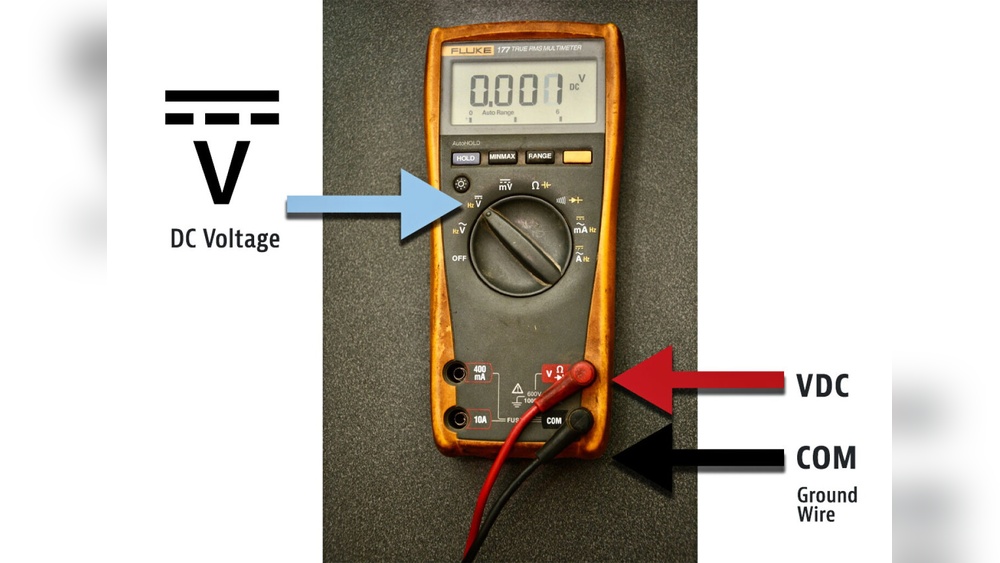
- Insert the black probe into the COM port.
- Insert the red probe into the VΩmA port.
- Set the dial to the correct voltage type (AC or DC) and range.
Pro Tip: If you’re unsure of the voltage level, always start with the highest range and step down if needed.

Credit: www.fluke.com
Step-by-step Guide: Measuring Voltage With A Multimeter
Step 1: Power On And Setup
- Turn on the multimeter.
- Insert probes as described above.
- Set dial to the appropriate voltage type (V~ for AC, V⎓ or V- for DC).
- For auto-ranging meters, select V and let the meter choose the range. For manual meters, choose a range above the expected voltage.
Step 2: Identify Test Points
- DC Voltage: Identify the positive and negative terminals (e.g., battery terminals, circuit board points).
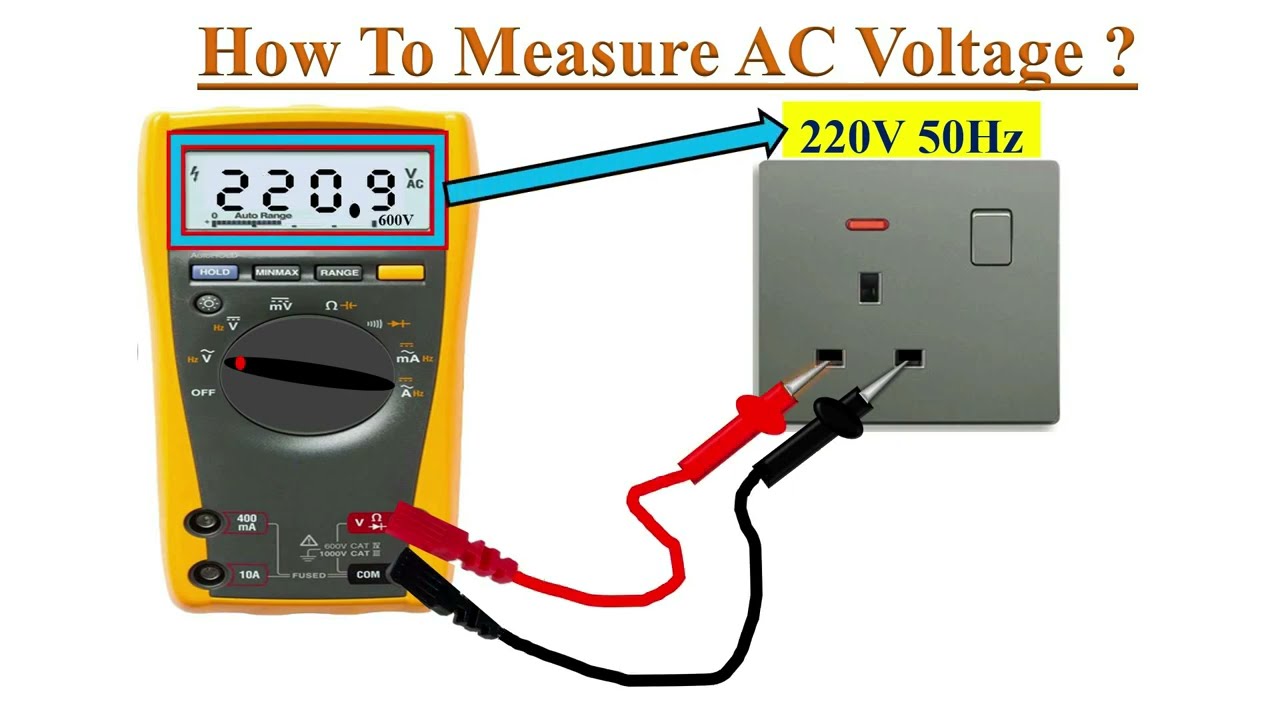
- AC Voltage: Identify the live (hot) and neutral (or ground) points (e.g., wall outlet slots).
Step 3: Probe Placement
- DC: Red probe to positive, black to negative.
- AC: Red probe to live, black to neutral/ground.
Warning: Never touch metal parts of the probes during measurement.
Step 4: Reading The Measurement
- Digital meters: Reading appears instantly on the display.
- Analog meters: Observe needle position against the voltage scale.
If the display shows OL or 1, the voltage is above the selected range. Increase the range and repeat.
Step 5: Recording And Interpreting Results
- Compare readings to expected values (e.g., a 9V battery should read close to 9V).
- Significantly lower readings may indicate a failing power source or circuit issue.
Step 6: Power Down And Store
- Remove probes from the circuit.
- Turn off the multimeter.
- Store it in a dry, safe place.
Common Mistakes And How To Avoid Them
- Wrong setting: Measuring AC with DC setting (or vice versa) gives false results.
- Probes reversed: For DC, negative value indicates reversed probes.
- Range too low: Meter may display OL or error.
- Testing with power off: No voltage will be detected.
Real-world Examples And Case Studies
Example 1: Checking A Household Battery
Suppose you suspect a AA battery is dead. Set your multimeter to DC voltage and a range above 1.5V. Touch the red probe to the battery’s + terminal and the black to -. If the reading is 1.5V or higher, the battery is good. Below 1.0V indicates a weak or dead battery.
Example 2: Testing A Wall Outlet
To test a 120V AC outlet, set your meter to AC voltage (V~), range above 120V. Insert one probe into the hot slot (narrower slot in US outlets), the other into neutral (wider slot). A healthy outlet should read close to 120V. If you get 0V, check for a tripped breaker.
Warning: Always use one hand when testing AC mains to reduce the risk of current passing through your chest.
Example 3: Diagnosing A Car Battery
Car batteries should measure 12.6V DC or higher when fully charged. Set your meter to DC voltage, range above 12V. Probe the battery’s positive and negative terminals. Readings below 12V may indicate a weak battery or charging system problem.
Example 4: Advanced: Measuring Voltage Drops
In troubleshooting, measuring voltage drop across a component can reveal issues like faulty connections or high resistance. For example, if a headlight is dim, measure voltage at the bulb terminals with the circuit active. A significant drop from the battery voltage signals a problem in wiring or connectors.
Advanced Techniques And Pro Tips
Auto-ranging Vs Manual Ranging
- Auto-ranging meters detect the correct range automatically, ideal for beginners.
- Manual-ranging meters require you to select the range, which can provide faster, more stable readings when you know the expected voltage.
Measuring Small Voltages Accurately
For sensitive electronics (microcontrollers, sensor circuits), use a meter with:
- High input impedance (10 MΩ or more).
- Low range settings for greater resolution.
Measuring Across Components
To diagnose issues, measure voltage across resistors, diodes, or IC pins while the circuit is powered. This reveals real-time information about circuit performance.
Using Relative/delta Mode
Many advanced DMMs have a REL/Δ button to compare a reading against a reference. This is useful for:
- Finding voltage drops.
- Comparing battery cells for balance.
Data Logging And Min/max Hold
Some meters can record readings over time or display minimum/maximum values. This helps diagnose intermittent faults or voltage fluctuations.
Dealing With Floating Voltages
When measuring in circuits with no clear ground (e. g. , isolated power supplies), floating voltages may appear. Always reference the correct ground point for accurate readings.
Example: In my experience troubleshooting solar power systems, identifying the true ground was crucial for accurate voltage measurements, especially when testing between panels and batteries.
Troubleshooting Voltage Measurement Problems
Meter Shows “ol” Or “1”
- Indicates voltage is above the selected range.
- Solution: Increase the range or check probe connections.
Unstable Or Fluctuating Readings
- Caused by loose probes, electrical noise, or unstable power.
- Solution: Secure probe placement, check meter battery, use shielded cables if necessary.
No Reading Or Zero Voltage
- Circuit may be powered off or fuse blown in meter.
- Solution: Verify power source, check and replace meter fuse if needed.
Reading Is Lower Than Expected
- Possible voltage drop due to poor connections or faulty components.
- Solution: Inspect wiring, measure voltage at multiple points to isolate issue.
Meter Doesn’t Turn On
- Dead battery or internal fault.
- Solution: Replace battery, consult manufacturer if problem persists.
Advanced Troubleshooting Example
Suppose you’re testing a complex circuit and notice inconsistent voltage readings. Advanced users can:
- Use oscilloscope function (if available) to visualize voltage over time.
- Compare readings at different points to map voltage drops and locate faulty components.
- Use differential probes for high-voltage or floating measurements.
Comparing Multimeter Features For Voltage Testing
Choosing a multimeter depends on your specific needs, do you need basic functionality for home use, or advanced features for professional diagnostics? Here’s a comparison of three popular models:
| Feature | Fluke 117 (Professional) | Extech EX330 (Intermediate) | INNOVA 3320 (Beginner) |
|---|---|---|---|
| Voltage Range | 600V AC/DC | 600V AC/DC | 600V AC/DC |
| Auto-Ranging | Yes | Yes | Yes |
| Display | Backlit digital | Digital | Digital |
| Input Impedance | 10 MΩ | 10 MΩ | 10 MΩ |
| CAT Rating | CAT III 600V | CAT II 600V | CAT II 600V |
| Special Features | Non-contact voltage, low input impedance mode | Temperature probe, data hold | Auto-ranging, color-coded |
| Typical Price | $200+ | $60, $80 | $25, $40 |
Pro Tip: For most home users, a reliable auto-ranging meter with CAT II 600V is sufficient. Professionals working with industrial equipment should opt for higher CAT ratings and advanced features.
Maintenance And Care Of Your Multimeter
Cleaning And Storage
- Wipe the case with a dry or slightly damp cloth.
- Do not immerse in water or use solvents.
- Store probes coiled loosely to avoid damaging the wires.
Battery Replacement
- Replace batteries when the low battery indicator appears.
- Use only recommended battery types.
Calibration And Professional Servicing
- Annual calibration is recommended for professional or industrial use. Manufacturers or certified labs can provide calibration services.
- Replace fuses only with manufacturer-specified types.
Probe Maintenance
- Inspect tips regularly for wear.
- Replace damaged probes to ensure accurate, safe measurements.
Firmware Updates (for Advanced Models)
Some high-end digital meters offer firmware updates via USB or Bluetooth. Always follow manufacturer instructions to avoid bricking the device.
Frequently Asked Questions
What Is The Difference Between Measuring Ac And Dc Voltage With A Multimeter?
When measuring DC voltage, the multimeter reads the electrical potential difference between two points where current flows in one direction, such as batteries or most electronics. For AC voltage, the meter measures the root-mean-square (RMS) value of an alternating signal, such as household outlets. It’s crucial to set your meter to the correct mode; using the wrong setting can cause inaccurate readings or damage.
How Do I Know If My Multimeter Is Accurate?
Multimeter accuracy depends on the model, calibration, and proper use. Periodically test your meter with a known voltage source, like a fresh battery. For critical applications, professional calibration is recommended. Some meters display an accuracy rating (e. g. , ±0.
5%). Check the manufacturer’s documentation for more details.
Can I Measure Voltage In A Live (powered) Circuit?
Yes, but extreme caution is required. Always ensure you’re using the correct settings, and never touch probe tips while testing. Use one hand to reduce the risk of current passing through your chest. For high-voltage work, consult a licensed electrician or technician for safety.
Why Does My Meter Show A Negative Voltage?
This typically means the probes are reversed: the red probe is on the negative terminal, and the black is on the positive (for DC measurements). Swap the probes to get a positive reading. For AC voltage, polarity does not matter, as the signal alternates.
What Should I Do If My Multimeter Stops Working After A Voltage Test?
First, check if the battery is dead or if the internal fuse has blown, most meters have a replaceable fuse to protect against overload. Inspect the probes and connections for damage. If the meter still doesn’t work, consult the user manual or contact the manufacturer for repair or replacement.
Additional Resources And Further Learning
For those eager to deepen their knowledge, numerous reputable resources offer detailed guides and tutorials. The official Wikipedia: Multimeter page provides comprehensive technical background. For advanced users, Fluke Multimeter Tutorials from a leading manufacturer offer best practices, troubleshooting tips, and videos.
Mastering voltage measurement with a multimeter empowers you to tackle a wide range of electrical projects safely and efficiently. By understanding both the basics and advanced techniques, you can confidently diagnose problems, verify circuits, and ensure your equipment runs smoothly.
With regular practice and attention to safety, this skill will serve you well, whether you’re a beginner or an expert.