
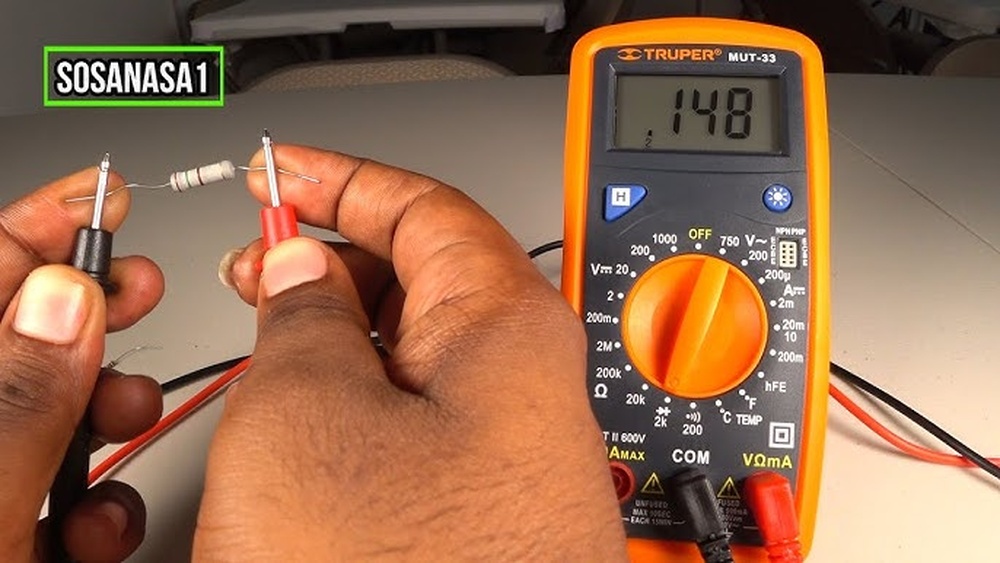
Measuring the resistance of an electronic component might seem intimidating, especially if you’re new to electronics. But with a digital multimeter, a staple tool for both beginners and seasoned engineers, this task becomes straightforward and precise. Whether you’re troubleshooting a circuit, verifying a resistor’s value, or learning how electronic devices function, knowing how to measure a resistor accurately is a foundational skill.
In my experience as both a hobbyist and an instructor, mastering this measurement process not only helps prevent costly mistakes but also deepens your practical understanding of circuitry. In this comprehensive guide, you’ll find everything you need: beginner-friendly, step-by-step instructions, advanced troubleshooting tips, real-world examples, and the technical nuances that even professionals should keep in mind. By the end, you’ll be able to measure resistors confidently, interpret readings accurately, and avoid the common pitfalls that can lead to misleading results.
Key Takeaways
- Measuring a resistor with a multimeter is a vital skill for electronics enthusiasts and professionals alike.
- Proper preparation, like powering down circuits and identifying resistor values, is crucial for accurate readings.
- Different types of multimeters and testing techniques can impact measurement precision.
- Advanced tips help you account for factors like temperature, tolerance, and circuit conditions.
- Real-world scenarios illustrate how to diagnose resistor issues and interpret measurement results.
- The FAQ section addresses deeper questions, including best practices and troubleshooting unusual readings.

Credit: www.youtube.com
Understanding Resistors And Their Role In Circuits
Resistors are among the most fundamental passive electronic components, controlling the flow of electrical current and dividing voltages within circuits. Their basic function is to provide a specific electrical resistance, measured in ohms (Ω), to limit or regulate current.
What Is A Resistor?
A resistor is a component designed to have a precise resistance value. This value dictates how much it opposes current flow, following Ohm’s Law: V = IR (Voltage = Current x Resistance). Resistors come in various forms, carbon film, metal film, wire-wound, and surface mount, each with unique characteristics and use cases.
Why Measure A Resistor?
Measuring resistors is essential for:
- Verifying component values before assembly.
- Troubleshooting circuits to identify failed or drifting components.
- Matching resistor pairs for applications like audio or instrumentation.
- Ensuring quality control during manufacturing.
Common Resistor Types And Their Markings
Resistors are typically marked with color bands or alphanumeric codes that indicate their value and tolerance. Beginners often find these codes confusing, but they’re crucial for quick identification.
| Resistor Type | Marking System | Common Applications |
|---|---|---|
| Carbon Film | Color Bands | General purpose, low-cost circuits |
| Metal Film | Color Bands | Precision, low-noise applications |
| Wire-wound | Alphanumeric | High power, low resistance |
| Surface Mount (SMD) | Numeric Codes | Compact, automated assembly |
Pro Tip: Use a resistor color code calculator or chart to decode banded resistors quickly, especially when starting out.

Credit: www.electricaltechnology.org
Essential Tools And Preparation
Accurate resistor measurement begins with the right tools and proper preparation. Skipping these steps can lead to incorrect readings or even damage to your multimeter.
Choosing The Right Multimeter
Multimeters come in two main varieties: digital and analog. Each has strengths and weaknesses:
| Multimeter Type | Accuracy | Ease of Use | Cost |
|---|---|---|---|
| Digital | High | Beginner-friendly | Moderate to High |
| Analog | Moderate | Requires interpretation | Low |
For most users, a digital multimeter (DMM) is the best choice due to its clarity and ease of use. Advanced models offer features like auto-ranging and high resolution, which are beneficial for measuring low or high resistance values.
Preparing For Measurement
Before you begin, ensure the following:
- Power off the circuit. Measuring resistors in a powered circuit can damage your multimeter and provide false readings.
- Discharge capacitors. Capacitors in the circuit can store voltage that affects resistance measurements.
- Isolate the resistor. Remove at least one end of the resistor from the circuit to prevent parallel pathways from skewing the reading.
- Inspect the resistor. Check for burns, discoloration, or physical damage.
- Set up your workspace. Use a non-conductive mat and keep metal tools away from the resistor during measurement.
Warning: Never attempt to measure resistance in a live circuit. This can damage your tools and compromise your safety.
Additional Helpful Tools
- Tweezers: For handling small resistors, especially SMD types.
- Component tester: For verifying unknown components.
- Schematic diagrams: To identify resistor placement and function within a circuit.
Step-by-step: Measuring A Resistor With A Multimeter
This section provides a detailed, beginner-friendly walkthrough for measuring a resistor’s value, followed by advanced tips for precision and troubleshooting.
Step 1: Set Up The Multimeter
- Turn on your multimeter.
- Set the dial or selector to the resistance (Ω) mode.
- If your multimeter is not auto-ranging, select a range higher than the expected resistor value.
Step 2: Prepare The Resistor
- If possible, remove the resistor from the circuit.
- If removal is not practical, desolder or disconnect one lead so only that resistor affects the measurement.
Step 3: Connect The Test Leads
- Insert the black lead into the COM (common) port.
- Insert the red lead into the port labeled with the Ω symbol.
- Hold the leads by the insulated parts to avoid introducing body resistance.
Step 4: Take The Measurement
- Touch the two probes to the resistor’s leads, ensuring firm contact.
- Wait for the reading to stabilize. Digital meters usually beep or display a steady value.
- Note the displayed value. Compare it to the resistor’s color code or marked value.
Pro Tip: For resistors with values below 10Ω, the resistance of the test leads themselves can become significant. Most digital multimeters allow you to “zero” the leads, connect the probes together and subtract the displayed value from your measurement.
Step 5: Interpret The Results
- If the reading matches the expected value within the resistor’s tolerance (often ±1% to ±5%), the resistor is functioning properly.
- If the reading is much higher (or infinite), the resistor may be open (damaged).
- If the reading is much lower, there may be a short circuit or a parallel path, or the resistor is out of specification.
Example: Measuring A 1kω Resistor
Suppose you have a resistor with brown-black-red-gold color bands (indicating 1,000Ω, 5% tolerance).
- Set the multimeter to 2kΩ range.
- Remove one end from the circuit.
- Touch probes to each lead.
- The display shows “0.998 kΩ”, well within tolerance.
Advanced Tips For Accurate Measurements
- Temperature matters: Resistance changes with temperature. For precision work, measure at room temperature and avoid touching the resistor with your fingers.
- Component age: Older resistors can drift in value. Always verify critical components.
- Contact quality: Dirty or oxidized leads can affect readings. Clean with isopropyl alcohol if needed.

Credit: electropeak.com
Advanced Techniques And Troubleshooting
For users seeking a deeper understanding or troubleshooting complex issues, mastering these advanced techniques is essential.
Dealing With Resistors In-circuit
While removing the resistor is best, sometimes it’s not feasible. Here’s how to handle in-circuit measurements:
- Be aware of parallel paths, other components can cause the measured resistance to be lower than the actual resistor value.
- Consult the circuit diagram to estimate possible parallel resistances.
- Use the “lift one leg” technique: Desolder or disconnect one resistor lead to isolate it electrically.
Four-wire (kelvin) Measurements
For low-value resistors (<1Ω), even small errors from test leads can be significant. The four-wire method uses separate pairs of wires for current and voltage measurement, eliminating lead resistance errors. High-end bench multimeters often have this feature.
Measuring Smd Resistors
Surface-mount resistors require extra care:
- Use fine-point probes or tweezers.
- Read the three- or four-digit code printed on the resistor, then confirm with your measurement.
- Be mindful of small component size, which can increase contact resistance.
Diagnosing Faulty Resistors
If you suspect a resistor is faulty:
- Visually inspect for burns, cracks, or discoloration.
- Measure its resistance out of circuit.
- Compare the value to the specification.
- If the reading is open (infinite) or far out of tolerance, replace the resistor.
Example: In a power supply circuit, a 0.5Ω resistor reads 3Ω in-circuit. After lifting one leg, the measurement drops to 0.51Ω, proving the resistor is healthy and another component is causing the in-circuit discrepancy.
Handling Unusual Readings
If your multimeter displays “OL” (overload) or a very high resistance, the resistor may be open. If the reading is zero or near zero, the resistor may be shorted. Always confirm with a second measurement and, if needed, test a known-good resistor to verify your multimeter.
Real-world Examples And Case Studies
Learning from practical scenarios can help solidify your understanding and prepare you for common challenges.
Example 1: Troubleshooting A Non-functioning Led Circuit
A beginner assembled a simple LED circuit, but the LED wouldn’t light up. By measuring the resistor, they discovered it was a 10kΩ resistor instead of the 220Ω specified. Swapping in the correct resistor restored the circuit’s function. This underscores the importance of verifying resistor values before soldering them into place.
Example 2: Diagnosing A Faulty Power Supply
A technician noticed that a power supply was overheating. Measuring a key resistor revealed it had drifted from 100Ω to 180Ω over years of use. Replacing the resistor resolved the overheating problem and restored stable operation. This case highlights the importance of checking resistor values during routine maintenance.
Example 3: Smd Resistor Confusion
In a compact audio device, a surface-mount resistor was marked “103. ” The technician used tweezers and a digital multimeter, confirming a value of 10kΩ (10 followed by three zeros). This quick verification prevented a misdiagnosis of the surrounding circuitry.
Data-driven Comparison: Multimeter Accuracy And Range
Different multimeters offer various specifications that impact their suitability for measuring resistors. The table below compares three popular types:
| Feature | Entry-Level DMM | Mid-Range DMM | Bench Multimeter |
|---|---|---|---|
| Accuracy | ±1.0%+5 digits | ±0.5%+2 digits | ±0.01%+1 digit |
| Resistance Range | 200Ω, 20MΩ | 200Ω, 40MΩ | 10mΩ, 100MΩ |
| Auto-Ranging | No | Yes | Yes |
| Four-Wire Capability | No | No | Yes |
| Price | $20, $40 | $50, $200 | $500+ |
Pro Tip: For most hobbyist and field work, a mid-range auto-ranging DMM is ideal. Reserve bench multimeters for laboratory or high-precision needs.
Factors Affecting Resistance Measurement Accuracy
Understanding the variables that influence measurement accuracy helps you obtain reliable results and avoid common errors.
Lead Resistance And Connection Quality
Test leads themselves can add up to 0. 5Ω of resistance, especially with low-value resistors. Always “zero” your meter before measuring precise low ohm values.
Environmental Conditions
- Temperature: Resistance increases with temperature, especially for high-precision applications. For example, a 1kΩ resistor with a temperature coefficient of 100ppm/°C will change by 0.1Ω per degree Celsius.
- Humidity: Rarely an issue, but in extremely humid environments, surface leakage can affect very high resistance measurements.
Multimeter Specifications
Each multimeter has a specified accuracy, usually written as ±(percentage of reading + number of digits). Always refer to your manual for details.
Resistor Tolerance
A resistor’s tolerance indicates its possible deviation from the nominal value. For instance, a 1kΩ resistor with 5% tolerance can range from 950Ω to 1,050Ω.
Parasitic Paths In Circuit Boards
Traces, solder bridges, or other components in parallel can create alternative current paths, reducing the measured resistance.
Best Practices For Reliable Measurements
Both beginners and advanced users benefit from disciplined measurement habits. Here’s a consolidated set of best practices:
For Beginners
- Always double-check the multimeter range and mode.
- Verify the resistor value with its color code or printed marking before measuring.
- Make sure your hands or conductive surfaces don’t touch the leads during measurement.
- Compare your measured value to the expected value, accounting for tolerance.
For Advanced Users
- Use four-wire measurement for resistors below 1Ω.
- Record environmental conditions for high-precision work.
- Calibrate your multimeter periodically, especially for critical measurements.
- Use high-quality, low-resistance leads and clean probe tips regularly.
Maintenance And Care
- Store your multimeter in a dry, dust-free environment.
- Replace test leads if they show signs of wear or corrosion.
- Replace multimeter batteries regularly to avoid inaccurate readings.
Pro Tip: When working on complex circuits, keep a log of measured values for future reference. This practice is invaluable for tracking changes over time and diagnosing intermittent faults.
Frequently Asked Questions
What Should I Do If My Resistor Measures Outside Its Tolerance Range?
If a resistor measures significantly outside its marked tolerance, first ensure it’s fully isolated from the circuit, parasitic paths can distort readings. If the resistor is indeed out of specification, replace it. Resistors can drift due to age, heat, or overcurrent.
Can I Measure A Resistor While It’s Still Soldered On The Circuit Board?
You can, but the reading may not reflect the true value due to parallel paths with other components. To improve accuracy, desolder one leg or consult the circuit diagram to identify possible parallel resistances. For critical measurements, always isolate the resistor.
How Can I Identify An Unmarked Or Damaged Resistor?
If the markings are unreadable, use your multimeter to measure its resistance. For more precision, compare the value to the circuit requirements or consult the schematic. If the resistor is critical, consider replacing it with a new, verified component. Some advanced component testers can also help identify unknown resistors.
Why Does My Multimeter Show “ol” Or “1” When Measuring A Resistor?
“OL” or “1” indicates the resistance is beyond the meter’s current range or the resistor is open (broken). Try switching to a higher resistance range on your multimeter. If the reading remains, the resistor is likely faulty and should be replaced.
Are There Specialized Tools For Measuring Resistors More Accurately?
Yes, for precision work, a LCR meter or a bench multimeter with four-wire measurement capabilities provides greater accuracy than standard handheld DMMs. Some component testers also measure resistance with high precision and can identify additional characteristics like inductance and capacitance. For more on advanced measurement tools, visit Wikipedia’s LCR meter page.
Further Learning And Resources
For those interested in deepening their understanding, consider exploring official resources and comprehensive guides:
- The International Electrotechnical Commission (IEC) provides standards on resistor measurement practices. See IEC Technical Committee 40 for more information.
- Many electronics communities and forums offer practical advice, troubleshooting help, and real-world examples.
Mastering the art of measuring resistors with a multimeter is more than a technical task; it’s a crucial step toward understanding electronic circuits at a foundational level. Whether you’re building your first LED project or fine-tuning a complex system, these skills will serve you throughout your journey in electronics.
With practice, patience, and the right approach, you’ll gain confidence in your measurements and the insights they provide, empowering you to tackle more ambitious projects with precision and assurance.